---
updatedAt: 2026-05-15T23:23:26.000Z
agentTools:
projectIndex: https://developers.tetrascience.com/llms.txt
---
# Chromatography Insights App v1.x Release Notes
[llms-txt]: # "For AI agents: the complete documentation index is at https://developers.tetrascience.com/llms.txt — markdown versions of any page are available by appending .md to the URL."
> 📘 NOTE
>
> Release notes for Chromatography Insights are now available through the app's **Details** page in the Tetra Data & AI Workspace. For more information, see [View Tetra Data App Documentation](https://developers.tetrascience.com/docs/tetra-data-workspace#view-tetra-data-app-documentation).
The following are the [Chromatography Insights](https://www.tetrascience.com/videos/chromatography-insights-in-the-tetra-data-and-ai-workspace) release notes for versions 1.x. Chromatography Insights consolidates data from multiple Chromatography Data Systems (CDSs) into a single, interactive dashboard. This empowers teams to better assess performance variability, identify root causes, and track trends of this critical analytical technique—which leads to faster, more informed decisions across labs.
NOTE
The Chromatography Insights App is available through a [limited availability release](https://developers.tetrascience.com/docs/tetrascience-release-types#limited-availability) currently and is activated for customers through coordination with TetraScience. For more information, or to activate the app in your environment, contact your customer account leader.
# v1.7.1
**Release date: 24 February 2026**
TetraScience has released its next version of the **Chromatography Insights** [Embedded Data App](https://developers.tetrascience.com/docs/embedded-tetra-data-apps), version 1.7.1. This release re-introduces Snowflake as a supported data provider, adds eCord column serial number support for Empower data, and support for v17 and v18 of the Empower IDS.
Here are the details for what's new in Chromatography Insights v1.7.1.
### Prerequisites
Chromatography Insights v1.7.1 requires the following:
* [Tetra Data Platform (TDP) v4.4.0](https://developers.tetrascience.com/docs/tdp-v440-release-notes) or higher deployed in a [Tetra-hosted environment](https://developers.tetrascience.com/docs/available-tetra-data-platform-deployment-options)
* Empower or Chromeleon CDS data processed into one of the following Intermediate Data Schemas (IDSs):
* [LC-UV Empower IDS (`lcuv-empower`)](https://tetrascience.zendesk.com/hc/en-us/articles/28506087868045-LC-UV-Empower-IDS-lcuv-empower) v15, v16, v17 or v18
* [Chromeleon IDS (`thermofisher-chromeleon`)](https://tetrascience.zendesk.com/hc/en-us/articles/28499784501005-Chromeleon-IDS-thermofisher-chromeleon) v6
* Data must be [converted into Lakehouse tables](https://developers.tetrascience.com/docs/convert-tetra-data-to-lakehouse-tables) using the [Data Lakehouse Architecture](https://developers.tetrascience.com/docs/data-lakehouse-architecture)
* Companion `chromatography-insights` Tetraflow v1.6.2
> 📘 NOTE
>
> For more information about each IDS, see [Intermediate Data Schemas](https://tetrascience.zendesk.com/hc/en-us/sections/27923297421837-Intermediate-Data-Schemas) in the TetraConnect Hub. To request access, see [Access the TetraConnect Hub](https://developers.tetrascience.com/docs/access-the-tetrascience-knowledge-base).
### New Functionality
New functionality includes features not previously available in Chromatography Insights.
#### Snowflake Provider Support Restored
Snowflake support as a data provider for Chromatography Insights has been restored in this release. This capability was temporarily removed in v1.7.0. Accounts will need to partner with their Snowflake and TetraScience developer operation teams to enable this capability.
To start using Snowflake as a data provider for Chromatography Insights, do the following:
1. Configure a zero-copy data share between the TDP and your Snowflake account. For instructions, see [Use Snowflake to Access Tetra Data](https://developers.tetrascience.com/docs/use-snowflake-to-access-tetra-data).
2. Connect the Chromatography Insights app in your TDP environment to your Snowflake account. For instructions, see [Connect External Systems to an Embedded Data App](https://developers.tetrascience.com/docs/embedded-tetra-data-apps#connect-external-systems-to-an-embedded-data-app).
3. Add Snowflake as a Data Provider to Chromatography Insights. For instructions, see [Add a Provider to an Embedded Data App](https://developers.tetrascience.com/docs/embedded-tetra-data-apps#add-a-provider-to-an-embedded-data-app). The app takes a few minutes to update.
#### eCord Column Serial Number Support for Empower
The app now supports eCord column serial number detection and display for Waters Empower data when used with `chromatography-insights` Tetraflow v1.6.1 or higher. When eCord-enabled columns are used with Empower CDS, the column serial number information is automatically detected and displayed in the app, providing better column tracking and identification capabilities.
#### Support for Empower IDS v17 and v18
Chromatography Insights now supports [LC-UV Empower IDS (`lcuv-empower`)](https://tetrascience.zendesk.com/hc/en-us/articles/28506087868045-LC-UV-Empower-IDS-lcuv-empower) v17 and v18 when used with `chromatography-insights` Tetraflow v1.6.2 or higher.
### Enhancements
Enhancements are modifications to existing functionality that improve performance or usability, but don't alter the function or intended use of the system.
### Updated `chromatography-insights` Tetraflow
For full functionality, it is recommended to use the app with v1.6.2 of the companion `chromatography-insights` Tetraflow. To update the version of the Tetraflow that your pipeline uses, see [Edit a Tetraflow Pipeline](https://developers.tetrascience.com/docs/transform-tetra-data-in-the-lakehouse#edit-a-tetraflow-pipeline).
Two Tetraflow version updates support new functionalities provided in this release:
* v1.6.1 and v1.6.2: includes support for Empower eCord column serial number detection
* v1.6.2: also includes support for [LC-UV Empower IDS (`lcuv-empower`)](https://tetrascience.zendesk.com/hc/en-us/articles/28506087868045-LC-UV-Empower-IDS-lcuv-empower) v16 and v17
### Limitations
The following are known limitations of Chromatography Insights v1.7.1:
* Using the custom field as a column identifier only applies to the filters on the column **Logbook** page.
* Providers can't be edited, because that changes their type to **custom**. The app does not support custom providers and will fall back to use the default TDP Amazon Athena connection. Instead of editing a provider, customers should delete it and create a new provider with the correct settings.
### Upgrade Considerations
To upgrade Chromatography Insights to the latest version, do the following:
1. Update the app's image version by doing the following:
* [Open the **Tetra Data & AI Workspace**](https://developers.tetrascience.com/docs/tetra-data-workspace#access-the-data--ai-workspace-page).
* In the Chromatography Insights App's settings, change the **Image Version** to the latest version.
For more information, see [Edit Embedded Data Apps Settings for Your Org](https://developers.tetrascience.com/docs/embedded-tetra-data-apps#edit-embedded-data-apps-settings-for-your-org).
2. Update the app's companion `chromatography-insights` Tetraflow to `v1.6.2`. For instructions, see [Edit a Tetraflow Pipeline](https://developers.tetrascience.com/docs/transform-tetra-data-in-the-lakehouse#edit-a-tetraflow-pipeline).
This Tetraflow expects file labels to be sourced from the Lakehouse `file_attribute_v1` Delta table. Contact your Lakehouse or platform team to confirm that the `file_attribute_v1` table is set up and kept up to date (for example, via the "Lakehouse File Info Attribute Delta Table Migration Glue Job") before relying on custom file labels in the app.
3. After the updated Tetraflow runs, refresh the Chromatography Insights table schemas by doing the following:
* [Open the **SQL Search** page](https://developers.tetrascience.com/docs/use-tdp-to-query-athena-sql-tables#access-the-sql-search-page). A list of your database tables appears on the left.
* Select the database that ends in `__tss__external`.
* For each of the following Chromatography Insights database tables (`chromatography_insights_`), select the hamburger menu icon next to the table name, and then select **Refresh Table Schemas**:
* `chromatography_insights_filter_values`
* `chromatography_insights_injection`
* `chromatography_insights_peak`
* `chromatography_insights_file_label`
To activate Chromatography Insights in the [Tetra Data and AI Workspace](https://developers.tetrascience.com/docs/tetra-data-workspace), please contact your customer account leader.
For more information about Tetra Data Apps, see [Tetra Data Apps](https://developers.tetrascience.com/docs/tetra-data-apps).
# v1.7.0
**Release date: 22 December 2025**
### What's New
TetraScience has released its next version of the **Chromatography Insights** [Embedded Data App](https://developers.tetrascience.com/docs/embedded-tetra-data-apps), version 1.7.0. This release introduces several new and improved features:
* **File-label** filtering allows customers to filter injections by custom file labels.
* **Automatic chromatogram alignment controls** allow quick alignment of traces by first, largest, or highest peaks, or against reference injections.
* **An enhanced chromatogram data reduction algorithm** significantly improves performance on dense traces while preserving critical chromatographic features.
* **Seed Files are No Longer Needed in Tetraflows for Unused CDS Sources** to help streamline app configuration.
This release also includes multiple UX and reliability improvements along with enhanced logging to simplify troubleshooting. Support for Snowflake as a provider has been temporarily removed in this release.
Here are the details for what's new in Chromatography Insights v1.7.0.
### Prerequisites
Chromatography Insights v1.7.0 requires the following:
* [Tetra Data Platform (TDP) v4.4.0](https://developers.tetrascience.com/docs/tdp-v440-release-notes) or higher deployed in a [Tetra-hosted environment](https://developers.tetrascience.com/docs/available-tetra-data-platform-deployment-options)
* Empower or Chromeleon CDS data processed into one of the following Intermediate Data Schemas (IDSs):
* [LC-UV Empower IDS (`lcuv-empower`)](https://tetrascience.zendesk.com/hc/en-us/articles/28506087868045-LC-UV-Empower-IDS-lcuv-empower) v15 or v16
* [Chromeleon IDS (`thermofisher-chromeleon`)](https://tetrascience.zendesk.com/hc/en-us/articles/28499784501005-Chromeleon-IDS-thermofisher-chromeleon) v6
* Data must be [converted into Lakehouse tables](https://developers.tetrascience.com/docs/convert-tetra-data-to-lakehouse-tables) using the [Data Lakehouse Architecture](https://developers.tetrascience.com/docs/data-lakehouse-architecture)
> 📘 NOTE
>
> For more information about each IDS, see [Intermediate Data Schemas](https://tetrascience.zendesk.com/hc/en-us/sections/27923297421837-Intermediate-Data-Schemas) in the TetraConnect Hub. To request access, see [Access the TetraConnect Hub](https://developers.tetrascience.com/docs/access-the-tetrascience-knowledge-base).
### New Functionality
New functionality includes features not previously available in Chromatography Insights.
#### Automatic Chromatogram Alignment
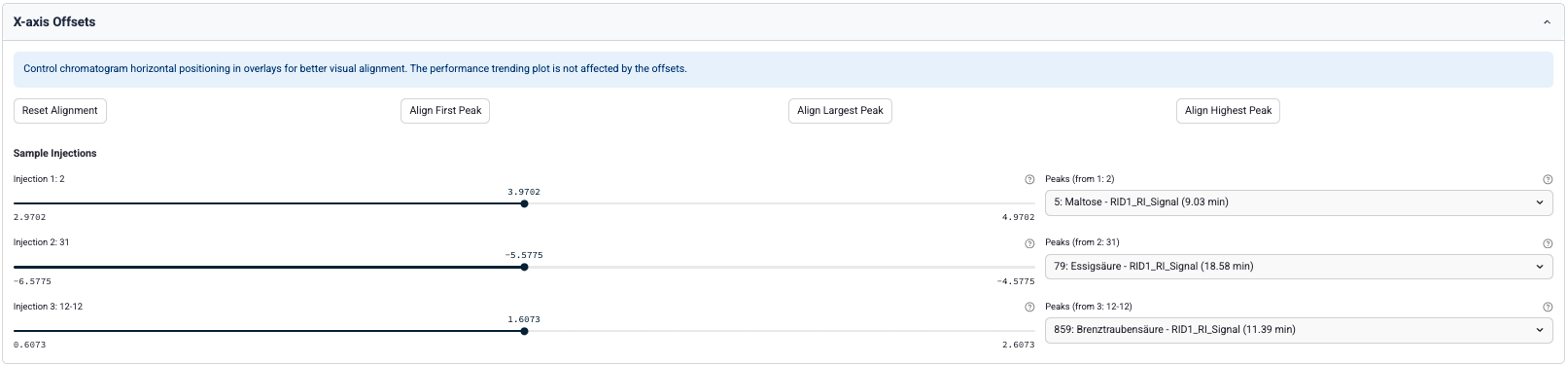
Scientists can now perform automatic alignment of chromatograms by the following:
* **first**: refers to the peak that elutes first (lowest retention time on the x-axis)
* **largest**: refers to the peak with the largest area (integration under the curve)
* **highest** refers to the most intense peak (peak with the highest maximum value on the y-axis)
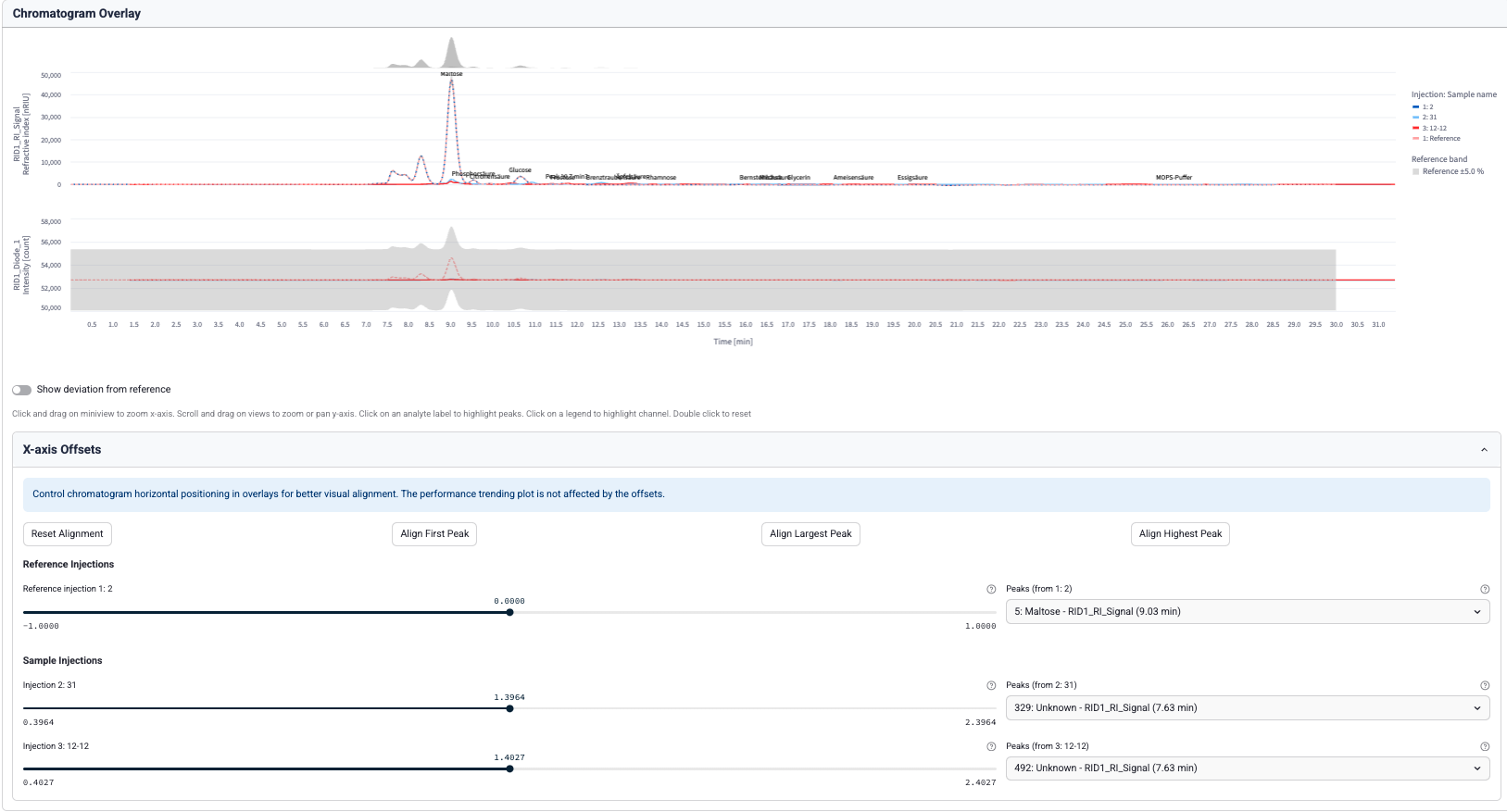
New dropdowns were also added for manual peak selection and to align chromatogram traces on any peak of interest. In the absence of a reference injection selection, all chromatograms will be aligned at their selected peaks.
After a reference injection is selected, all chromatograms are now aligned at the selected peak of the reference injection (or the mean of selected reference injection peaks if multiple reference injections are selected).
#### Filter by Custom File Labels
Scientists can now filter injections by using **Custom fields from file labels** as filters in the app's settings.
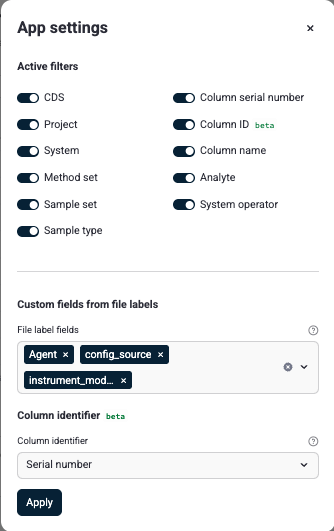
These labels can then be used to filter injections from the filter sidebar:
### Enhancements
Enhancements are modifications to existing functionality that improve performance or usability, but don't alter the function or intended use of the system.
#### Smarter Data Reduction Algorithm for Chromatogram Traces
To improve performance when rendering large traces, the data reduction algorithm for chromatogram traces has been updated from a simple decimation to a Visvalingam-Whyatt algorithm. The new algorithm preserves critical chromatographic features while significantly improving performance on dense traces, allowing the user to interact with the overlay plots more smoothly.
#### UI Improvements
Chromatography Insights v1.7.0 includes the following UI improvements:
* Addition of sample name to tooltip in Performance Trending tab peak chart
* Deterministic ordering of rows in Chromatogram Channels table by injection number
* Reference sample selections now show sample name and injection number
* Improvements to datepicker interactivity, with all months within the range of available data now being selectable
#### Seed Files are No Longer Needed in Tetraflows for Unused CDS Sources
When used with the companion `chromatography-insights` Tetraflow v1.6.0, customers who only use either Empower or Chromeleon no longer need to provide seed files for the CDS they do not use. Instead, the unused source can be configured with its sync setting (`empower_sync` or `chromeleon_sync`) set to `off` when running the Tetraflow.
### Bug Fixes
The following bugs are now fixed:
* Multiple reference samples with the same sample name are now handled correctly, without error.
* Injections with multiple channels are no longer counted as `reprocessed` by default.
* Duplicate channel names now display a warning to the user if duplicate channel names are detected for Empower, and only use processed channels for Chromeleon data. Previously, only the final channel was shown when one injection had duplicate channel names.
* Chromatogram channel selections are no longer reset on re-render.
* To prevent jumbled chromatogram traces, multiple traces sharing the same sample name and channel can no longer be combined.
### Limitations
The following are known limitations of Chromatography Insights v1.7.0:
* Using the custom field as a column identifier only applies to the filters on the column logbook page.
* Providers cannot be edited, because that changes their type to **custom**. The app does not support custom providers and will fall back to use the default TDP Amazon Athena connection. Instead of editing a provider, delete it and create a new provider with the correct settings.
* Snowflake provider support has been temporarily removed in this release.
* The app can't fetch **eCord** data from Empower Client 3.8.0 and higher. A fix for this issue is in development and testing and is scheduled for a future release.
### Upgrade Considerations
To upgrade Chromatography Insights to the latest version, do the following:
1. Update the app's image version by doing the following:
* [Open the **Tetra Data & AI Workspace**](https://developers.tetrascience.com/docs/tetra-data-workspace#access-the-data--ai-workspace-page).
* In the Chromatography Insights App's settings, change the **Image Version** to the latest version.
For more information, see [Edit Embedded Data Apps Settings for Your Org](https://developers.tetrascience.com/docs/embedded-tetra-data-apps#edit-embedded-data-apps-settings-for-your-org).
2. Update the app's companion `chromatography-insights` Tetraflow to `v1.6.0`. For instructions, see [Edit a Tetraflow Pipeline](https://developers.tetrascience.com/docs/transform-tetra-data-in-the-lakehouse#edit-a-tetraflow-pipeline).
This Tetraflow expects file labels to be sourced from the Lakehouse `file_attribute_v1` Delta table. Contact your Lakehouse or platform team to confirm that the `file_attribute_v1` table is set up and kept up to date (for example, via the "Lakehouse File Info Attribute Delta Table Migration Glue Job") before relying on custom file labels in the app.
3. After the updated Tetraflow runs, refresh the Chromatography Insights table schemas by doing the following:
* [Open the **SQL Search** page](https://developers.tetrascience.com/docs/use-tdp-to-query-athena-sql-tables#access-the-sql-search-page). A list of your database tables appears on the left.
* Select the database that ends in `__tss__external`.
* For each of the following Chromatography Insights database tables (`chromatography_insights_`), select the hamburger menu icon next to the table name, and then select **Refresh Table Schemas**:
* `chromatography_insights_filter_values`
* `chromatography_insights_injection`
* `chromatography_insights_peak`
* `chromatography_insights_file_label`
To activate Chromatography Insights in the [Tetra Data and AI Workspace](https://developers.tetrascience.com/docs/tetra-data-workspace), please contact your customer account leader.
For more information about Tetra Data Apps, see [Tetra Data Apps](https://developers.tetrascience.com/docs/tetra-data-apps).
# v1.6.0
**Release date: 18 July 2025**
### What's New
TetraScience has released its next version of the **Chromatography Insights** [Embedded Data App](https://developers.tetrascience.com/docs/embedded-tetra-data-apps), version 1.6.0. This release introduces a new **Golden Chromatogram** functionality that helps scientists quantify peak deviations between chromatograms by assigning a reference chromatogram. This release also adds [Databricks](https://www.databricks.com/) as a supported data provider and provides users with new treemap and heatmap visualization capabilities on the **System Usage** page.
Here are the details for what's new in Chromatography Insights v1.6.0.
### Prerequisites
Chromatography Insights v1.6.0 requires the following:
* [Tetra Data Platform (TDP) v4.1.1](https://developers.tetrascience.com/docs/tdp-v411-release-notes) or higher deployed in a [Tetra-hosted environment](https://developers.tetrascience.com/docs/available-tetra-data-platform-deployment-options)
* Empower or Chromeleon CDS data processed into one of the following Intermediate Data Schemas (IDSs):
* [LC-UV Empower IDS (`lcuv-empower`)](https://tetrascience.zendesk.com/hc/en-us/articles/28506087868045-LC-UV-Empower-IDS-lcuv-empower) v15 or v16
* [Chromeleon IDS (`thermofisher-chromeleon`)](https://tetrascience.zendesk.com/hc/en-us/articles/28499784501005-Chromeleon-IDS-thermofisher-chromeleon) v6
* Data must be [converted into Lakhouse tables](https://developers.tetrascience.com/docs/convert-tetra-data-to-lakehouse-tables) using the [Data Lakehouse Architecture](https://developers.tetrascience.com/docs/data-lakehouse-architecture)
> 📘 NOTE
>
> For more information about each IDS, see [Intermediate Data Schemas](https://tetrascience.zendesk.com/hc/en-us/sections/27923297421837-Intermediate-Data-Schemas) in the TetraConnect Hub. To request access, see [Access the TetraConnect Hub](https://developers.tetrascience.com/docs/access-the-tetrascience-knowledge-base).
### New Functionality
New functionality includes features not previously available in Chromatography Insights.
#### Golden Chromatogram Comparisons
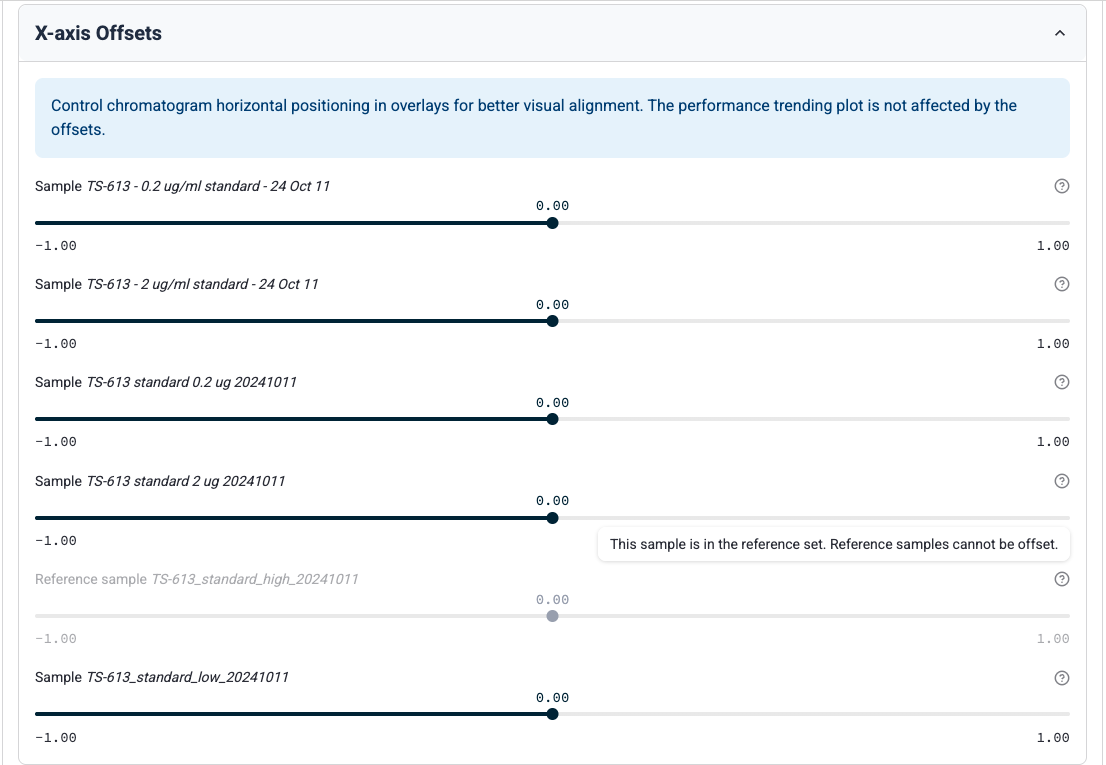
Scientists can now perform **Golden Chromatogram** assessments from the **Performance Trending** page. A user starts by selecting analytes of interest to overlay. Then, they can identify one or more reference chromatograms from the selected chromatogram table.
**How It Works**
1. Under **Reference samples**, select analytes of interest to overlay.

2. Select one or more reference chromatograms from the chosen table.
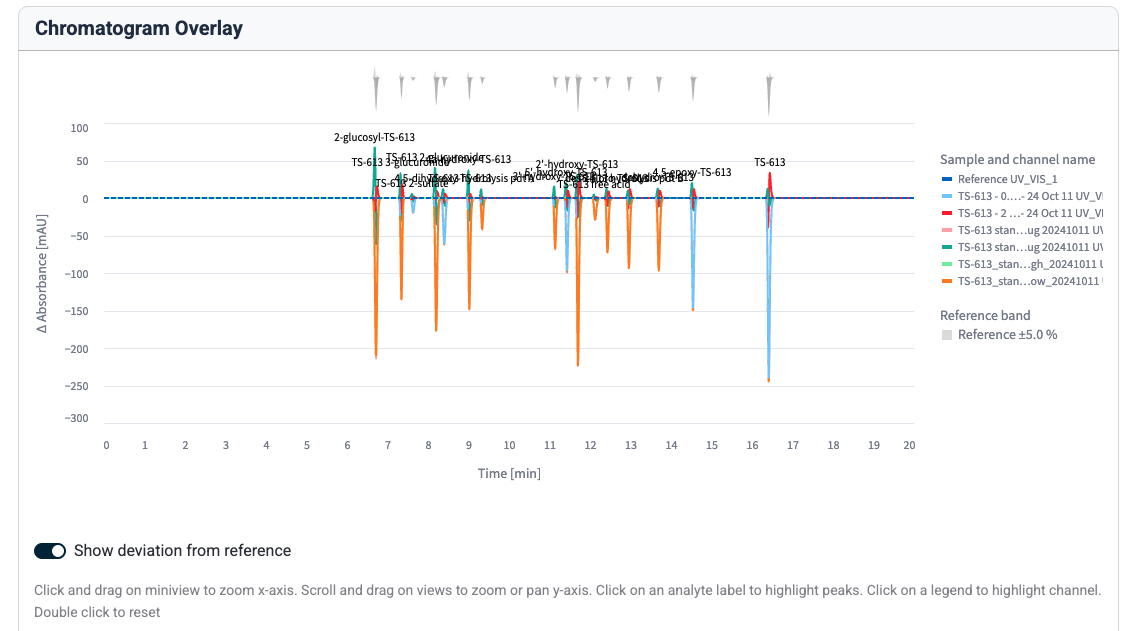
3. (Optional) Open **X-axis Offsets** to adjust horizontal positioning in overlays for better visual alignment.
#### Databricks Is Now a Supported Data App Provider
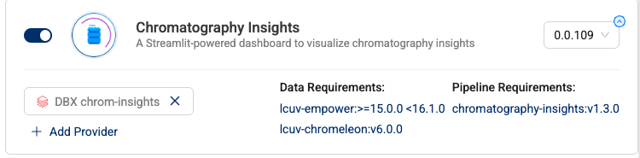
The app now supports zero-copy data sharing through [Databricks](https://www.databricks.com/) as a supported data provider. Accounts will need to partner with their Databricks and TetraScience developer operation teams to enable this capability.
To start using Databricks as a data provider, customers should do the following:
1. Contact your customer account leader and request that Databricks be set up as a Data Provider for Chromatography Insights in your TDP environment. TetraScience will set up a zero-copy delta share between the TDP and your Databricks account.
2. Have your system administrator configure access to the share in Databricks and your chosen Databricks compute infrastructure.
3. Create a data app provider for your Databricks account in your TDP environment. For instructions, see [Connect External Systems to an Embedded Data App Based on Streamlit](https://developers.tetrascience.com/docs/embedded-tetra-data-apps#connect-external-systems-to-an-embedded-data-app-based-on-streamlit)
4. Add Databricks as a Data Provider to Chromatography Insights. For instructions, see [Add a Provider to an Embedded Data App Based on Streamlit](https://developers.tetrascience.com/docs/embedded-tetra-data-apps#add-a-provider-to-an-embedded-data-app-based-on-streamlit). The app will take a few minutes to update.
### Enhancements
Enhancements are modifications to existing functionality that improve performance or usability, but don't alter the function or intended use of the system.
#### System Usage UI Updates
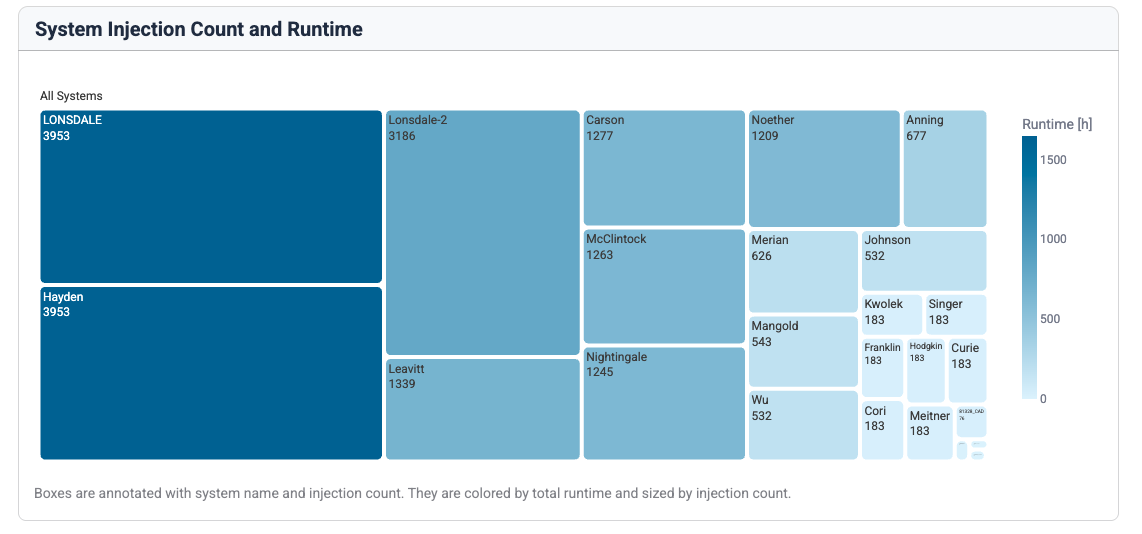
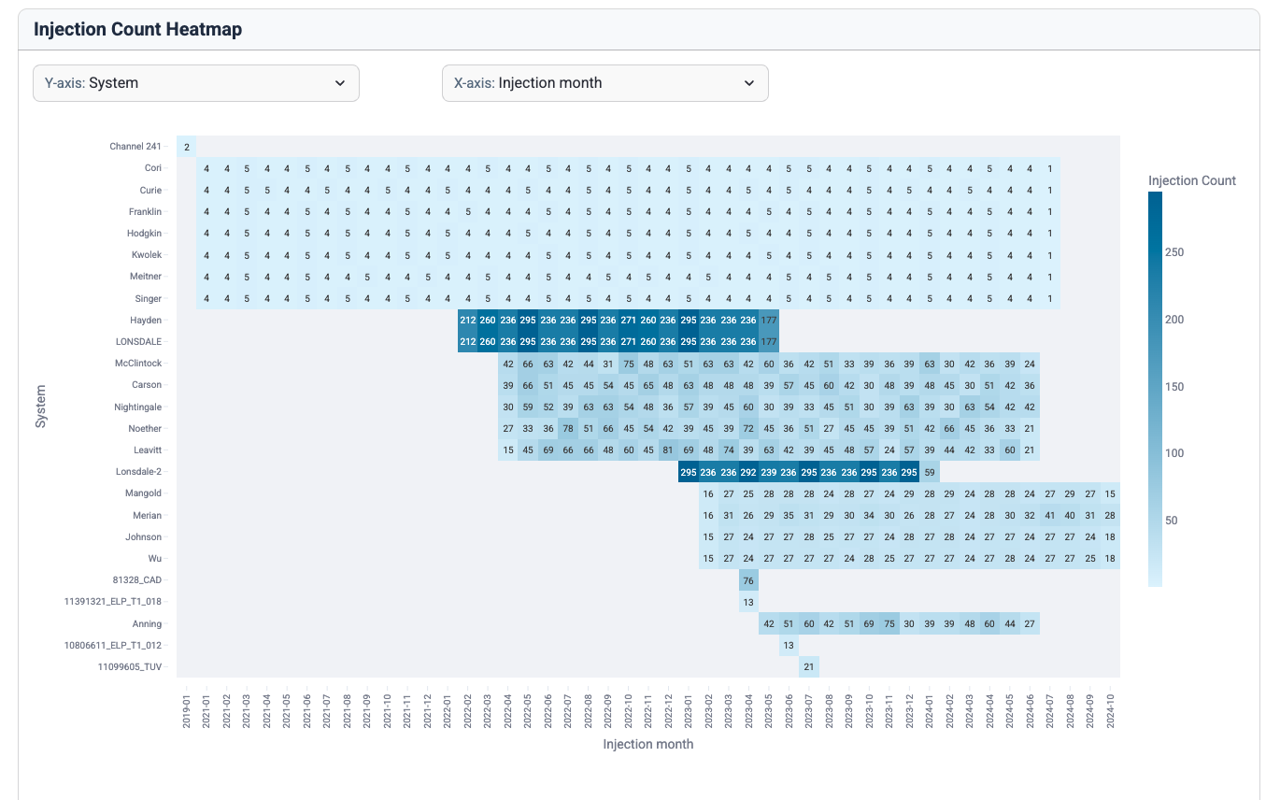
The following updates have been made to the **System Usage** page to help improve usability:
* Queries that return more than 20,000 results are now supported.
* A new treemap visualization provides a hierarchical relationship between systems, injection count, and run time.
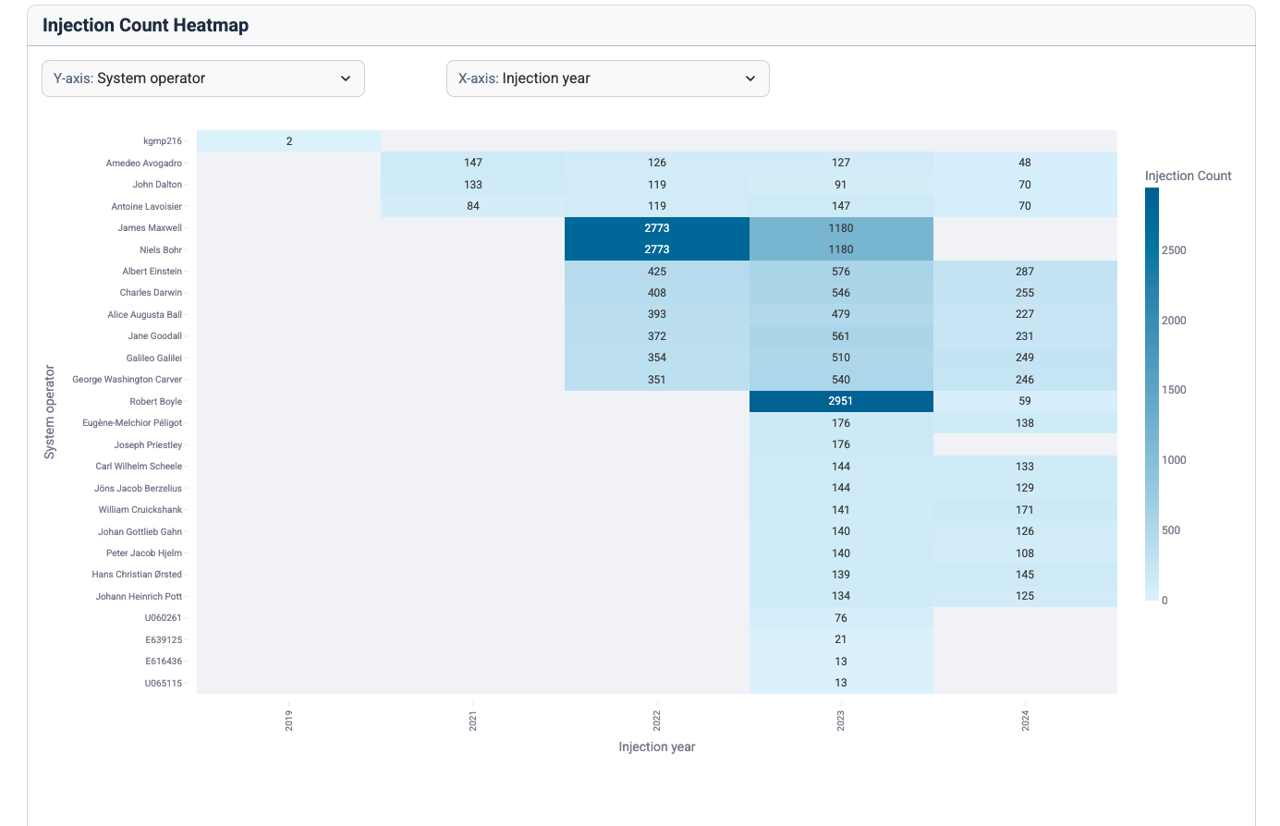
* A new injection count heatmap helps users explore various variables by modifying `Y` and `X` axes to customize the plot. Users can now compare variables, such as **system** or **user** by month or year.
* All bar plots now support color by a dropdown selection tool, show absolute values on bars, and report total run time values.
### Bug Fixes
The following bugs are now fixed:
* Fixed multiple UI stability issues, including screen blinking when opening settings and custom field selection persistence problems.
* Fixed session state errors that occurred when switching between custom field configurations across different app pages.
* Fixed an issue where the channel selection table would randomly reset during re-rendering.
### Known and Possible Issues
*Last updated: 8 October 2025*
The following are known and possible issues of Chromatography Insights v1.6.0:
* The app can't fetch **eCord** data from Empower Client 3.8.0 and higher. A fix for this issue is in development and testing and is scheduled for a future release. *(Added on 8 October 2025)*
### Limitations
The following are known limitations of Chromatography Insights v1.6.0:
* Using the custom field as a column identifier only applies to the filters on the column logbook page.
* Providers cannot be edited, because that changes their type to **custom**. The app does not support custom providers and will fall back to use the default TDP Amazon Athena connection. Instead of editing a provider, delete it and create a new provider with the correct settings.
### Upgrade Considerations
To upgrade Chromatography Insights to the latest version, do the following:
1. Update the app's image version by doing the following:
* [Open the **Tetra Data & AI Workspace**](https://developers.tetrascience.com/docs/tetra-data-workspace#access-the-data--ai-workspace-page).
* In the Chromatography Insights App's settings, change the **Image Version** to the latest version.
For more information, see [Edit Embedded Data Apps Settings for Your Org](https://developers.tetrascience.com/docs/embedded-tetra-data-apps#edit-embedded-data-apps-settings-for-your-org).
2. Update the app's companion `chromatography-insights` Tetraflow to `v1.6.0`. For instructions, see [Edit a Tetraflow Pipeline](https://developers.tetrascience.com/docs/transform-tetra-data-in-the-lakehouse#edit-a-tetraflow-pipeline).
3. After the updated Tetraflow runs, refresh the Chromatography Insights table schemas by doing the following:
* [Open the **SQL Search** page](https://developers.tetrascience.com/docs/use-tdp-to-query-athena-sql-tables#access-the-sql-search-page). A list of your database tables appears on the left.
* Select the database that ends in `__tss__default`.
* For each of the following Chromatography Insights database tables (`chromatography_insights_`), select the hamburger menu icon next to the table name, and then select **Refresh Table Schemas**:
* `chromatography_insights_filter_values`
* `chromatography_insights_injection`
* `chromatography_insights_peak`
To activate Chromatography Insights in the [Tetra Data and AI Workspace](https://developers.tetrascience.com/docs/tetra-data-workspace), please contact your customer success manager (CSM) or account executive.
For more information about Tetra Data Apps, see [Tetra Data Apps](https://developers.tetrascience.com/docs/tetra-data-apps).
# v1.5.0
**Release date: 30 May 2025**
### What's New
TetraScience has released its next version of the **Chromatography Insights** [Embedded Data App](https://developers.tetrascience.com/docs/embedded-tetra-data-apps), version 1.5.0. This release introduces the ability to choose a custom field as a column identifier (beta feature) and adds the option to turn off filters in the sidebar.
### Prerequisites
Chromatography Insights v1.5.0 requires the following:
* [Tetra Data Platform (TDP) v4.1.1](https://developers.tetrascience.com/docs/tdp-v411-release-notes) or higher deployed in a [Tetra-hosted environment](https://developers.tetrascience.com/docs/available-tetra-data-platform-deployment-options)
* [Data Lakehouse Architecture](https://developers.tetrascience.com/docs/data-lakehouse-architecture)
* Empower or Chromeleon CDS data processed into one of the following Intermediate Data Schemas (IDSs):
* [LC-UV Empower IDS (`lcuv-empower`)](https://tetrascience.zendesk.com/hc/en-us/articles/28506087868045-LC-UV-Empower-IDS-lcuv-empower) v15 or v16
* [Chromeleon IDS (`thermofisher-chromeleon`)](https://tetrascience.zendesk.com/hc/en-us/articles/28499784501005-Chromeleon-IDS-thermofisher-chromeleon) v6
> 📘 NOTE
>
> For more information about each IDS, see [Intermediate Data Schemas](https://tetrascience.zendesk.com/hc/en-us/sections/27923297421837-Intermediate-Data-Schemas) in the TetraConnect Hub. To request access, see [Access the TetraConnect Hub](https://developers.tetrascience.com/docs/access-the-tetrascience-knowledge-base).
### New Functionality
New functionality includes features not previously available in the Tetra Data Platform (TDP) or Chromatography Insights.
#### Custom Field as Column Identifier (Beta)
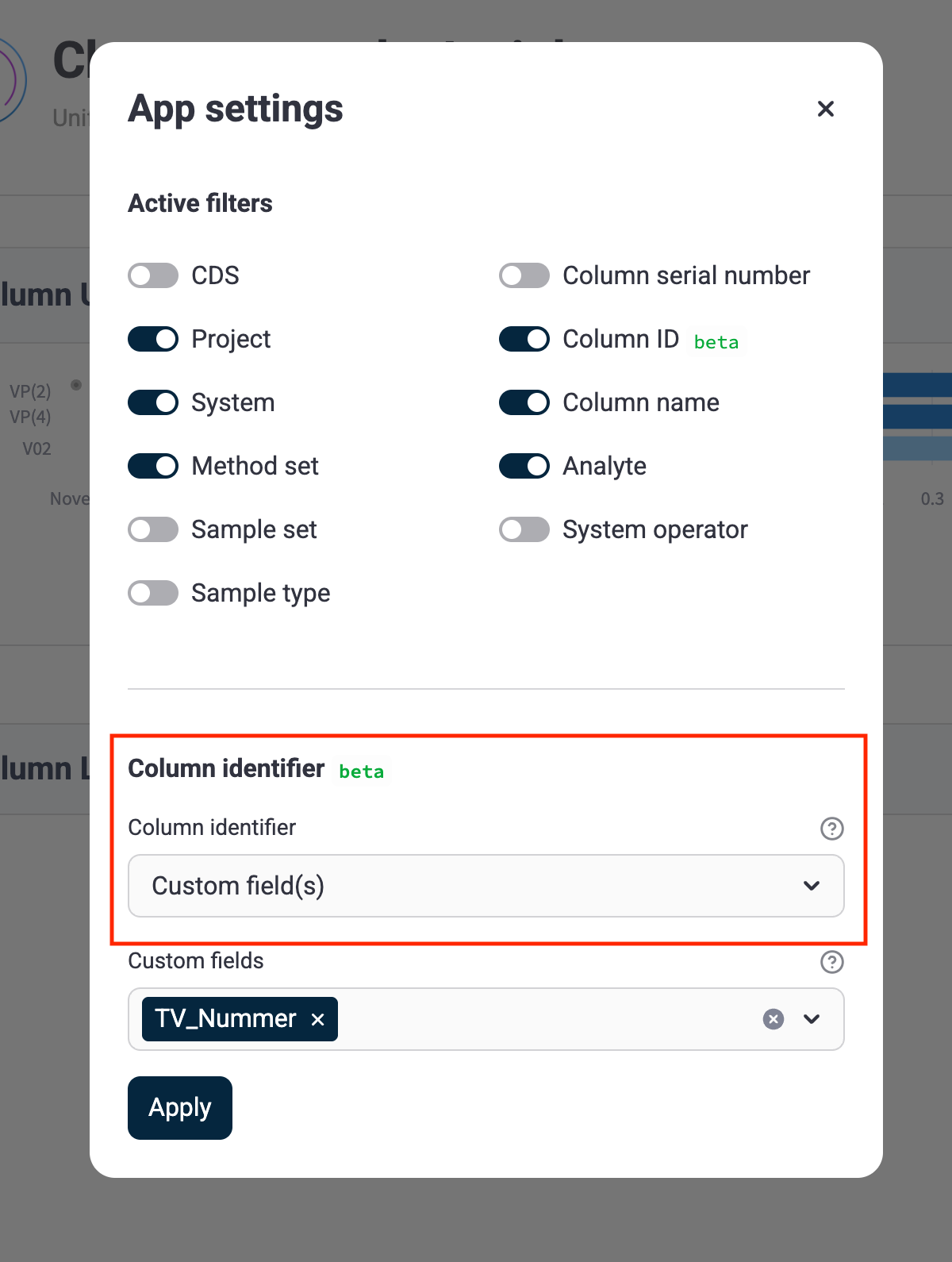
Chromatography Insights now supports using a custom field as a column identifier. This beta feature allows users to select a specific custom field to identify columns, which is particularly useful when the standard column identification fields don't contain the necessary information.
When this feature is enabled, column logbook queries use the custom column ID when grouping injections for aggregation, providing more accurate and relevant column usage data.
#### Option to Disable Sidebar Filters
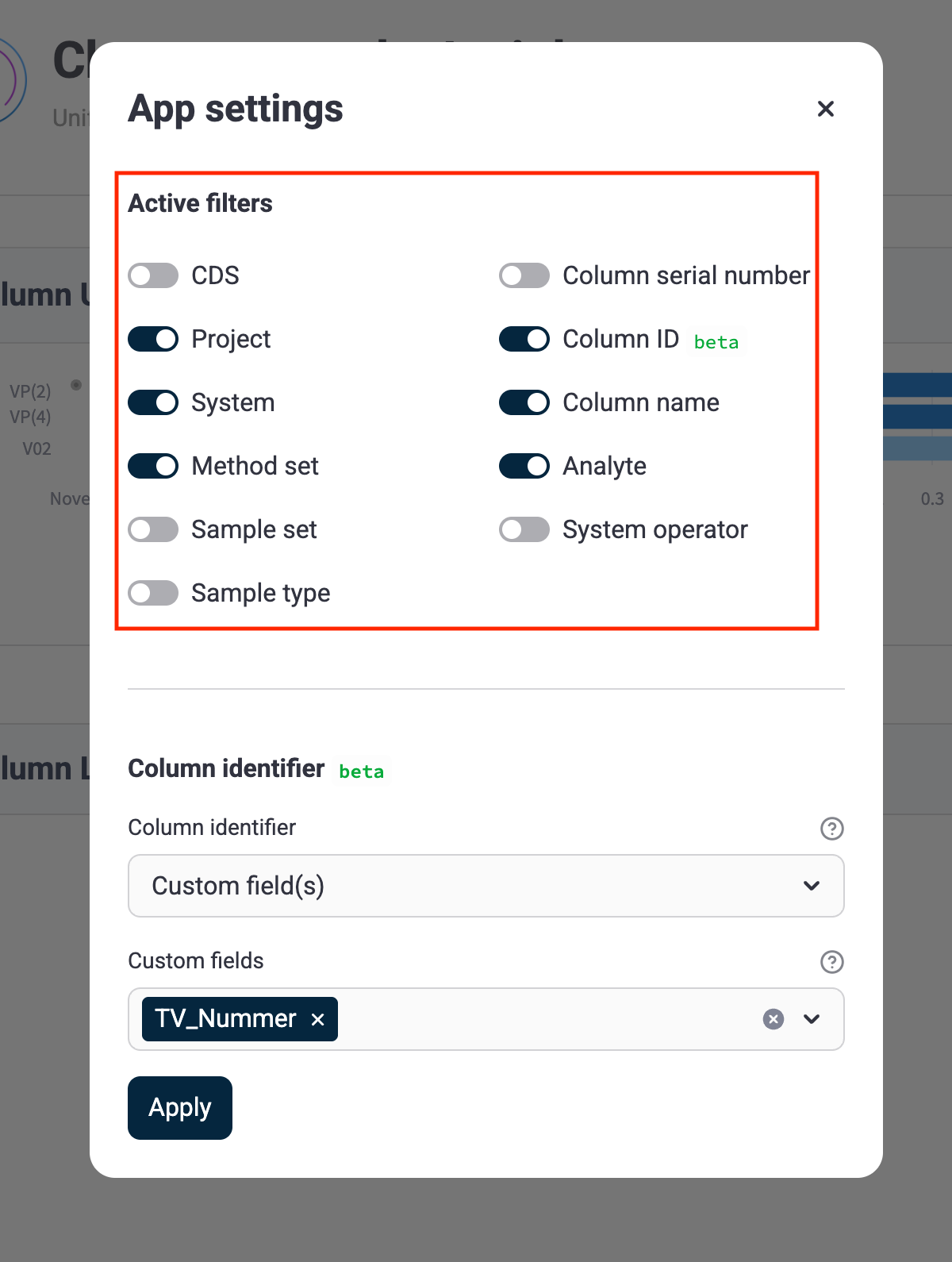
Users can now turn off filters in the sidebar, providing a cleaner interface when filters aren't needed. This enhancement improves the user experience by reducing visual clutter and focusing attention on the data visualization.
### Enhancements
Enhancements are modifications to existing functionality that improve performance or usability, but don't alter the function or intended use of the system.
* There are no enhancements in this release.
### Bug Fixes
The following bugs are now fixed:
* There are no bug fixes in this release.
### Limitations
The following are known limitations of Chromatography Insights v1.5.0:
* Using the custom field as a column identifier only applies to the filters on the column logbook page.
### Upgrade Considerations
To upgrade Chromatography Insights to the latest version, do the following:
1. Update the app's image version by doing the following:
* [Open the **Tetra Data & AI Workspace**](https://developers.tetrascience.com/docs/tetra-data-workspace#access-the-data--ai-workspace-page).
* In the Chromatography Insights App's settings, change the **Image Version** to the latest version.
For more information, see [Edit Embedded Data Apps Settings for Your Org](https://developers.tetrascience.com/docs/embedded-tetra-data-apps#edit-embedded-data-apps-settings-for-your-org).
2. Update the app's companion `chromatography-insights` Tetraflow to `v1.4.0`. For instructions, see [Edit a Tetraflow Pipeline](https://developers.tetrascience.com/docs/transform-tetra-data-in-the-lakehouse#edit-a-tetraflow-pipeline).
3. After the updated Tetraflow runs, refresh the Chromatography Insights table schemas by doing the following:
* [Open the **SQL Search** page](https://developers.tetrascience.com/docs/use-tdp-to-query-athena-sql-tables#access-the-sql-search-page). A list of your database tables appears on the left.
* Select the database that ends in `__tss__default`.
* For each of the following Chromatography Insights database tables (`chromatography_insights_`), select the hamburger menu icon next to the table name, and then select **Refresh Table Schemas**:
* `chromatography_insights_filter_values`
* `chromatography_insights_injection`
* `chromatography_insights_peak`
To activate Chromatography Insights in the [Tetra Data and AI Workspace](https://developers.tetrascience.com/docs/tetra-data-workspace), please contact your customer success manager (CSM) or account executive.
For more information about Tetra Data Apps, see [Tetra Data Apps](https://developers.tetrascience.com/docs/tetra-data-apps).
# v1.4.0
**Release date: 31 March 2025**
### What's New
TetraScience has released its next version of the **Chromatography Insights** [Embedded Data App](https://developers.tetrascience.com/docs/embedded-tetra-data-apps), version 1.4.0. This release introduces a new capability to select named Data App Providers for [Snowflake](https://docs.snowflake.com/) data by using zero-copy data sharing. It also adds a new **UV Wavelength** column to the **Chromatogram Overlay** page, enhanced **Peak** table filtering options, an improved chromatogram navigation tool that uses a mini viewer, and resolves a known Streamlit hover-over functionality issue.
### Prerequisites
Chromatography Insights v1.4.0 requires the following:
* [Tetra Data Platform (TDP) v4.1.1](https://developers.tetrascience.com/docs/tdp-v411-release-notes) or higher deployed in a [Tetra-hosted environment](https://developers.tetrascience.com/docs/available-tetra-data-platform-deployment-options)
* [Data Lakehouse Architecture](https://developers.tetrascience.com/docs/data-lakehouse-architecture)
* Empower or Chromeleon CDS data processed into one of the following Intermediate Data Schemas (IDSs):
* [LC-UV Empower IDS (`lcuv-empower`)](https://tetrascience.zendesk.com/hc/en-us/articles/28506087868045-LC-UV-Empower-IDS-lcuv-empower) v15 or v16
* [Chromeleon IDS (`thermofisher-chromeleon`)](https://tetrascience.zendesk.com/hc/en-us/articles/28499784501005-Chromeleon-IDS-thermofisher-chromeleon) v6
> 📘 NOTE
>
> For more information about each IDS, see [Intermediate Data Schemas](https://tetrascience.zendesk.com/hc/en-us/sections/27923297421837-Intermediate-Data-Schemas) in the TetraConnect Hub. To request access, see [Access the TetraConnect Hub](https://developers.tetrascience.com/docs/access-the-tetrascience-knowledge-base).
### New Functionality
New functionality includes features not previously available in the Tetra Data Platform (TDP) or Chromatography Insights.
#### Snowflake Is Now a Supported Data App Provider
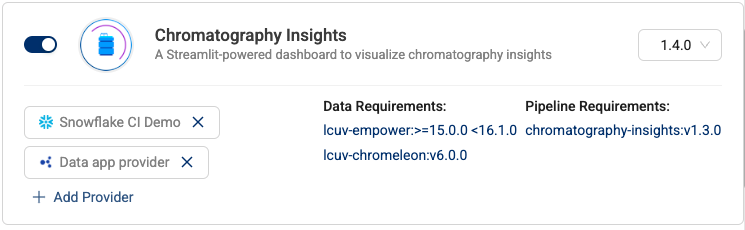
Chromatography Insights now supports zero-copy data sharing through [Snowflake](https://docs.snowflake.com/). Accounts will need to partner with their Snowflake and TetraScience developer operation teams to enable this capability.
To start using Snowflake as a data provider for Chromatography Insights, do the following:
1. Configure a zero-copy data share between the TDP and your Snowflake account. For instructions, see [Use Snowflake to Access Tetra Data](https://developers.tetrascience.com/docs/use-snowflake-to-access-tetra-data).
2. Connect the Chromatography Insights app in your TDP environment to your Snowflake account. For instructions, see [Connect External Systems to an Embedded Data App Based on Streamlit](https://developers.tetrascience.com/docs/embedded-tetra-data-apps#connect-external-systems-to-an-embedded-data-app-based-on-streamlit).
3. Add Snowflake as a Data Provider to Chromatography Insights. For instructions, see [Add a Provider to an Embedded Data App Based on Streamlit](https://developers.tetrascience.com/docs/embedded-tetra-data-apps#add-a-provider-to-an-embedded-data-app-based-on-streamlit). The app will take a few minutes to update.
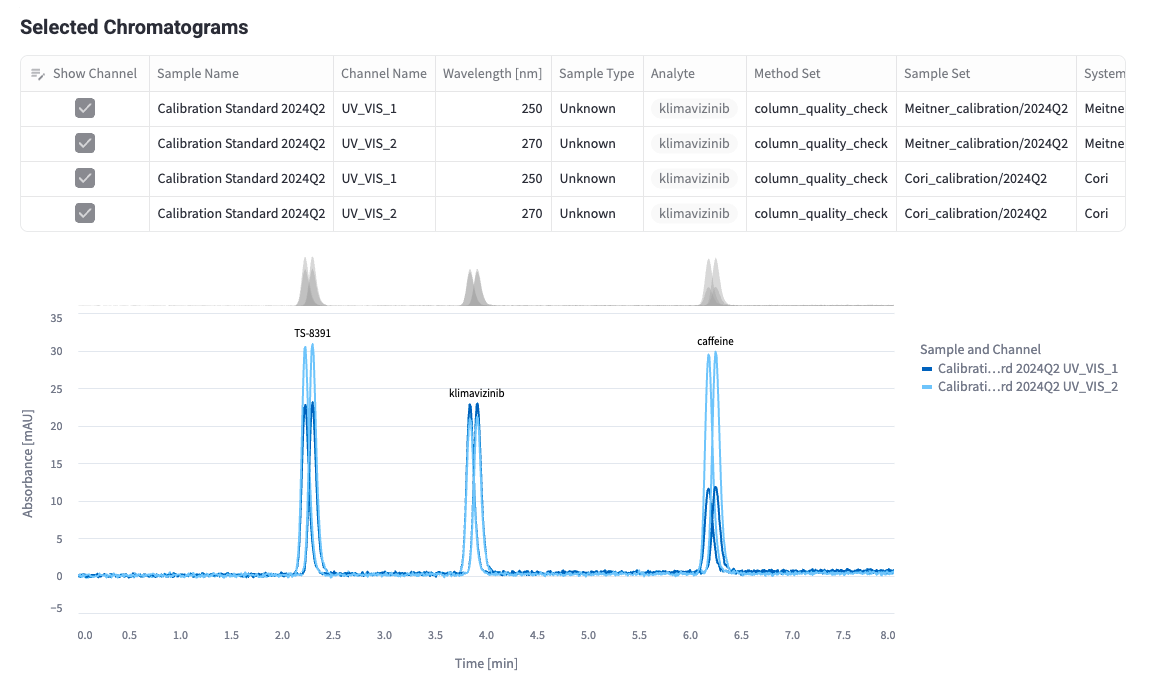
#### New UV Wavelength Column on the Chromatogram Overlay Page
The Selected Chromatogram table has been updated to include a column specifying the UV-Vis wavelength used to measure the absorbance from an injection. This measurement helps analysts quickly determine what UV-Vis settings were applied to the injection channel.
#### Dynamic Hover-Over Peak Label Selection
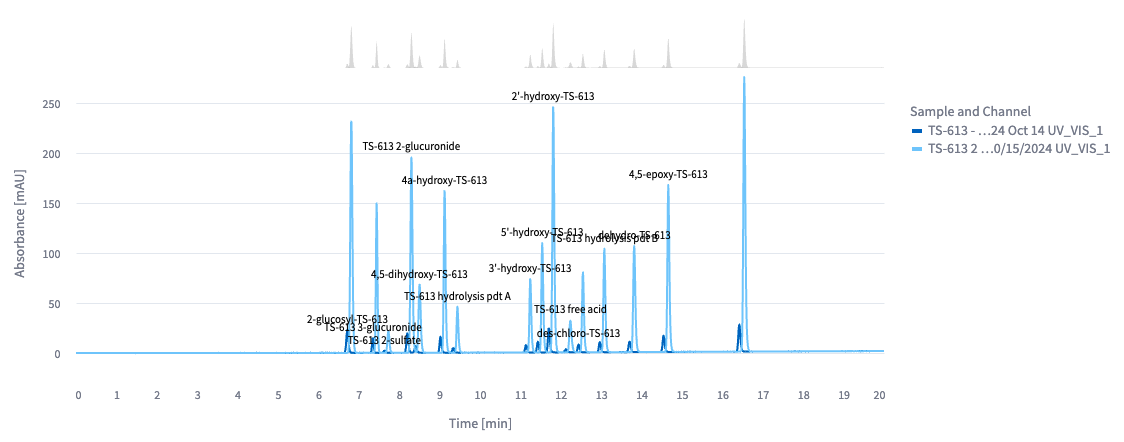
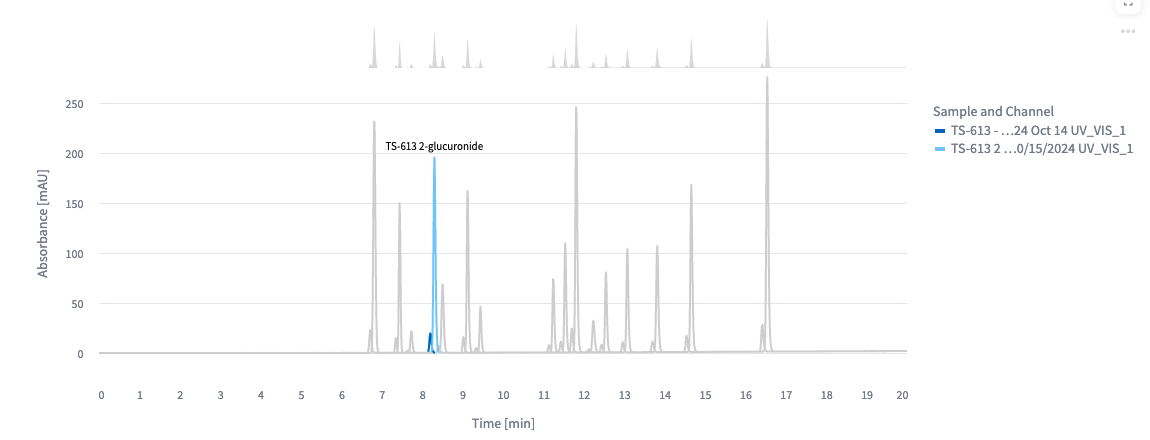
This release improves the user experience for selecting peak labels on the plotted chromatograms. A single peak label is now shown for overlaid chromatograms, and peak labels are dynamically removed from the view when a user hovers their cursor over a peak.
**Peaks with Multiple Labels View**
**Single Peak Label View**
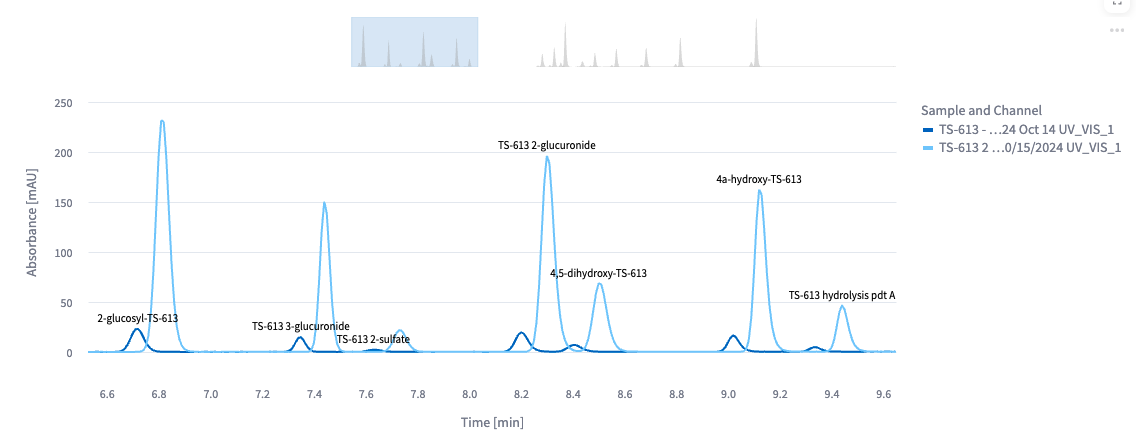
#### Mini View for Chromatogram Navigation
Users now have the ability to use the mini view above the chromatogram plot to zoom in on regions of interest and drag across the plot. This feature improves plot visibility when injections have many peaks.
### Enhancements
Enhancements are modifications to existing functionality that improve performance or usability, but don't alter the function or intended use of the system.
* **The performance trending peak table now show only peak values from selected injections:** Previously, the **Peak** table showed all peak values matching selected filters.
### Bug Fixes
The following bug is now fixed:
* The latest Streamlit version (v1.43.0) resolves a hover-over functionality issue where a tooltip with the text **true** would show when hovering over elements set to not have a tooltip. The tooltip would sometimes obscure key content. With this update, the app no longer shows the incorrect tooltip.
### Limitations
The following are known limitations of Chromatography Insights v1.4.0:
* Loading more than 20,000 injections at once can cause visualization graphs to load slowly. It's recommended that customers apply filters to limit the number of data points that each visualization graph loads.
* App users must have a TDP role that has at least **View Access** permissions for the **Data App** functionality (for example, a **Member** or **Read Only** role). For more information, see [Roles and Permissions](https://developers.tetrascience.com/docs/platform-roles-and-permissions).
* The **Method Set**, **Sample Set**, and **Project** filters apply to Empower CDS data only.
### Deprecated Features
There are no new deprecated features in this release. For more information about TDP deprecations, see [Tetra Product Deprecation Notices](https://developers.tetrascience.com/docs/tdp-deprecation-notices).
### Known and Possible Issues
There are no new known and possible issues in this release.
### Upgrade Considerations
To upgrade Chromatography Insights to the latest version, do the following:
1. Update the app's image version by doing the following:
* [Open the **Tetra Data & AI Workspace**](https://developers.tetrascience.com/docs/tetra-data-workspace#access-the-data--ai-workspace-page).
* In the Chromatography Insights App's settings, change the **Image Version** to the latest version.
For more information, see [Edit Embedded Data Apps Settings for Your Org](https://developers.tetrascience.com/docs/embedded-tetra-data-apps#edit-embedded-data-apps-settings-for-your-org).
2. Update the app's companion `chromatography-insights` Tetraflow to `v1.3.0` if needed. Note, there is no update to the companion tetraflow with this version of the app. For instructions, see [Edit a Tetraflow Pipeline](https://developers.tetrascience.com/docs/transform-tetra-data-in-the-lakehouse#edit-a-tetraflow-pipeline).
3. After the updated Tetraflow runs, refresh the Chromatography Insights table schemas by doing the following:
* [Open the **SQL Search** page](https://developers.tetrascience.com/docs/use-tdp-to-query-athena-sql-tables#access-the-sql-search-page). A list of your database tables appears on the left.
* Select the database that ends in `__tss__default`.
* For each of the following Chromatography Insights database tables (`chromatography_insights_`), select the hamburger menu icon next to the table name, and then select **Refresh Table Schemas**:
* `chromatography_insights_filter_values`
* `chromatography_insights_injection`
* `chromatography_insights_peak`
To activate Chromatography Insights in the [Tetra Data and AI Workspace](https://developers.tetrascience.com/docs/tetra-data-workspace), please contact your customer success manager (CSM) or account executive.
For more information about Tetra Data Apps, see [Tetra Data Apps](https://developers.tetrascience.com/docs/tetra-data-apps).
# v1.3.0
**Release date: 6 March 2025**
### What's New
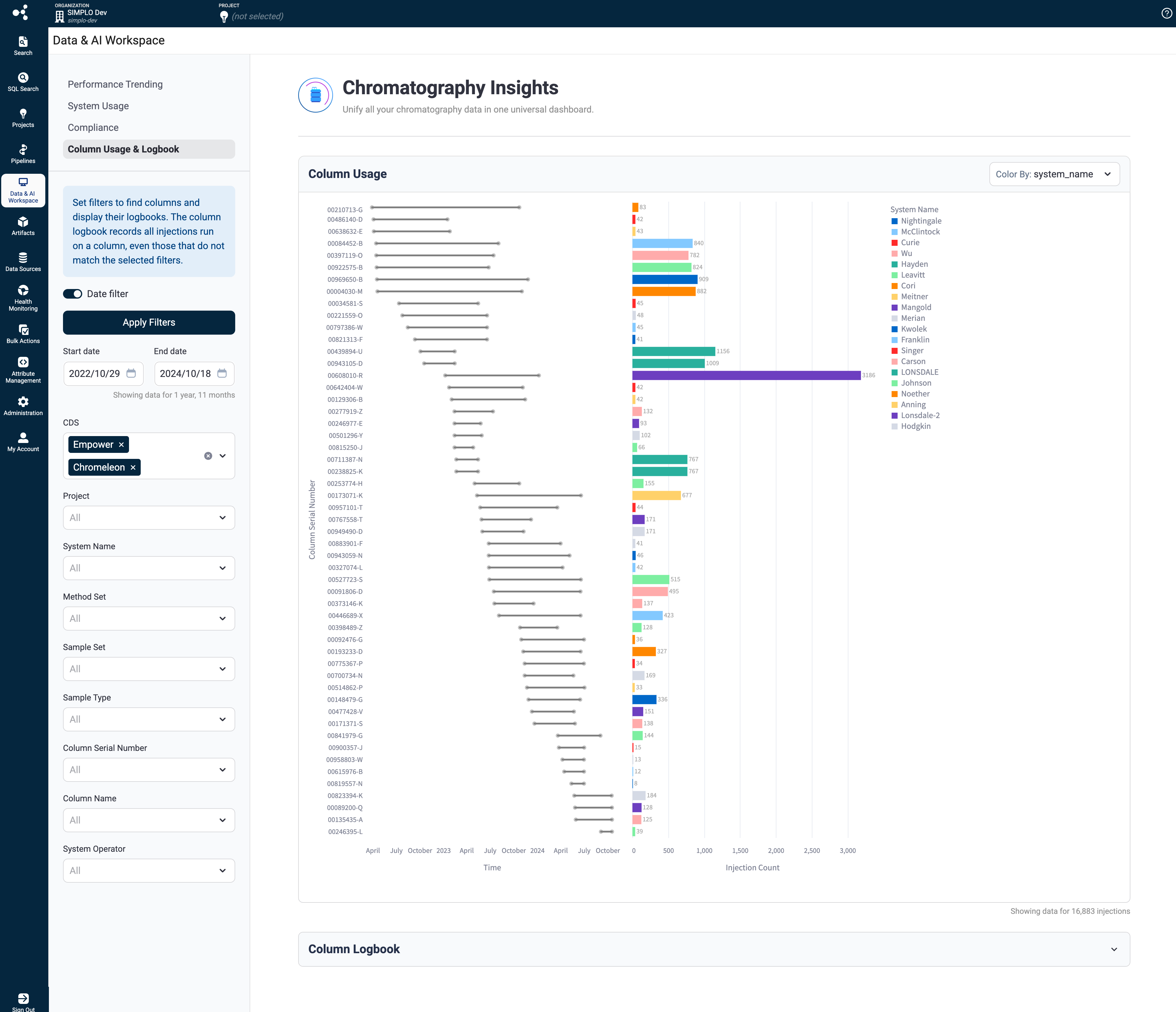
TetraScience has released its next version of the **Chromatography Insights** [Embedded Data App](https://developers.tetrascience.com/docs/embedded-tetra-data-apps), version 1.3.0. This release introduces a new **Column Usage & Logbook** page, which replaces the previous **Column Utilization** page and fixes a known issue. The **Column Usage & Logbook** page includes a new **Logbook** chart that shows the first and last injection date for selected columns. It also includes a **Column Usage** chart that provides the total injection count for selected columns. The new page also introduces a column logbook table that provides users a readout of all corresponding samples tested with a particular column.
### Prerequisites
Chromatography Insights v1.3.0 requires the following:
* [Tetra Data Platform (TDP) v4.1.1](https://developers.tetrascience.com/docs/tdp-v411-release-notes) or higher deployed in a [Tetra-hosted environment](https://developers.tetrascience.com/docs/available-tetra-data-platform-deployment-options)
* [Data Lakehouse Architecture](https://developers.tetrascience.com/docs/data-lakehouse-architecture)
* Empower or Chromeleon CDS data processed into one of the following Intermediate Data Schemas (IDSs):
* [LC-UV Empower IDS (`lcuv-empower`)](https://tetrascience.zendesk.com/hc/en-us/articles/28506087868045-LC-UV-Empower-IDS-lcuv-empower) v15 or v16
* [Chromeleon IDS (`thermofisher-chromeleon`)](https://tetrascience.zendesk.com/hc/en-us/articles/28499784501005-Chromeleon-IDS-thermofisher-chromeleon) v6
> 📘 NOTE
>
> For more information about each IDS, see [Intermediate Data Schemas](https://tetrascience.zendesk.com/hc/en-us/sections/27923297421837-Intermediate-Data-Schemas) in the TetraConnect Hub. To request access, see [Access the TetraConnect Hub](https://developers.tetrascience.com/docs/access-the-tetrascience-knowledge-base).
### New Functionality
New functionality includes features not previously available in the Tetra Data Platform (TDP) or Chromatography Insights.
* A new **Column Usage & Logbook** page replaces the previous **Column Utilization** page. The **Column Usage & Logbook** page includes the following:
* **Logbook** chart: Shows all injections for selected columns
* **Column Usage** chart: Shows column utilization over time
### Enhancements
Enhancements are modifications to existing functionality that improve performance or usability, but don't alter the function or intended use of the system.
* There are no enhancements in this release.
### Bug Fixes
The following bugs are now fixed:
* X-axis chart values now align consistently across channels when viewing chromatograms.
### Limitations
The following are known limitations of Chromatography Insights v1.3.0:
* Loading more than 20,000 injections at once can cause visualization graphs to load slowly. It's recommended that customers apply filters to limit the number of data points that each visualization graph loads.
* App users must have a TDP role that has at least **View Access** permissions for the **Data App** functionality (for example, a **Member** or **Read Only** role). For more information, see [Roles and Permissions](https://developers.tetrascience.com/docs/platform-roles-and-permissions).
* The **Method Set**, **Sample Set**, and **Project** filters apply to Empower CDS data only.
### Deprecated Features
There are no new deprecated features in this release. For more information about TDP deprecations, see [Tetra Product Deprecation Notices](https://developers.tetrascience.com/docs/tdp-deprecation-notices).
### Known and Possible Issues
There are no new known and possible issues in this release.
### Upgrade Considerations
To upgrade Chromatography Insights to the latest version, do the following:
1. Update the app's image version by doing the following:
* [Open the **Tetra Data & AI Workspace**](https://developers.tetrascience.com/docs/tetra-data-workspace#access-the-data--ai-workspace-page).
* In the Chromatography Insights App's settings, change the **Image Version** to the latest version.
For more information, see [Edit Embedded Data Apps Settings for Your Org](https://developers.tetrascience.com/docs/embedded-tetra-data-apps#edit-embedded-data-apps-settings-for-your-org).
2. Update the app's companion `chromatography-insights` Tetraflow to `v1.3.0`. For instructions, see [Edit a Tetraflow Pipeline](https://developers.tetrascience.com/docs/transform-tetra-data-in-the-lakehouse#edit-a-tetraflow-pipeline).
3. After the updated Tetraflow runs, refresh the Chromatography Insights table schemas by doing the following:
* [Open the **SQL Search** page](https://developers.tetrascience.com/docs/use-tdp-to-query-athena-sql-tables#access-the-sql-search-page). A list of your database tables appears on the left.
* Select the database that ends in `__tss__default`.
* For each of the following Chromatography Insights database tables (`chromatography_insights_`), select the hamburger menu icon next to the table name, and then select **Refresh Table Schemas**:
* `chromatography_insights_filter_values`
* `chromatography_insights_injection`
* `chromatography_insights_peak`
To activate Chromatography Insights in the [Tetra Data and AI Workspace](https://developers.tetrascience.com/docs/tetra-data-workspace), please contact your customer success manager (CSM) or account executive.
For more information about Tetra Data Apps, see [Tetra Data Apps](https://developers.tetrascience.com/docs/tetra-data-apps).
# v1.2.0
**Release date: 6 February 2025**
### What's New
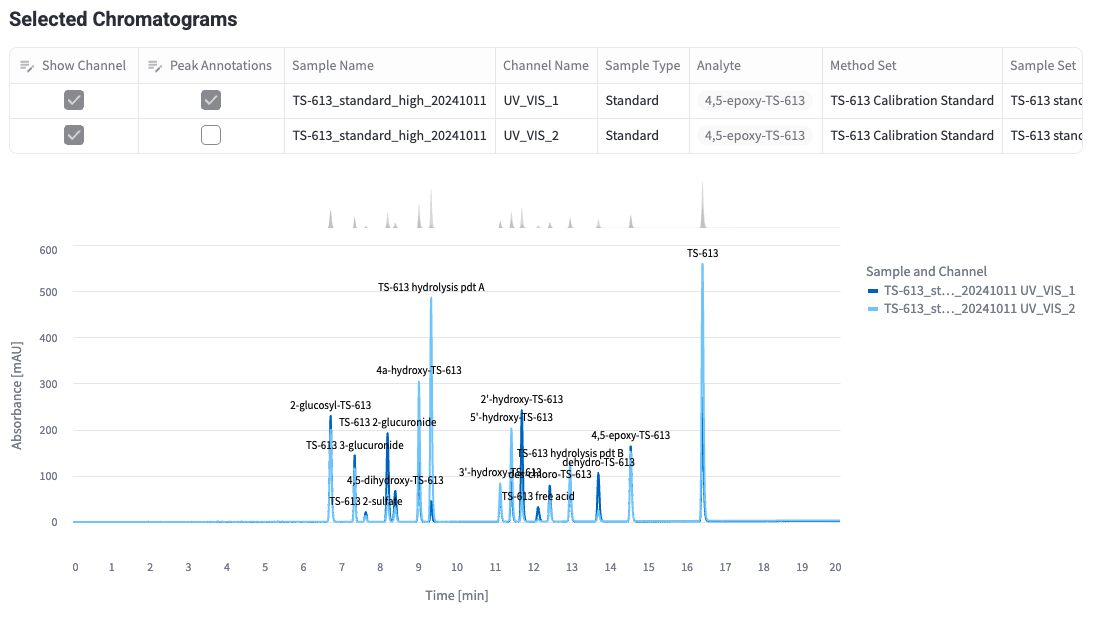
TetraScience has released its next version of the **Chromatography Insights** [Embedded Data App](https://developers.tetrascience.com/docs/embedded-tetra-data-apps), version 1.2.0. This release introduces a new **Chromatogram Viewer** that lets users visualize individual chromatography injections and quickly compare chromatograms across multiple injections. Users can also now select multiple channels to visualize several UV detector, pressure, and temperature channels simultaneously.
### Prerequisites
Chromatography Insights v1.2.0 requires the following:
* [Tetra Data Platform (TDP) v4.1.1](https://developers.tetrascience.com/docs/tdp-v411-release-notes) or higher deployed in a [Tetra-hosted environment](https://developers.tetrascience.com/docs/available-tetra-data-platform-deployment-options)
* [Data Lakehouse Architecture](https://developers.tetrascience.com/docs/data-lakehouse-architecture)
* Empower or Chromeleon CDS data processed into one of the following Intermediate Data Schemas (IDSs):
* [LC-UV Empower IDS (`lcuv-empower`)](https://tetrascience.zendesk.com/hc/en-us/articles/28506087868045-LC-UV-Empower-IDS-lcuv-empower) v15 or higher
* [Chromeleon IDS (`thermofisher-chromeleon`)](https://tetrascience.zendesk.com/hc/en-us/articles/28499784501005-Chromeleon-IDS-thermofisher-chromeleon) v6 or higher
> 📘 NOTE
>
> For more information about each IDS, see [Intermediate Data Schemas](https://tetrascience.zendesk.com/hc/en-us/sections/27923297421837-Intermediate-Data-Schemas) in the TetraConnect Hub. To request access, see [Access the TetraConnect Hub](https://developers.tetrascience.com/docs/access-the-tetrascience-knowledge-base).
### New Functionality
New functionality includes features not previously available in the Tetra Data Platform (TDP) or Chromatography Insights.
* A new **Chromatogram Viewer** that includes the following:
* Chromatograms are rendered after the user selects one or more injections from the **Performance Trending** view.
* A **Selected Chromatograms** table is created based on the selected injections. The table lets users toggle channels (for example, UV, pressure, or temperature) or peak annotations for rendered chromatograms.
* A single chart view that overlays multiple injections so the user can compare chromatography runs. The chart includes peak labels for each run.
* The chart hover tooltip provides users quick access to standard chromatography peak data, such as peak area, peak start, peak end, and resolution.
#### Chromatography Viewer
### Enhancements
Enhancements are modifications to existing functionality that improve performance or usability, but don't alter the function or intended use of the system.
* There are no enhancements in this release.
### Bug Fixes
There are no bug fixes in this release.
### Limitations
The following are known limitations of Chromatography Insights v1.2.0:
* Loading more than 20,000 injections at once can cause visualization graphs to load slowly. It's recommended that customers apply filters to limit the number of data points that each visualization graph loads.
* App users must have a TDP role that has at least **View Access** permissions for the **Data App** functionality (for example, a **Member** or **Read Only** role). For more information, see [Roles and Permissions](https://developers.tetrascience.com/docs/platform-roles-and-permissions).
* The **Method Set**, **Sample Set**, and **Project** filters apply to Empower CDS data only.
### Deprecated Features
There are no new deprecated features in this release. For more information about TDP deprecations, see [Tetra Product Deprecation Notices](https://developers.tetrascience.com/docs/tdp-deprecation-notices).
### Known and Possible Issues
There are no new known and possible issues in this release.
### Upgrade Considerations
To upgrade Chromatography Insights to the latest version, open the **Tetra Data & AI Workspace** in the TDP. Then, change the **Image Version** to the latest version in the Chromatography Insights App's settings. For instructions, see [Edit Embedded Data Apps Settings for Your Org](https://developers.tetrascience.com/docs/embedded-tetra-data-apps#edit-embedded-data-apps-settings-for-your-org).
To activate Chromatography Insights in the [Tetra Data and AI Workspace](https://developers.tetrascience.com/docs/tetra-data-workspace), please contact your customer success manager (CSM) or account executive.
For more information about Tetra Data Apps, see [Tetra Data Apps](https://developers.tetrascience.com/docs/tetra-data-apps).
# v1.1.1
**Release date: 18 December 2024**
### What's New
TetraScience has released its next version of the **Chromatography Insights** [Embedded Data App](https://developers.tetrascience.com/docs/embedded-tetra-data-apps), version 1.1.1. This release introduces an improvement to the **Performance Trending** chart that makes it easier to see trends over short time ranges.
### Prerequisites
Chromatography Insights v1.1.1 requires the following:
* [Tetra Data Platform (TDP) v4.1.1](https://developers.tetrascience.com/docs/tdp-v411-release-notes) or higher deployed in a [Tetra-hosted environment](https://developers.tetrascience.com/docs/available-tetra-data-platform-deployment-options)
* [Data Lakehouse Architecture](https://developers.tetrascience.com/docs/data-lakehouse-architecture)
* Empower or Chromeleon CDS data processed into one of the following Intermediate Data Schemas (IDSs):
* [LC-UV Empower IDS (`lcuv-empower`)](https://tetrascience.zendesk.com/hc/en-us/articles/28506087868045-LC-UV-Empower-IDS-lcuv-empower) v15 or higher
* [Chromeleon IDS (`thermofisher-chromeleon`)](https://tetrascience.zendesk.com/hc/en-us/articles/28499784501005-Chromeleon-IDS-thermofisher-chromeleon) v6 or higher
> 📘 NOTE
>
> For more information about each IDS, see [Intermediate Data Schemas](https://tetrascience.zendesk.com/hc/en-us/sections/27923297421837-Intermediate-Data-Schemas) in the TetraConnect Hub. To request access, see [Access the TetraConnect Hub](https://developers.tetrascience.com/docs/access-the-tetrascience-knowledge-base).
### New Functionality
New functionality includes features not previously available in the Tetra Data Platform (TDP) or Chromatography Insights.
* There is no new functionality in this release.
### Enhancements
Enhancements are modifications to existing functionality that improve performance or usability, but don't alter the function or intended use of the system.
* When customers filter down to a small number (<7) of days on the **Performance Trending** chart, it now displays the full timestamps of all of the labels on the x-axis instead of grouping all of the points into a single day. This update makes it easier to see performance trends over a short time range.
### Bug Fixes
There are no bug fixes in this release
### Limitations
The following are known limitations of Chromatography Insights v1.1.1:
* Loading more than 20,000 injections at once can cause visualization graphs to load slowly. It is recommended that customers apply filters to limit the number of data points that each visualization graph loads.
* App users must have a TDP role that has at least **View Access** permissions for the **Data App** functionality (for example, a **Member** or **Read Only** role). For more information, see [Roles and Permissions](https://developers.tetrascience.com/docs/platform-roles-and-permissions).
* The **Method Set**, **Sample Set**, and **Project** filters apply to Empower CDS data only.
### Deprecated Features
There are no new deprecated features in this release. For more information about TDP deprecations, see [Tetra Product Deprecation Notices](https://developers.tetrascience.com/docs/tdp-deprecation-notices).
### Known and Possible Issues
There are no new known and possible issues in this release.
### Security
Various security updates were applied.
### Upgrade Considerations
To upgrade Chromatography Insights to the latest version, open the **Tetra Data & AI Workspace** in the TDP. Then, change the **Image Version** to the latest version in the Chromatography Insights App's settings. For instructions, see [Edit Embedded Data Apps Settings for Your Org](https://developers.tetrascience.com/docs/embedded-tetra-data-apps#edit-embedded-data-apps-settings-for-your-org).
> 🚧 IMPORTANT
>
> Existing data won't load initially after upgrading to Chromatography Insights v1.1.1 from v1.1.1 because of a known issue. To get existing Chromatography Insights data to load in the app after upgrading to v1.1.1, you must do the following:
>
> 1. [Open the **SQL Search** page](https://developers.tetrascience.com/docs/use-tdp-to-query-athena-sql-tables#access-the-sql-search-page). A list of your database tables appears on the left.
> 2. For each of your Chromatography Insights database tables (`chromatography_insights_`), select the hamburger menu icon next to the table name. Then, select **Refresh Table Schemas**. Make sure that you run the action for each of the following Chromatography Insights database tables:
> * `chromatography_insights_filter_values`
> * `chromatography_insights_injection`
> * `chromatography_insights_peak`
To activate Chromatography Insights in the [Tetra Data and AI Workspace](https://developers.tetrascience.com/docs/tetra-data-workspace), please contact your customer success manager (CSM) or account executive.
For more information about Tetra Data Apps, see [Tetra Data Apps](https://developers.tetrascience.com/docs/tetra-data-apps).
# v1.1.0
**Release date: 2 December 2024**
### What's New
TetraScience has released its next version of the **Chromatography Insights** [Embedded Data App](https://developers.tetrascience.com/docs/embedded-tetra-data-apps), version 1.1.0, as part of a [limited availability release](https://developers.tetrascience.com/docs/tetrascience-release-types#limited-availability). [Chromatography Insights](https://www.tetrascience.com/videos/chromatography-insights-in-the-tetra-data-and-ai-workspace) consolidates data from multiple Chromatography Data Systems (CDSs) into a single, interactive dashboard. This empowers teams to better assess performance variability, identify root causes, and track trends of this critical analytical technique—which leads to faster, more informed decisions across labs.
This release introduces additional pages for **Compliance**, **Column Utilization**, and **System Usage**. It also adds support for LC-UV Empower IDS (\`lcuv-em