

TDP v4.4.2 Release Notes
Release date: 29 January 2026
TetraScience has released Tetra Data Platform (TDP) version 4.4.2. This release focuses on enhancing platform stability and pipeline reliability while resolving several known issues.
Key updates include the following:
- Improved data reconciliation job performance so customers with large file volumes can reconcile missing file metadata without impacting active user operations
- Intermediate Data Schema (IDS) metadata is now propagated to downstream
direct-to-lakehousetables to help ensure that valuable metadata context is preserved - Managed Tables for Data Apps (Limited Availability) allow Self-Service Data Apps to persist analysis results, session state, and labeled datasets directly back to the TDP
- Custom Pipeline Email Notifications (Limited Availability) provide customers the option to configure their own email notifications for pipeline events based on task script inputs, and then passing specific content from processed files into the body of the notifications
Here are the details for what's new in TDP v4.4.2.
Notes
Learn about note blocks and what they mean.
* Any blue NOTE blocks indicate helpful considerations, but don’t require customer action.
NOTE
- Any yellow IMPORTANT note blocks indicate required actions that customers must take to either use a new functionality or enhancement, or to avoid potential issues during the upgrade.
IMPORTANT
GxP Impact Assessment
All new TDP functionalities go through a GxP impact assessment to determine validation needs for GxP installations.
New Functionality items marked with an asterisk (*) address usability, supportability, or infrastructure issues, and do not affect Intended Use for validation purposes, per this assessment.
Enhancements and Bug Fixes do not generally affect Intended Use for validation purposes.
Items marked as either beta release or early adopter program (EAP) are not validated for GxP by TetraScience. However, customers can use these prerelease features and components in production if they perform their own validation.
New Functionality
New functionalities are features that weren't previously available in the TDP.
Beta and Limited Availability Release New Functionality
Managed Tables for Data Apps (Limited Availability)
Self-Service Data Apps can now persist analysis results, session state, and labeled datasets directly back to the TDP through their own, optional database tables (managed tables) within the TDP. Available as part of a limited availability release, managed tables allow Data Apps to store, retrieve, and modify data directly in the TDP.
To start using managed tables, customers should contact their account leader. For more information, see Self-Service Data Apps in the TetraConnect Hub. For access, see Access the TetraConnect Hub.
Custom Pipeline Email Notifications (Limited Availability)
Customers can now configure custom email notifications for Tetra Data Pipeline events based on task script inputs in addition to the existing, default SEND ON SUCCESS and SEND ON FAILURE notification options. Available as part of a limited availability release, custom pipeline email notifications can pass specific content from processed files into the body of the notification, which is then automatically sent to any configured email recipients.
After custom pipeline email notifications are activated in a customer's TDP environment, two new, optional custom email template inputs appear on the Pipeline Edit page in the Set Notifications section:
- USE CUSTOM SUCCESS TEMPLATE
- USE CUSTOM FAILURE TEMPLATE
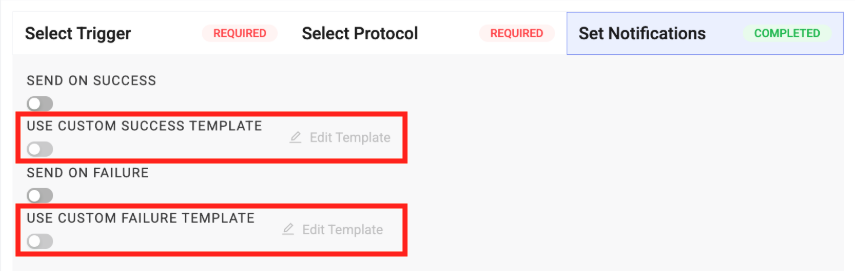
After selecting one of the custom template options, customers can then configure a custom email using standard HTML in a new Edit Custom {Success/Failure} Template dialog.
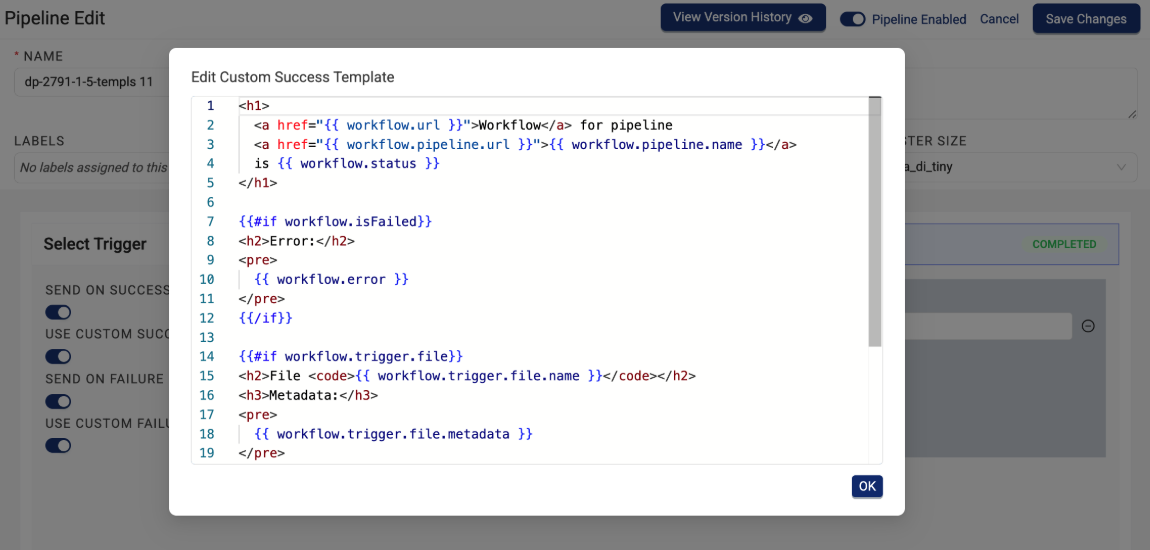
To start using custom pipeline email notifications, customers should contact their account leader. For more information, see Create Custom Pipeline Email Notifications.
Enhancements
Enhancements are modifications to existing functionality that improve performance or usability, but don't alter the function or intended use of the system.
Data Harmonization and Engineering Enhancements
Improved Reconciliation Job Performance
Data reconciliation jobs now backfill missing file information more efficiently by using Amazon S3 Inventory as input. Previously, the platform's Amazon S3 listing operations didn't perform fast enough to support large-scale reconciliation tasks. Now, customers with large file volumes who need to reconcile missing file metadata without impacting active user operations can do so by running a reconciliation job.
For more information, see Reprocess Files.
NOTE
Improved reconciliation job performance was first introduced in the TDP v4.3.4 patch release and is now available in TDP v4.4.2 and higher.
IDS Metadata Is Now Propagated to Downstream direct-to-lakehouse Tables
direct-to-lakehouse TablesTo provide richer context and improved data discoverability for both machine-learning models and customers working with Lakehouse data, Intermediate Data Schema (IDS) column descriptions and metadata are now propagated to downstream direct-to-lakehouse tables automatically.
This enhancement ensures that valuable metadata context is preserved throughout each direct-to-lakehouse data pipeline.
For more information, see Create Lakehouse Tables.
File Processing Page Now Groups Pipelines by Labels
To provide improved organization and discoverability for Tetra Data Pipelines, the File Processing page now provides an option to group pipelines by their assigned labels, if there are any.
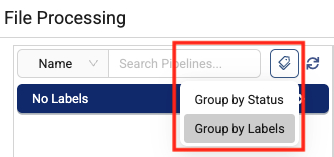
For more information, see Monitor and Manage Pipelines by Using the File Processing Page.
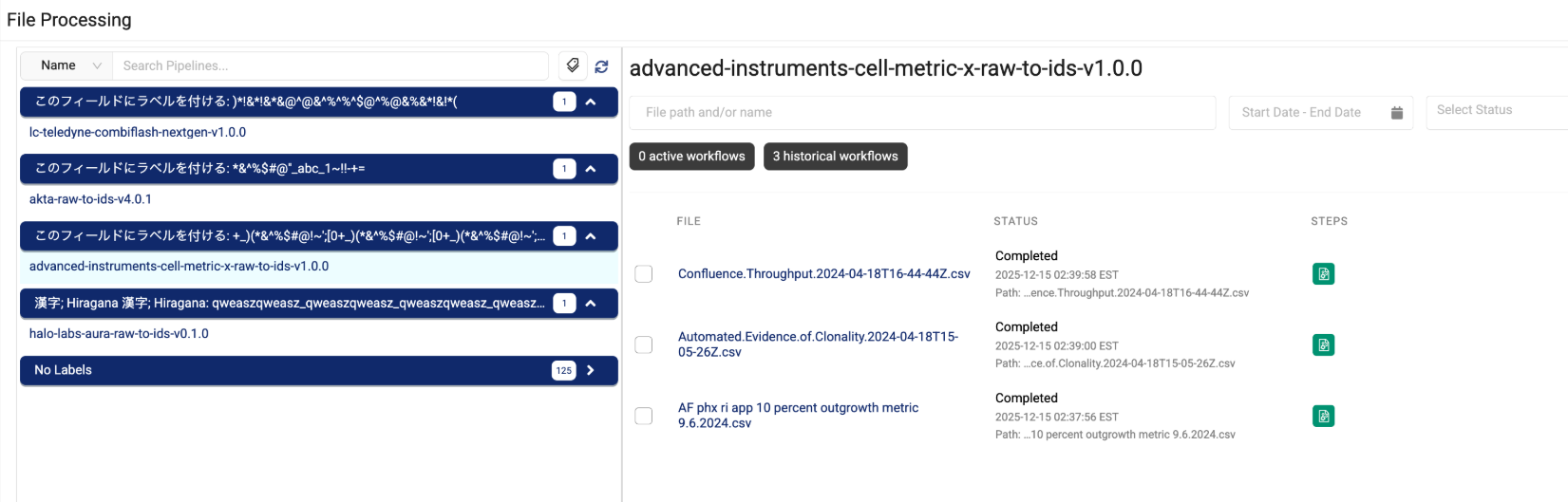
Beta and Limited Availability Release Enhancements
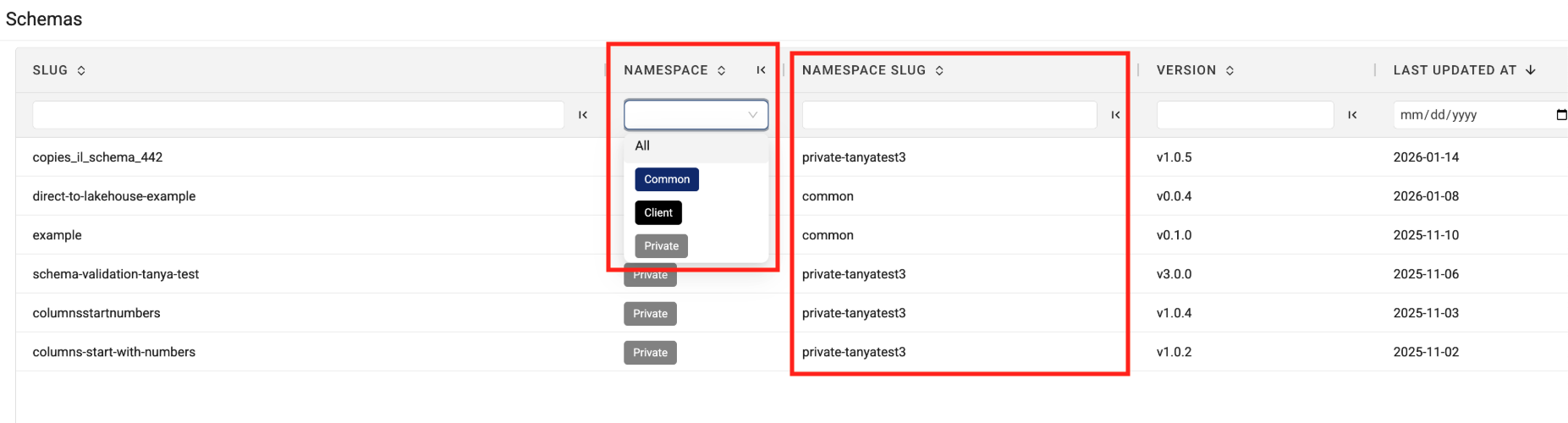
The Schema Page Now Displays Artifacts' Namespace Values
To help make it easier to quickly find and sort the new, limited availability Schema artifacts, the Schema page now displays each artifact's namespace and namespace slug.
Schema artifacts provide the same rich metadata and context of Intermediate Data Schema (IDS) tables for non-IDS tables produced through direct-to-lakehouse pipelines. To start using the new Schema type, customers should contact their account leader.
Infrastructure Updates
There are no infrastructure updates in this release.
Bug Fixes
The following bugs are now fixed:
Data Access and Management Bug Fixes
- To prevent authentication errors when using React-based Tetra Data Apps, the apps' UI responses are no longer cached by customers' web browsers. To fix the issue, app responses now include cache-control headers that prevent browser caching.
- Cross-Origin Resource Sharing (CORS) issues that occurred for Tetra Data Apps in specific browsers (particularly Chrome 142) when the apps needed to communicate with APIs hosted on local networks are now resolved. To fix the issue, Tetra Data Apps'iFrame components now allow local network requests.
TDP System Administration Bug Fixes
- The Operational Insights dashboard's page header now displays Operational Insights instead of Health Monitoring.
- Users assigned the Machine Learning Engineer Policy can now activate and install Scientific AI Workflows
Deprecated Features
There are no new deprecated features in this release.
For more information about TDP deprecations, see Tetra Product Deprecation Notices.
Known and Possible Issues
Last updated: 3 March 2026
The following are known and possible issues for the TDP v4.4.2.
Data Integrations Known Issues
- For new Tetra Agents set up through a Tetra Data Hub and a Generic Data Connector (GDC), Agent command queues aren’t enabled by default. However, the TDP UI still displays the command queue as enabled when it’s deactivated. As a workaround, customers can manually sync the Tetra Data Hub with the TDP. A fix for this issue is in development and testing and is scheduled for a future release.
- For on-premises standalone Connector deployments that use a proxy, the Connector’s installation script fails when the proxy’s name uses the following format:
username:password@hostname. As a workaround, customers should contact their customer account leader to update the Connector’s install script. A fix for this issue is in development and testing and is scheduled for a future release.
Data Harmonization and Engineering Known Issues
- For customers using proxy servers to access the TDP, Tetraflow pipelines created in TDP v4.3.0 and earlier fail and return a
CalledProcessErrorerror. As a workaround, customers should disable any existing Tetraflow pipelines and then enable them again. A fix for this issue is in development and testing and is scheduled for a future release. - The legacy
ts-sdk putcommand to publish artifacts for Self-service pipelines (SSPs) returns a successful (0) status code, even if the command fails. As a workaround, customers should switch to using the latest TetraScience Command Line Interface (CLI) and run thets-cli publishcommand to publish artifacts instead. - IDS files larger than 2 GB are not indexed for search.
- The Chromeleon IDS (thermofisher_chromeleon) v6 Lakehouse tables aren't accessible through Snowflake Data Sharing. There are more subcolumns in the table’s
methodcolumn than Snowflake allows, so Snowflake doesn’t index the table. A fix for this issue is in development and testing and is scheduled for a future release. - Empty values in Amazon Athena SQL tables display as
NULLvalues in Lakehouse tables. - File statuses on the File Processing page can sometimes display differently than the statuses shown for the same files on the Pipelines page in the Bulk Processing Job Details dialog. For example, a file with an
Awaiting Processingstatus in the Bulk Processing Job Details dialog can also show aProcessingstatus on the File Processing page. This discrepancy occurs because each file can have different statuses for different backend services, which can then be surfaced in the TDP at different levels of granularity. A fix for this issue is in development and testing. - Logs don’t appear for pipeline workflows that are configured with retry settings until the workflows complete.
- Files with more than 20 associated documents (high-lineage files) do not have their lineage indexed by default. To identify and re-lineage-index any high-lineage files, customers must contact their CSM to run a separate reconciliation job that overrides the default lineage indexing limit.
- OpenSearch index mapping conflicts can occur when a client or private namespace creates a backwards-incompatible data type change. For example: If
doc.myFieldis a string in the common IDS and an object in the non-common IDS, then it will cause an index mapping conflict, because the common and non-common namespace documents are sharing an index. When these mapping conflicts occur, the files aren’t searchable through the TDP UI or API endpoints. As a workaround, customers can either create distinct, non-overlapping version numbers for their non-common IDSs or update the names of those IDSs. - File reprocessing jobs can sometimes show fewer scanned items than expected when either a health check or out-of-memory (OOM) error occurs, but not indicate any errors in the UI. These errors are still logged in Amazon CloudWatch Logs. A fix for this issue is in development and testing.
- File reprocessing jobs can sometimes incorrectly show that a job finished with failures when the job actually retried those failures and then successfully reprocessed them. A fix for this issue is in development and testing.
- File edit and update operations are not supported on metadata and label names (keys) that include special characters. Metadata, tag, and label values can include special characters, but it’s recommended that customers use the approved special characters only. For more information, see Attributes.
- The File Details page sometimes displays an Unknown status for workflows that are either in a Pending or Running status. Output files that are generated by intermediate files within a task script sometimes show an Unknown status, too.
- Some historical protocols and IDSs are not compatible with the new
ids-to-lakehousedata ingestion mechanism. The following protocols and IDSs are known to be incompatible withids-to-lakehousepipelines:- Protocol:
fcs-raw-to-ids< v1.5.1 (IDS:flow-cytometer< v4.0.0) - Protocol:
thermofisher-quantstudio-raw-to-ids< v5.0.0 (IDS: pcr-thermofisher-quantstudio < v5.0.0) - Protocol:
biotek-gen5-raw-to-idsv1.2.0 (IDS:plate-reader-biotek-gen5v1.0.1) - Protocol:
nanotemper-monolith-raw-to-idsv1.1.0 (IDS:mst-nanotemper-monolithv1.0.0) - Protocol:
ta-instruments-vti-raw-to-idsv2.0.0 (IDS:vapor-sorption-analyzer-tainstruments-vti-sav2.0.0)
- Protocol:
Data Access and Management Known Issues
Last updated: 26 March 2026
-
Data App providers may exhibit the following issues when shared secrets are configured using the Custom provider option:
- Existing secrets linked to a provider can appear blank or fail to resolve correctly.
- New secrets created through the Custom provider option on the Providers page can appear as duplicate entries on the Shared Settings page. Do not delete these entries.
- Upgrading a data app after deleting a provider can return a
503error. As a workaround, do a hard refresh in your browser and retry the upgrade.
To avoid these issues when using the Custom provider option, create shared secrets on the Shared Settings page using all-lowercase names, and reference them as existing secrets in the provider rather than creating new secrets directly from the Providers page. Do a hard refresh in your browser after any provider changes, especially deletion. If you encounter duplicate secret entries or secrets that fail to resolve, contact your customer account leader for assistance. A fix for these issues is in development and testing and is scheduled for a future release. (Added on 26 March 2026)
-
The Download selected files action replaces the following characters with an underscore (
_) if they appear before the file extension in file names:/[/\\:*?<>|.]+/gu;. As a workaround, customers should compare the names of downloaded files against the source file names in the TDP and then rename them if required. A fix for this issue is in development and testing and is scheduled for TDP v4.4.4. (Added on 3 March 2026) -
Tables displayed in the following
commonnamespace Tetra Data Apps don't load in MT US environments, or any environment where the TDP is on a different subdomain than the TetraScience API (tetrascience.com):ts-data-app-doe-experiment-planner(v0.2.0 and earlier)ts-data-app-transition-analysis(v0.3.2 and earlier)ts-data-app-purification-insights(v0.4.3 and earlier)
Tables in Data Apps that are in theprivateorclientnamespaces also don't load if the apps use thestreamlit-aggridpackage. Security updates in TDP v4.4.2 block this package, which creates interactive tables in these apps. A fix for this issue is in development and testing and will be included in the next patch release for each affected app as well as in the next TDP release. To resolve the issue before the next TDP release, customers must update to the latest patch version of each app once it's available.
-
When creating a
direct-to-lakehousepipeline, the pipeline won't create the transform output tables if any line breaks (\n), trailing whitespaces, or other special characters are included in the transform output'sschemaIdentifierfield. -
When using the SQL Search page to query a table created from a
direct-to-lakehousepipeline, the Select First 100 Rows functionality sometimes defaults to an invalid query and displays the following error:"COLUMN_NOT_FOUND: line <number>. Column 'col' cannot be resolved or requester is not authorized to access requested resources."As a workaround, customers should adjust their queries to a standardSELECT *orSELECT column_namequery, and then choose the SELECT First 100 Rows option again. -
On the Search (Classic) page, shortcuts created in browse view also appear in collections and as saved searches when they shouldn’t.
-
Saved Searches created on the Search (Classic) page can't be used or saved as Collections on the Search page.
-
Data Apps won’t launch in customer-hosted environments if the private subnets where the TDP is deployed are restricted and don’t have outbound access to the internet. As a workaround, customers should enable the following AWS Interface VPC endpoint in the VPC that the TDP uses:
com.amazonaws.<AWS REGION>.elasticfilesystem -
Data Apps return CORS errors in all customer-hosted deployments. As a workaround, customers should create an AWS Systems Manager (SSM) parameter using the following pattern:
/tetrascience/production/ECS/ts-service-data-apps/DOMAINFor
DOMAIN, enter your TDP URL without thehttps://(for example,platform.tetrascience.com). -
The Data Lakehouse Architecture doesn't support restricted, customer-hosted environments that connect to the TDP through a proxy and have no connection to the internet. A fix for this issue is in development and testing and is scheduled for a future release.
-
On the File Details page, related files links don't work when accessed through the Show all X files within this workflow option. As a workaround, customers should select the Show All Related Files option instead. A fix for this issue is in development and testing and is scheduled for a future release.
-
When customers upload a new file on the Search page by using the Upload File button, the page doesn’t automatically update to include the new file in the search results. As a workaround, customers should refresh the Search page in their web browser after selecting the Upload File button. A fix for this issue is in development and testing and is scheduled for a future TDP release.
-
Values returned as empty strings when running SQL queries on SQL tables can sometimes return
Nullvalues when run on Lakehouse tables. As a workaround, customers taking part in the Data Lakehouse Architecture EAP should update any SQL queries that specifically look for empty strings to instead look for both empty string andNullvalues. -
Query DSL queries run on indices in an OpenSearch cluster can return partial search results if the query puts too much compute load on the system. This behavior occurs because the OpenSearch
search.default_allow_partial_resultsetting is configured astrueby default. To help avoid this issue, customers should use targeted search indexing best practices to reduce query compute loads. A way to improve visibility into when partial search results are returned is currently in development and testing and scheduled for a future TDP release. -
Text within the context of a RAW file that contains escape (
\) or other special characters may not always index completely in OpenSearch. A fix for this issue is in development and testing, and is scheduled for an upcoming release. -
If a data access rule is configured as [label] exists > OR > [same label] does not exist, then no file with the defined label is accessible to the Access Group. A fix for this issue is in development and testing and scheduled for a future TDP release.
-
File events aren’t created for temporary (TMP) files, so they’re not searchable. This behavior can also result in an Unknown state for Workflow and Pipeline views on the File Details page.
-
When customers search for labels in the TDP UI’s search bar that include either @ symbols or some unicode character combinations, not all results are always returned.
-
The File Details page displays a
404error if a file version doesn't comply with the configured Data Access Rules for the user.
TDP System Administration Known Issues
-
The Data user policy doesn’t allow users who are assigned the policy to create saved searches, even though it should grant the required functionality permissions.
-
Limited availability release Data Retention Policies don’t consistently delete data. A fix for this issue is in development and testing and is scheduled for a future release.
-
Failed files in the Data Lakehouse can’t be reprocessed through the Health Monitoring page. Instead, customers should monitor and reprocess failed Lakehouse files by using the Data Reconciliation, File Processing, or Workflow Processing pages.
-
The latest Connector versions incorrectly log the following errors in Amazon CloudWatch Logs:
Error loading organization certificates. Initialization will continue, but untrusted SSL connections will fail.Client is not initialized - certificate array will be empty
These organization certificate errors have no impact and shouldn’t be logged as errors. A fix for this issue is currently in development and testing, and is scheduled for an upcoming release. There is no workaround to prevent Connectors from producing these log messages. To filter out these errors when viewing logs, customers can apply the following CloudWatch Logs Insights query filters when querying log groups. (Issue #2818)
CloudWatch Logs Insights Query Example for Filtering Organization Certificate Errors
fields @timestamp, @message, @logStream, @log | filter message != 'Error loading organization certificates. Initialization will continue, but untrusted SSL connections will fail.' | filter message != 'Client is not initialized - certificate array will be empty' | sort @timestamp desc | limit 20 -
If a reconciliation job, bulk edit of labels job, or bulk pipeline processing job is canceled, then the job’s ToDo, Failed, and Completed counts can sometimes display incorrectly.
Upgrade Considerations
During the upgrade, there might be a brief downtime when users won't be able to access the TDP user interface and APIs.
After the upgrade, the TetraScience team verifies that the platform infrastructure is working as expected through a combination of manual and automated tests. If any failures are detected, the issues are immediately addressed, or the release can be rolled back. Customers can also verify that TDP search functionality continues to return expected results, and that their workflows continue to run as expected.
For more information about the release schedule, including the GxP release schedule and timelines, see the Product Release Schedule.
For more details on upgrade timing, customers should contact their customer account leader.
Security
TetraScience continually monitors and tests the TDP codebase to identify potential security issues. Various security updates are applied to the following areas on an ongoing basis:
- Operating systems
- Third-party libraries
Quality Management
TetraScience is committed to creating quality software. Software is developed and tested following the ISO 9001-certified TetraScience Quality Management System. This system ensures the quality and reliability of TetraScience software while maintaining data integrity and confidentiality.
Other Release Notes
To view other TDP release notes, see Tetra Data Platform Release Notes.
Updated about 1 month ago