

Tetra Empower Agent Create Sample Set Method Command
The following procedure shows how to create or update a Sample Set Method in Waters Empower programmatically by using the Tetra Empower Agent and the Tetra Data Platform (TDP) Command Service.
A Sample Set Method is an ordered list of sample information and corresponding functions that define data acquisition. This command allows you to create a new Sample Set Method or create a new version of an existing Sample Set Method in Empower.
Prerequisites
The Tetra Empower Agent Create Sample Set Method Command requires the following:
- A running Tetra Empower Agent v5.1.x or higher installed and configured with its queue enabled.
- A valid JSON Web Token (JWT) for the service user running the command. To create a JWT, see Generate a JWT for a Service User.
- Your TDP organization's slug (ORG SLUG). To find your org slug, see View Organization Details.
- Access to a tool that will allow you to run REST API calls, such as curl or Postman.
Empower Requirements
Before running the command, verify the following Empower requirements:
Empower Version
The current solution is compatible with Empower 3 Feature Release 2 through Empower 3.6.1.
Empower Options
The command supports all Empower options except the following:
- Dissolution system is not supported. According to Empower documentation, to create a Sample Set Method for Dissolution, you must use the Sample Set Method Wizard instead of Empower Toolkit.
Empower Project
- The project must exist in Empower. The command will not create a new project if the specified project doesn't exist.
- The project must not be locked.
- The project must not have the Confirm Identity option enabled for method changes. If enabled, the Agent will hang because it cannot handle the password prompt popup.
Empower User Account
- The Agent Empower User Account must have permission to access the specified project.
- The Empower User Account must have the Save Sample Set Method permission enabled.
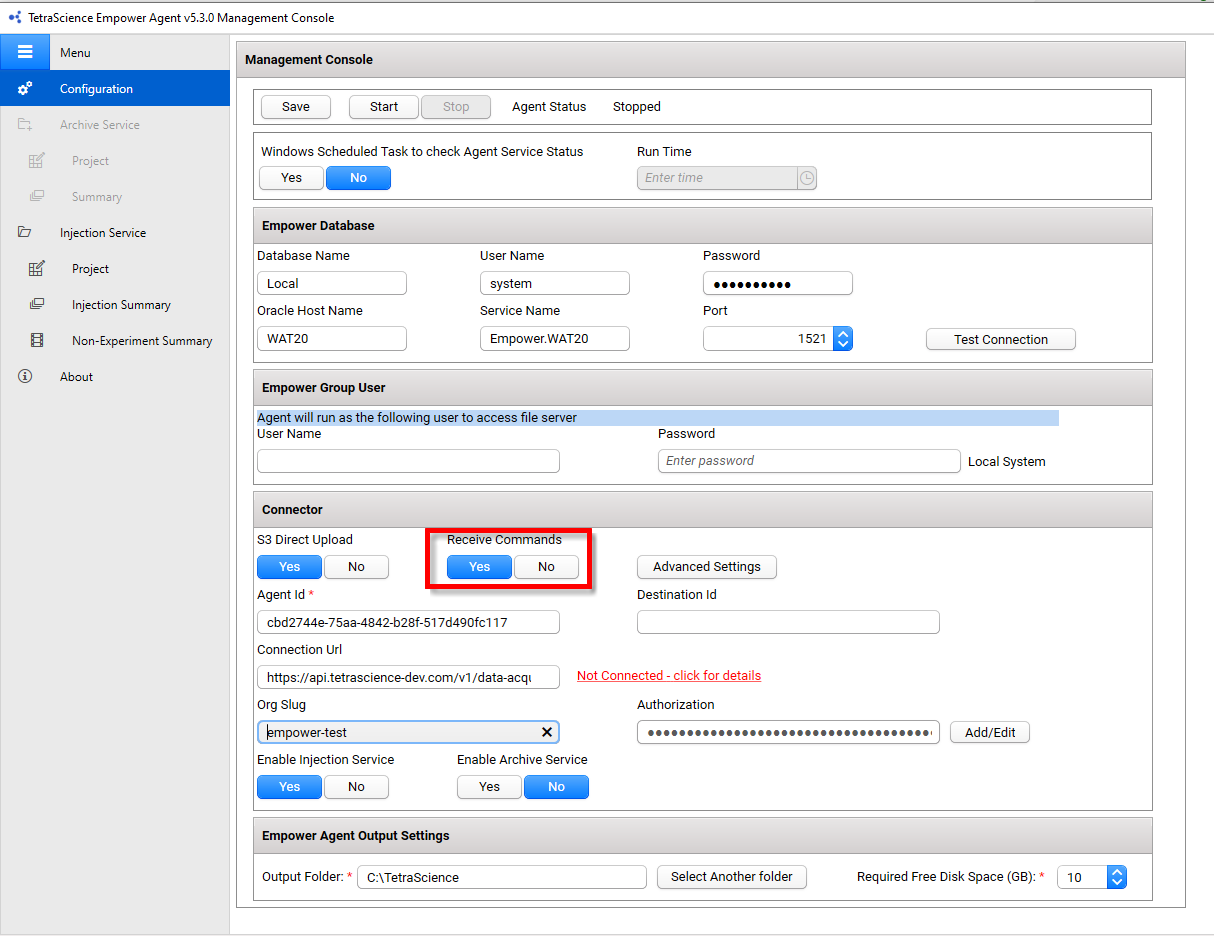
Step 1: Verify That the Agent Can Receive Commands
To allow the Agent to securely receive and run commands from the TDP, do the following:
- From the Tetra Empower Agent Management Console, in the left navigation menu, under Menu, choose Configuration.
- Verify that the Receive Commands toggle is set to Yes (the default value is set to No).
For more information, see Verify Connector Settings in the Tetra Empower Agent Installation Guide.
Step 2: Run the Create Sample Set Method Command
To run the Tetra Empower Agent Create Sample Set Method Command, do the following:
- Create a valid Create Command in your code editor by using the following Create Sample Set Method Command Example code snippet.
- Copy and run the updated command by using a tool that will allow you to run REST API calls, such as curl or Postman.
Upon receiving the Create Sample Set Method Command, the Agent will create the Sample Set Method in the specified Empower project. If a Sample Set Method with the same name already exists, Empower creates a new version of that method. After the Agent successfully creates the Sample Set Method, the Agent then sends a SUCCESS status back to the TDP.
IMPORTANTBecause Empower has various versions and options in production, the Sample Set Method payload can vary. We recommend that you run the Fetch Sample Set Method Command to fetch an existing method as a template, instead of creating the method payload from scratch.
Create Sample Set Method Command Example
IMPORTANTYou must enter values for the following variables:
- For
POST, enterhttps://api.tetrascience.com/v1/commands- For
x-org-slug, enter your organization's slug.- For
ts-auth-token, enter your service user's JWT.- Make sure that you enter a valid
Request bodythat includes all of the Required fields listed in the Request Body Data Fields table.
// POST https://api.tetrascience.com/v1/commands

// Headers:
x-org-slug: <your-org-slug>
ts-auth-token: <your-auth-token>

// Request body:
{
  "targetId": "caed8e22-d100-49a3-a00d-2dc0345e174b",
  "action": "TetraScience.Agent.empower.CreateSampleSetMethod",
  "expiresAt": "YYYY-MM-DDTHH:MM:SSZ",
  "payload": {
    "project_name": "MyProject",
    "sample_set_method_name": "MySampleSetMethod",
    "lines": [
      {
        "vial": "1",
        "inj_vol": "10",
        "num_of_injs": "1",
        "sample_name": "Sample1",
        "function": "Inject Samples",
        "method_set_or_report_method": "MyMethodSet",
        "processing": "Normal",
        "dilution": "1",
        "run_time": "30",
        "sample_weight": "1",
        "blank": false,
        "custom_fields": [
          {
            "key": "ColumnName",
            "value": "MyColumn",
            "value_data_type": "string"
          }
        ],
        "components": [
          {
            "component": "Component1",
            "value": "1.0",
            "purity": "99.5",
            "units": "mg/mL"
          }
        ]
      }
    ]
  }
}
Request Body Data Fields
| Field | Description | Example |
|---|---|---|
"targetId" | (Required) ID of the Agent that receives the command | caed8e22-d100-49a3-a00d-2dc0345e174b |
"expiresAt" | (Required) Command expiration date in ISO-8601 format | 2026-12-31T23:58:43.749Z |
"action" | (Required) Command name (this field is case-insensitive) | TetraScience.Agent.empower.CreateSampleSetMethod |
"payload" | (Required) Command body (payload must be in the format required by the command type defined in the action field) | For an example "payload", see Create Sample Set Method Command Example |
"project_name" | (Required) A valid Empower project name (case-insensitive). The Agent Empower User must have permission to access this project. | "MyProject" |
"sample_set_method_name" | (Required) The name for the Sample Set Method (case-insensitive). Cannot contain hyphens (-). If it already exists, a new version will be created. | "MySampleSetMethod" |
"lines" | (Required) An array of Sample Set Method lines defining the sample information and functions | See Sample Set Method Line Fields |
Sample Set Method Line Fields
The following table describes the fields available for each line in the lines array:
| Field | Empower Name | Description | Required |
|---|---|---|---|
function | Empower Function | The Empower function to perform. Must be a valid Empower function from the Valid Empower Functions list. | Yes |
vial | Vial Number | The vial number in the autosampler or rack of samples from which an injection is made. Run Samples automatically increments the vial number. Valid entries: 1 to 384. | No |
sample_name | Sample Name | The identifier for a sample (unknown or standard). If not specified, the software inserts default identifiers: Unk for unknown and Std for standard. Data type: string. | No |
label | Label | Labels each injection function row in the Sample table on which Empower performs Calibrate, Quantitate, or Report functions. Duplicate labels are allowed in a sample set. Data type: string. | No |
inj_vol | Injection Volume | The volume of sample to inject for a single injection or row in a Sample set. Data type: float. | No |
num_of_injs | Number of Injections | The number of injections to make from each vial. Data type: integer. | No |
label_reference | Label Reference | Instructs Empower to perform the Calibrate, Quantitate, or Report function on all previous rows containing a matching label entry. Wildcards (* or ?) are supported. Data type: string. | No |
run_time | Run Time | The length of time in minutes to collect data for a sample or to perform a function. Data type: float. | No |
data_start | Data Start | The time (in minutes) that data collection begins, measured from injection time. Data type: float. | No |
processing | Empower Processing Option | Controls processing and system suitability actions for rows in the Samples table. Must be a valid Processing Option. Data type: string. | No |
method_set_or_report_method | Method Set or Report Method | A valid Method Set, Report, or Export Method contained in the project. Use null (not an empty string) if no value is needed. Data type: string. | No |
next_inj_delay | Next Inj Delay | Delay (in minutes) between the end of data acquisition for an injection and the start of setup for the next injection. Data type: float. | No |
sample_weight | Sample Weight | The sample weight factor by which the software multiplies the calculated amount. A default custom field in the software. Data type: float. | No |
dilution | Dilution | The dilution factor. A default custom field in the software. Data type: float. | No |
peak_ratio_reference | Peak Ratio Reference | Use Sample's peak ratio as reference value. Data type: boolean. | No |
level | Level | Identifies all standards in the sample set that are to have their amounts averaged together. Standards with the same level label are averaged to create a single data point in the calibration curve. Data type: string. | No |
column_position | Column Position | Specifies the column flow direction through an optional Column Selection Valve. Only accessible if the optional valve is installed. Valid options: No Change, Position 1 through Position 6, Toggle. Data type: string. | No |
auto_additions | Auto Additions | Performs the Auto Additions function. For Empower v3.6.0 and above, see Notes for Empower v3.6.0 and Higher. | No |
sample_matrix | Sample Matrix | Assesses the effect of the matrix on recovery of impurities and drug substances from the drug product matrix. A built-in field assigned from a list of editable, enumerated strings. | No |
blank | Blank | Indicates if a blank sample. Data type: boolean. | No |
target_mass_1 ... target_mass_5 | TargetMass1 ... TargetMass5 | Defines targeted mass acquisition values. | No |
custom_fields | Custom Fields | An array of custom fields defined in the project. See Custom Fields. | No |
components | Components | An array of component definitions. See Component Fields. | No |
Custom Fields
The custom_fields array allows you to include project-specific custom fields that are not defined as top-level properties. Each custom field requires the following properties:
| Field | Description |
|---|---|
key | The field name as defined in Empower |
value | The string representation of the data value |
value_data_type | The data type: string or boolean |
Example:
"custom_fields": [
  {
    "key": "ColumnID",
    "value": "10677193",
    "value_data_type": "string"
  },
  {
    "key": "PrepType",
    "value": "In-Needle Auto Additions",
    "value_data_type": "string"
  }
]
NOTEValid boolean values include:
true,false,True, andFalse. The valuesnull,"",-1,0, and1are not supported for boolean fields.
Component Fields
The components array defines chemical components for each Sample Set Method line:
| Field | Empower Name | Description | Required |
|---|---|---|---|
component | Component | The component name. Empower accepts any string. | No |
value | Component Value | The component value. | No |
purity | Component Purity | The purity factor. Data type: float. | No |
units | Component Unit | The unit of measurement. Data type: string. | No |
Valid Empower Functions
The function field must contain one of the following valid Empower functions:
- Inject Standards
- Inject Samples
- Inject Controls
- Inject RF Internal Standards
- Inject Immediate Standards
- Inject Immediate Samples
- Clear Calibration
- Equilibrate
- Report
- Quantitate
- Calibrate
- Condition Column
- Purge Inj
- Purge Det
- Refresh Syringe
- Wash Needle
- Wet Prime
- Sys Prep
- Summarize Custom Fields
- Pause
- Summarize Custom Fields (Exclude Faulted)
- Summarize Custom Fields Incrementally
- Summarize Custom Fields Incrementally (Exclude Faulted)
- Export
- Inject Narrow Standards
- Inject Broad Standards
- Inject Narrow Unknowns
- Inject Broad Unknowns
- Dissolution Wait
- Compute Dissolution
Valid Processing Options
The processing field must contain one of the following values:
NormalDon't Process or ReportDon't ReportIgnore FaultsNo Sys Suit
Data Validation and Null Values
Data Type
All data types are either string or boolean. Empower Toolkit can handle integer, float, and double values from their string representation.
Null Values Handling
The following Empower-defined null values are not allowed in the payload:
-2147483648(mtkNullLong)-50000(mtkNullDouble, mtkNullSingle)-32768(mtkNullInteger)
For optional fields, either omit the field or set it to null.
Non-English Locale Handling
If the Tetra Empower Agent is hosted on an Empower client that has a non-English (United States) locale, the string values in the JSON payload should reflect this setting.
For example, if the locale is English (Germany), Windows uses , (comma) instead of . (dot) as the decimal separator:
{
  "sample_weight": "1,00000",
  "target_mass_1": "365,10"
}
Notes for Empower v3.6.0 and Higher
Waters modified the Auto Addition options in Sample Set Method for Empower v3.6.0 and above. Auto Addition options are handled by two additional fields that can be configured in the custom_fields section:
PrepType- for example:"In-Needle Auto Additions"SamplePrep- for example:"2,5.1"
Empower Audit Trail
When the Sample Set Method is created successfully, an entry is written into the Project Audit Trail. If the method is updated, the Project Audit Trail includes the version number.
If the payload is invalid, no entry is written to any Empower Audit Trails.
Including the Create Sample Set Method Command in Task Scripts
You can use the Tetra Empower Agent Create Sample Set Method Command in task scripts to automate Sample Set Method creation.
Troubleshooting
| Issue | Possible Cause | Resolution |
|---|---|---|
| Command fails with project access error | User lacks permission | Verify Empower User Account has correct project permissions |
| Command fails with invalid function error | Invalid function value | Use valid Empower functions from the list above |
| Agent hangs when saving the method | Confirm Identity enabled | Use a project without Confirm Identity enabled |
| Command fails with method error | Empty string instead of null | Use null for method_set_or_report_method when no value is needed |
Documentation Feedback
Do you have questions about our documentation or suggestions for how we can improve it? Start a discussion in TetraConnect Hub. For access, see Access the TetraConnect Hub.
NOTEFeedback isn't part of the official TetraScience product documentation. TetraScience doesn't warrant or make any guarantees about the feedback provided, including its accuracy, relevance, or reliability. All feedback is subject to the terms set forth in the TetraConnect Hub Community Guidelines.
Updated about 1 month ago