

TetraScience AI Services v1.0.x Release Notes
The following are the release notes for TetraScience AI Services versions 1.0.x Tetra AI Services empower developers and scientists to transform data into decisions through seamless, secure APIs, and enable intelligent automation across scientific, lab, and enterprise workflows.
NOTETetraScience AI Services are currently part of a limited availability release and must be activated in coordination with TetraScience along with related consuming applications. For more information, contact your customer account leader.
v1.0.2
Release date: 9 February 2026
TetraScience has released a patch to the limited availability TetraScience AI Services, version 1.0.2. This release resolves an issue that caused TetraScience AI Services v1.0.1 to incorrectly display v1.0.0.
Here are the details for what's new in TetraScience AI Services v1.0.2.
Prerequisites
TetraScience AI Services v1.0.2 requires the following:
- Tetra Data Platform (TDP) v4.4.1 or higher
New Functionality
New functionality includes features not previously available in the Tetra Data Platform (TDP).
- There is no new functionality in this release.
Enhancements
Enhancements are modifications to existing functionality that improve performance or usability, but don't alter the function or intended use of the system.
- There are no enhancements in this patch release.
Bug Fixes
The following bugs are now fixed:
- The TetraScience AI Services page now correctly displays the correct version number for the installed version (v1.0.2). TetraScience AI Services v1.0.1 incorrectly displays v1.0.0.
Deprecated Features
There are no deprecated features in this release. For more information about TDP deprecations, see Tetra Product Deprecation Notices.
Known and Possible Issues
The following are known limitations of Tetra AI Services v1.0.2:
- AI Workflow Installation Status Issue: When the AI Services page is under heavy load, AI Workflow installation statuses can appear as In Progress on the UI when they have actually successfully completed. As a workaround, customers can programmatically uninstall the Workflow and then reinstall it from the UI to ensure the status is correctly reported. A fix for this issue is scheduled for a future AI Services release.
- Task Script README Parsing: The platform uses task script README files to determine input configurations. Parsing might be inconsistent due to varying README file formats.
- AI Agent Accuracy: AI-generated information cannot be guaranteed to be accurate. Agents may hallucinate or provide incorrect information.
- Databricks Workspace Mapping: Initially, one TDP organization maps to one Databricks workspace only.
- Analyst Policy Install Workflow UI Access: Users assigned a role with an Analyst policy can view, but not use, the Install Workflow button even though the policy doesn't allow them to install an AI workflow or run an inference. A fix for this issue is scheduled for a future AI Services UI release.
Upgrade Considerations
TetraScience AI Services are currently part of a limited availability release and must be activated in coordination with TetraScience and related consuming applications.
For instructions on how to validate core AI Services functionality programmatically, see Test TetraScience AI Services Programmatically in the TetraConnect Hub. For access, see Access the TetraConnect Hub.
For more information, see the TetraSciences AI Services documentation.
v1.0.1
Release date: 22 December 2025 (Last updated: 29 December 2025)
TetraScience has released a patch to the limited availability TetraScience AI Services, version 1.0.1. To support inferences with larger payloads, this release increases the real-time (synchronous) inference request endpoint’s payload size limit to 16 MB from 0.4 MB.
Here are the details for what's new in TetraScience AI Services v1.0.1.
Prerequisites
TetraScience AI Services v1.0.1 requires the following:
- Tetra Data Platform (TDP) v4.4.1 or higher
New Functionality
New functionality includes features not previously available in the Tetra Data Platform (TDP).
- There's no new functionality in this release.
Enhancements
Enhancements are modifications to existing functionality that improve performance or usability, but don't alter the function or intended use of the system.
There are no enhancements with this patch release.
Bug Fixes
Increased Payload Size Limit for Real-Time (Synchronous) Inferences
To support inferences with larger payloads, the real-time (synchronous) inference request endpoint’s payload size limit is now 16 MB, rather than the previous 0.4 MB limit.
For more information, see Run an Online (Synchronous) Inference.
Deprecated Features
There are no deprecated features in this initial release. For more information about TDP deprecations, see Tetra Product Deprecation Notices.
Known and Possible Issues
The following are known limitations of Tetra AI Services v1.0.1:
- AI Workflow Installation Status Issue: When the AI Services page is under heavy load, AI Workflow installation statuses can appear as In Progress on the UI when they have actually successfully completed. As a workaround, customers can programmatically uninstall the Workflow and then reinstall it from the UI to ensure the status is correctly reported. A fix for this issue is scheduled for a future AI Services release.(Added on 8 December 2025)
- Task Script README Parsing: The platform uses task script README files to determine input configurations. Parsing might be inconsistent due to varying README file formats.
- AI Agent Accuracy: AI-generated information cannot be guaranteed to be accurate. Agents may hallucinate or provide incorrect information.
- Databricks Workspace Mapping: Initially, one TDP organization maps to one Databricks workspace only.
- Analyst Policy Install Workflow UI Access: Users assigned a role with an Analyst policy can view, but not use, the Install Workflow button even though the policy doesn't allow them to install an AI workflow or run an inference. A fix for this issue is scheduled for a future AI Services UI release.
Upgrade Considerations
TetraScience AI Services are currently part of a limited availability release and must be activated in coordination with TetraScience and related consuming applications.
For instructions on how to validate core AI Services functionality programmatically, see Test TetraScience AI Services Programmatically in the TetraConnect Hub. For access, see Access the TetraConnect Hub.
For more information, see the TetraSciences AI Services documentation.
v1.0.0
Release date: 11 December 2025 (Last updated: 29 December 2025)
TetraScience has released its first limited availability version of TetraScience AI Services, version 1.0.0. Available through the Tetra Data Platform (TDP), AI Services introduces foundational capabilities for deploying and operating Scientific AI Workflows in production.
While model training happens outside of AI Services, this release provides managed compute and model-serving infrastructure so customers can run AI workflows without handling clusters, endpoints, or scaling. Each workflow artifact is versioned, access-controlled, and promoted through admin controlled activation. AI Services also captures key inference and operational metrics usage, performance, and errors to support monitoring and audit needs. This foundation enables customers to operationalize AI reliably while building toward future capabilities.
Here are the details for what's new in TetraScience AI Services v1.0.0.
Prerequisites
TetraScience AI Services v1.0.0 requires the following:
- Tetra Data Platform (TDP) v4.4.1 or higher
New Functionality
New functionality includes features not previously available in the Tetra Data Platform (TDP).
AI Services User Interface
A new, dedicated AI Services interface that can be accessed within the TDP through Artifacts > AI Services provides the following:
-
Scientific AI Workflows: Browse and review workflow versions with associated metadata.
-
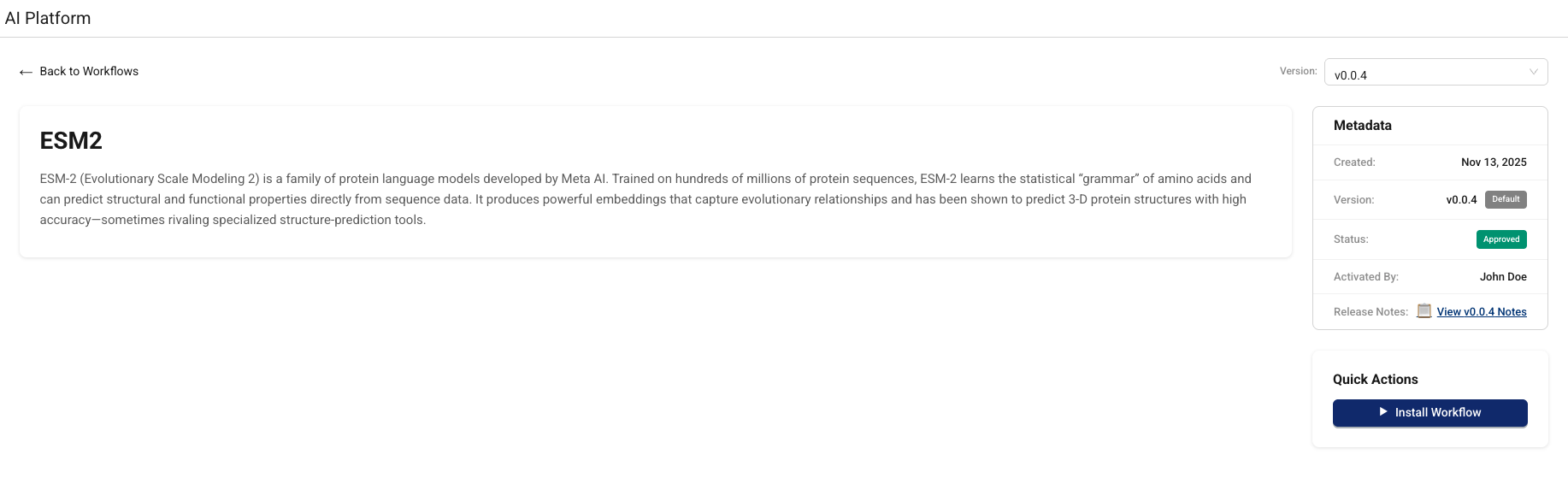
Activate Workflow: Admins can activate a specific workflow version to make it available for authorized users.
-
Install Workflow: Provision the required compute resources on-demand, resulting in an inference endpoint you can invoke.
-
Online Inference: The online inference endpoint invokes the appropriate LLM, AI agent, or custom model to return real-time predictions from text-based inputs.
-
Offline Inference: Provide inputs through JSON files or specify datasets for batch predictions and asynchronous processing.
-
Job Monitoring: Track failed inference jobs through the TDP Health Monitoring Dashboard.
-
Uninstall Workflow: Remove the compute resources for a workflow without deleting its artifacts or versions.
For more information, see the TetraScience AI Services User Guide (v1.0.x) .
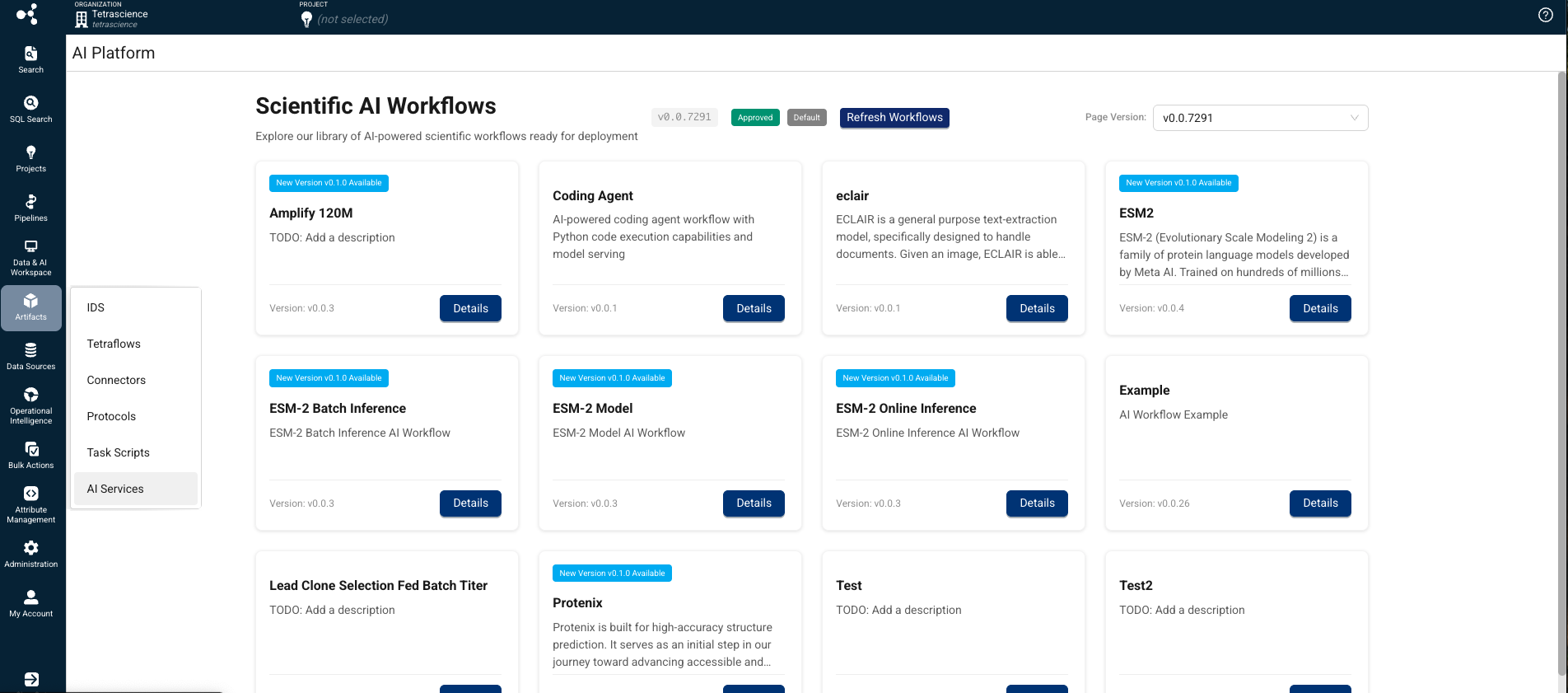
Scientific AI Workflows
AI Services supports many Scientific AI Workflows for specific use cases, which will be released independently from the AI Services user interface and the TDP as their own artifacts. The scientific use cases that the AI Workflows support are developed as Embedded Data Apps in the Tetra Data & AI Workspace. Updates to all three artifacts (AI Services, AI workflows, and Data Apps) can be released independently.
For more information about how to run inferences on installed Scientific AI Workflows, see Run an Inference (AI Services v1.0.x) .
AI Services APIs
AI Services provide five core APIs that enable AI-driven tasks:
- Submit an online (synchronous) inference request(
/inference/online): Performs real-time ML inference and returns results synchronously. - Submit an offline (asynchronous) inference request(
/inference): Submit an asynchronous, file-based inference request with support for partial file staging success. Returns a request ID and status URL for tracking progress. - Health check (
/health): Returns a200response if the service is running and supports error simulation for testing. - Get inference request status (
/inference/{inferenceId}/status): Retrieves the current status and details of an inference request. Includes file-level details and partial success information when applicable. - Get metrics for a synchronous (online) inference request (
/inference/online/{requestId}/metrics): Retrieves metrics and status information for a completed synchronous (online) inference request. Metrics are stored for tracking and debugging purposes.
For more information about how to use these endpoints to run inferences on installed Scientific AI Workflows, see Run an Inference (AI Services v1.0.x) .
AI Workflow Lifecycle Management
AI Services provide the following AI Workflow lifecycle management capabilities:
- AI Workflow Installation: Install a specific workflow version to provision the required compute infrastructure on Databricks (model serving endpoints, jobs depending on the workflow).
- AI Workflow Versioning: Maintain multiple versions of an AI Workflow, each with its own packaged assets and configuration.
AI Services track versions for discoverability, installation, upgrade paths, and controlled rollout across environments. - Multiple AI Workflow Types: Support for online inference using foundational LLM, custom models, AI Agents (synchronous), custom models (asynchronous) and tools workflow types.
Dynamic AI Agent Deployment
The platform supports dynamic deployment of AI agents that encapsulate task-specific instructions and logic:
- Category/Alias-based Routing: Route requests to appropriate agents using categories or aliases (for example, Coding Agent, and Pipeline Agent).
- Agent Behavior Configuration: Define agent behavior through instruction templates and knowledge base associations.
Inference Capabilities
AI Services provide the following flexible inference execution options:
- Synchronous Inference: Quick, interactive responses for real-time use cases.
- Asynchronous Inference: Batch processing for larger datasets with job tracking and notifications.
- Image Upload for Inference: Upload single or multiple images from scientific instruments for analysis.
- Pipeline Integration: Integrate inference into data pipelines using task scripts with specified endpoints.
- GetData API: Query for output data using request UUIDs once inference is complete.
Enhancements
Enhancements are modifications to existing functionality that improve performance or usability, but don't alter the function or intended use of the system.
Platform Operations
- Independent Releases: AI Services releases independently of TDP releases.
- Terraform-controlled Activation: Platform activation managed through Terraform without requiring customer AWS CloudFormation templates.
- Backward Compatibility: Newer AI Services versions maintain backward compatibility with TDP releases v4.4.0 and higher (TDP v4.4.1 or higher is recommended).
- Dynamic Resource Scaling: Databricks compute resources scale up to meet demand, maintain for sequential requests, and scale down after 5 minutes of inactivity.
Developer Experience
- Cookie Cutter/TS-CLI: Project setup templates for standardized AI/ML project structure.
- YAML-based Configuration: Configure jobs, parameters, and artifacts using YAML files.
- MLflow Integration: Templatized MLflow format for compute configuration and workflow tracking.
- Development Environment Support: Compatible with VSCode and Databricks notebooks.
Observability and Monitoring
- Platform-level Observability: Monitor data flow and infrastructure health.
- Product Observability: Monitoring and troubleshooting capabilities.
- Job Status Tracking: Comprehensive tracking of submitted jobs with success/failure reasons.
- Email Notifications: Automatic push notifications upon job completion.
Bug Fixes
There are no bug fixes in this initial release.
Deprecated Features
There are no deprecated features in this initial release. For more information about TDP deprecations, see Tetra Product Deprecation Notices.
Known and Possible Issues
Last updated: 8 December 2025
The following are known limitations of Tetra AI Services v1.0.0:
- AI Workflow Installation Status Issue: When the AI Services page is under heavy load, AI Workflow installation statuses can appear as In Progress on the UI when they have actually successfully completed. As a workaround, customers can programmatically uninstall the Workflow and then reinstall it from the UI to ensure the status is correctly reported. A fix for this issue is scheduled for a future AI Services release.(Added on 8 December 2025)
- Task Script README Parsing: The platform uses task script README files to determine input configurations. Parsing might be inconsistent due to varying README file formats.
- AI Agent Accuracy: AI-generated information cannot be guaranteed to be accurate. Agents may hallucinate or provide incorrect information.
- Databricks Workspace Mapping: Initially, one TDP organization maps to one Databricks workspace only.
- Analyst Policy Install Workflow UI Access: Users assigned a role with an Analyst policy can view, but not use, the Install Workflow button even though the policy doesn't allow them to install an AI workflow or run an inference. A fix for this issue is scheduled for a future AI Services UI release.
Security
AI Services extends existing TDP security practices:
- Data Encryption: Maintains data encryption standards
- Data Residency: Supports data residency requirements
- Penetration Testing: Regular security assessments
- JWT Authentication: Secure API access with JWT tokens
- Tenant-level Authorization: Scoped access to workflows, agents, memory, and context based on JWT claims.
For more information, see Product Security.
Compliance
- AI Clauses in Contracts: Includes disclaimers and transparency requirements for AI tool usage.
- AI Workflow Observability: Tracking and monitoring for data and workflow drift detection.
- Audit Trail: Comprehensive traceability for trained AI Workflows including code, hyperparameters, and training data.
Upgrade Considerations
TetraScience AI Services are currently part of a limited availability release and must be activated in coordination with TetraScience and related consuming applications.
For instructions on how to validate core AI Services functionality programmatically, see Test TetraScience AI Services Programmatically in the TetraConnect Hub. For access, see Access the TetraConnect Hub.
For future upgrades, AI Services will release independently of TDP releases, with activation controlled through Terraform and feature flags.
For more information, see the TetraSciences AI Services documentation.
Updated 22 days ago