

TetraScience AI Services v1.1.x Release Notes
Release notes for TetraScience AI Services versions 1.1.x, including v1.1.0 and v1.1.1
The following are the release notes for TetraScience AI Services versions 1.1.x TetraScience AI Services empower developers and scientists to transform data into decisions through seamless, secure APIs, and enable intelligent automation across scientific, lab, and enterprise workflows.
NOTETetraScience AI Services are currently part of a limited availability release and must be activated in coordination with TetraScience along with related consuming applications. For more information, contact your customer account leader.
v1.1.1
Release date: 13 February 2026
TetraScience has released TetraScience AI Services version 1.1.1. This release introduces GZIP file handling support, an increased inference file output limit, LLM integration improvements, along with Tetra Data Platform (TDP) System Log support for AI Services artifacts.
Here are the details for what's new in TetraScience AI Services v1.1.1.
Prerequisites
TetraScience AI Services v1.1.1 requires the following:
- Tetra Data Platform (TDP) v4.4.1 or higher
New Functionality
New functionality includes features not previously available in TetraScience AI Services.
- There is no new functionality in this release.
Enhancements
Enhancements are modifications to existing functionality that improve performance or usability, but don't alter the function or intended use of the system.
GZIP File Support
TetraScience AI Services now supports processing GZIP-compressed files (.gz), expanding the file format compatibility for data ingestion and processing in Scientific AI Workflows.
For more information, see Supported File Types in Run an Inference (AI Services v1.1.x).
Increased Inference File Output Limit
Inferences can now produce an almost unlimited number of files. Previously, the inference output file limit was 1,000 files.
OpenAI SDK Wrapper for Databricks LLMs
An improved wrapper for Databricks LLM integration provides enhanced compatibility with the OpenAI SDK, allowing developers to use standard OpenAI client libraries with Databricks-hosted language models.
Artifact Version Management Actions in TDP System Log
User actions for managing TetraScience AI Services artifact versions are now captured in the TDP System Log, providing administrators with visibility into version changes.
The following actions are now logged for AI Workflow entities and the AI Services user interface entity, which are are all versioned separately:
- Activated: When an artifact version is activated for the first time
- Cancelled: When an artifact version is cancelled
- Set as current: When a previously activated artifact version is set as the current version
- In review: When an artifact version is marked for review
These events appear in the System Log with the entity type corresponding to the entity type, enabling administrators to track and audit version management activities across the platform.
For more information, see Entities and Logged Actions for System Logs.
Bug Fixes
The following bugs are now fixed.
- The
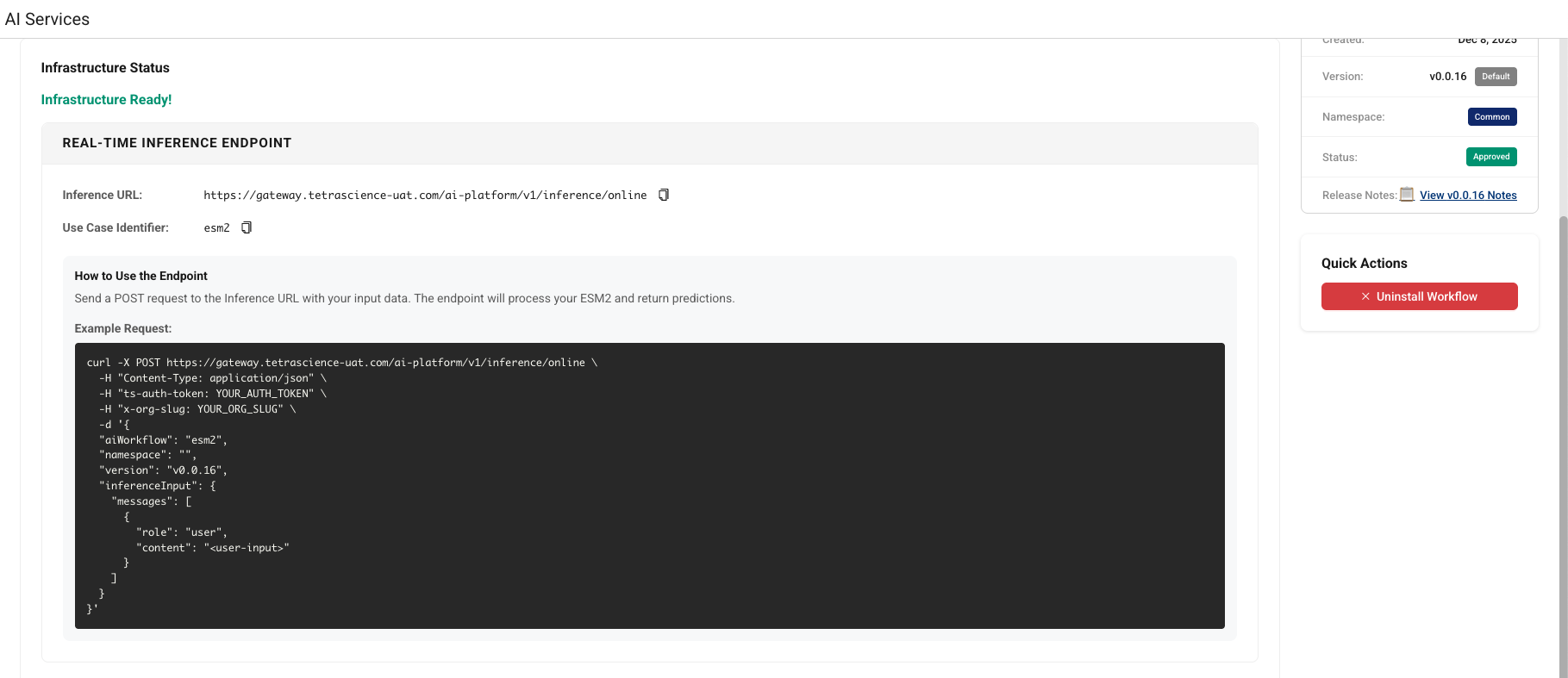
namespacefield is now correctly populated in real-time inference curl command output for Scientific AI Workflows installed in thecommonnamespace. - When the AI Services page is under heavy load, AI Workflow installation statuses no longer appear as In Progress on the UI when they have actually successfully completed.
Deprecated Features
There are no deprecated features in this release. For more information about TDP deprecations, see Tetra Product Deprecation Notices.
Known and Possible Issues
The following are known limitations of TetraScience AI Services v1.1.1:
- Task Script README Parsing: The platform uses task script README files to determine input configurations. Parsing might be inconsistent due to varying README file formats.
- AI Agent Accuracy: AI-generated information cannot be guaranteed to be accurate. Agents may hallucinate or provide incorrect information.
- Databricks Workspace Mapping: Initially, one TDP organization maps to one Databricks workspace only.
- Analyst Policy Install Workflow UI Access: Users assigned a role with an Analyst policy can view, but not use, the Install Workflow button even though the policy doesn't allow them to install an AI workflow or run an inference. A fix for this issue is scheduled for a future AI Services UI release.
Upgrade Considerations
To upgrade to the latest AI Services version, see Update the AI Services UI version in the TetraScience AI Services User Guide (v1.1.x).
During the upgrade, there might be a brief downtime when users won't be able to access AI Services functionality.
After the upgrade, verify the following:
- Existing AI Workflow installations continue to function correctly
- Inference requests complete successfully with bearer token authentication
- GZIP-compressed files are processed correctly
- The AI Services UI displays correctly
For instructions on how to validate core AI Services functionality programmatically, see Test TetraScience AI Services Programmatically in the TetraConnect Hub. For access, see Access the TetraConnect Hub.
For more information, see the TetraScience AI Services User Guide (v1.1.x).
v1.1.0
Release date: 21 January 2026
TetraScience has released TetraScience AI Services version 1.1.0. This release introduces support for Large Language Model (LLM) invocation through Databricks, common and client namespace support for Scientific AI Workflows, Tetra Data Platform (TDP) System Log integration, along with numerous bug fixes and user interface improvements.
Here are the details for what's new in TetraScience AI Services v1.1.0.
Prerequisites
TetraScience AI Services v1.1.0 requires the following:
- Tetra Data Platform (TDP) v4.4.1 or higher
New Functionality
New functionality includes features not previously available in TetraScience AI Services.
LLM Invocation Support through Databricks
TetraScience AI Services now supports invoking Large Language Models (LLMs) hosted on Databricks. LLM invocation capability is configurable as an API call within distinct Scientific AI Workflows and is available by default.
System Log Integration
AI Workflow operations are now logged in the TDP System Log, providing visibility into AI Services activities. The following event types are now available:
- AI Workflow installation (
ai-workflow.install-request.v1) - AI Workflow uninstall (
ai-workflow.uninstall-request.v1) - AI Workflow inference (
ai-workflow.inference-request.v1)
For more information, see System Log.
Python LLM Wrapper for Tetra Data Apps and Task Scripts
To help simplify integration with AI Services from custom applications, a new Python wrapper allows Tetra Data Apps and Task Scripts to interact with online inference endpoints that serve LLMs.
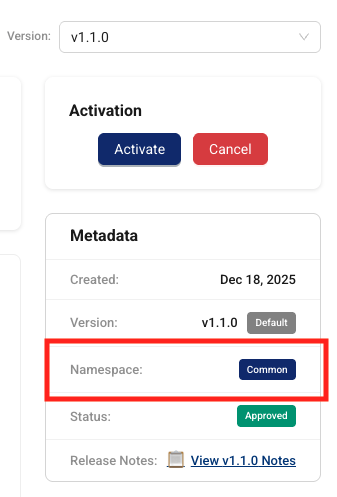
common and client Namespace Support for AI Workflows
common and client Namespace Support for AI WorkflowsScientific AI Workflows now support common (shared) and client namespaces, allowing organizations to differentiate between which AI Workflows are specific to their org and those that are shared. Support for private namespace AI Workflows is scheduled for a future AI Services release.
The backend correctly handles namespace for the following:
- Artifact differentiation and storage
- Installation and inference requests
- API responses and payload generation
Enhancements
Enhancements are modifications to existing functionality that improve performance or usability, but don't alter the function or intended use of the system.
Improved Inference Type Display
To help clarify what each inference endpoint type does, the previous Online and Offline inference endpoint types have been updated to the following in the AI Services UI:
- Real-Time Inference (formerly Online Inference): invokes the appropriate LLM, AI agent, or custom model to return real-time predictions from text-based inputs.
- Batch Inference (formerly Offline Inference): provides inputs through JSON files or specifies datasets for batch predictions and asynchronous processing.
Scientific AI Workflows also now correctly display only the supported inference types (Real-Time, Batch, or both) in the UI and API responses. Previously, workflows that only supported real-time inference incorrectly showed both batch and real-time endpoints.
Artifact Version Format Consistency
Version queries and responses now consistently use the vX.Y.Z format across all TetraScience AI Services endpoints, ensuring consistency with other TetraScience artifact management systems.

Admin Version Management
Administrators can now run the following actions on AI Services page versions:
- Setting a version as the default for all users
- Activating previously activated versions
- Canceling or disabling versions
For more information, see Update the AI Services UI Version in the TetraSciences AI Services User Guide (v1.1.x).
Improved Status Flow Logic
The artifact status flow logic has been hardened to correctly handle version rollback scenarios and status transitions between Approved, In Review, and Cancelled states.
Bug Fixes
The following bugs are now fixed.
Installation and Status Reporting Bug Fixes
- The API no longer shows Running status even after AI Workflow installation completes successfully on Databricks.
- Simultaneous AI Workflow installations no longer result in incorrect waiting statuses due to Databricks rate limiting.
- Failed installation requests no longer show Pending status instead of the correct error state.
- The AI Workflow installation response no longer shows the incorrect namespace (
common) forclient-specific AI Workflows. - The List installations endpoint no longer returns malformed data when no active installations exist.
UI Bug Fixes
- The AI Services page now displays AI Services instead of AI Platform.
- The Install and Uninstall buttons no longer remain active after they're clicked.
- AI Workflow descriptions are no longer removed in the UI when new versions are published.
- The default AI Services page version now correctly changes for non-admin users after an admin activates a new version.
- Multiple modal popups no longer flash on screen during AI Workflow installation polling.
- Previously activated AI Services versions can now be set as the default version.
- Validation is now renamed to Actions in the UI for clarity.
Deprecated Features
There are no deprecated features in this release. For more information about TDP deprecations, see Tetra Product Deprecation Notices.
Known and Possible Issues
The following are known limitations of TetraScience AI Services v1.1.0:
- AI Workflow Installation Status Issue: When the AI Services page is under heavy load, AI Workflow installation statuses can appear as In Progress on the UI when they have actually successfully completed. As a workaround, customers can programmatically uninstall the Workflow and then reinstall it from the UI to ensure the status is correctly reported. A fix for this issue is scheduled for a future AI Services release.(Added on 8 December 2025)
- Task Script README Parsing: The platform uses task script README files to determine input configurations. Parsing might be inconsistent due to varying README file formats.
- AI Agent Accuracy: AI-generated information cannot be guaranteed to be accurate. Agents may hallucinate or provide incorrect information.
- Databricks Workspace Mapping: Initially, one TDP organization maps to one Databricks workspace only.
- Analyst Policy Install Workflow UI Access: Users assigned a role with an Analyst policy can view, but not use, the Install Workflow button even though the policy doesn't allow them to install an AI workflow or run an inference. A fix for this issue is scheduled for a future AI Services UI release.
Upgrade Considerations
During the upgrade, there might be a brief downtime when users won't be able to access AI Services functionality.
After the upgrade, verify the following:
- Existing AI Workflow installations continue to function correctly
- Inference requests complete successfully
- The AI Services UI displays correctly
For instructions on how to validate core AI Services functionality programmatically, see Test TetraScience AI Services Programmatically in the TetraConnect Hub. For access, see Access the TetraConnect Hub.
For more information, see the TetraScience AI Services User Guide (v1.1.x).
Updated 27 days ago