

Workflow Creation Assistant v1.0.x Release Notes
The following are the Workflow Creation Assistant release notes for versions 1.0.x. The app provides customers the ability to quickly build and deploy their own, custom lab data automation workflows to move data to selected electronic lab notebooks (ELNs) and laboratory information management systems (LIMS), without needing to write any code or rely on internal IT teams to build custom data integrations.
This app uses an AI-enhanced workflow to help scientists leverage TetraScience's harmonized and schematized data into custom pipelines that integrate with select ELNs and LIMS, such as Revvity Signals and Benchling. The app guides users through an integration process that produces configured Tetra Data Pipelines that automatically map and deliver scientific results to target ELNs and LIMS up to 40x faster than traditional, manual methods.
v1.0.2
Release date: 21 May 2026
TetraScience has released Workflow Creation Assistant v1.0.2. This maintenance release focuses on reliability and correctness improvements for enterprise deployments, including support for network-restricted environments with AWS Identity and Access Management (IAM) proxies, self-signed TLS certificates in customer-hosted environments, and improved Benchling codegen accuracy.
Prerequisites
Workflow Creation Assistant v1.0.2 requires the following:
- TDP v4.2.x or later (v4.3.1 or later is recommended for full functionality)
- Customers must contact their customer account leader to activate the app in the TDP user interface.
- App users must have either Developer or Administrator TDP permissions.
- For Revvity Signals integrations, users must have access to the following:
- Base URL
- API key
- Access to Admin Defined Tables and Experiments
- For Benchling Integrations, users must have access to the following:
- Base URL
- Assay Run schema definitions defined and accessible in Feature Settings
- Assay Result schema definitions defined and accessible in Feature Settings
- Their selected Project and corresponding Project ID
- Benchling App credentials with access to all schemas and Benchling Projects in scope
- A Client ID
- A Client Secret
New Functionality
New functionality includes features not previously generally available in the Workflow Creation Assistant.
- There's no new functionality in this release.
Enhancements
Enhancements are modifications to existing functionality that improve performance or usability, but don't alter the function or intended use of the system.
- Self-Signed Certificate Support: The app now loads the TDP deployment CA certificate from S3, enabling it to work in customer-hosted environments that use self-signed TLS certificates. All server-side TDP API requests use the loaded certificate.
- IAM Proxy Support: Bedrock API calls now run server-side, and all AWS SDK clients route through
IAM_PROXYwhen set. This enables the WCA to function in network-restricted TDP environments where direct AWS endpoint access is blocked. - Benchling Codegen Accuracy: The app now generates more accurate code for Benchling integrations without changing the
transform_idsoutput contract. This release also upgrades to Claude Sonnet 4.6. - 504 Gateway Timeout Error Handling: The app now parses nginx 504 gateway timeout responses and displays a human-readable error message instead of raw HTML.
Bug Fixes
The following bugs were fixed in this release:
- SSO Login Token Resolution: Fixed JWT token resolution for users authenticating through SSO in platform deployments. Previously, some users authenticating through SSO could not access certain TDP API endpoints.
Limitations
Although the Workflow Creation Assistant can enable significant improvements in developing integrations, it should not be considered a complete replacement for custom pipeline development. The following are known limitations of Workflow Creation Assistant v1.0.2 that benefit from expert tuning by an integrations expert:
- The app will configure target pipelines with generated code, but will not create new pipelines or configure them with access credentials. Users will need to manually create their TDP Pipeline and configure it with authentication credentials for their target ELN before using the WCA.
- The app can configure
python-execpipelines with code, but won't adjust any other pipeline configuration options. - The app will execute the pipeline on user-selected files, but won't configure pipeline triggers.
- The app creates an integration to the user-selected project and experiment. Users will need to update their pipeline code to dynamically assign results to target projects (for Benchling) and experiments (For Revvity Signals) in the destination ELN after end-to-end testing verifies that the integration is functional.
- The app supports direct, 1:1 mapping of fields from an IDS to target ELN fields. Complex transformations and M:M field mappings are the responsibility of the user to implement.
- The app is able to perform integration with file contents, but is unable to directly access TDP-associated metadata, like
file key,file ID,source, andMTL. - The app does not support Benchling output file configurations set to Record Datasets only (
Benchling action: NO_ACTION). These configurations lack a result schema and are skipped during import. Users who need to upload data to these outputs must manually modify the transform function.
Known and Possible Issues
The following are known issues in Workflow Creation Assistant v1.0.2:
- By default, Benchling integration code includes the user's configured Project ID. Users will need to extract and apply the project ID from file labels, file content, file path, or other sources. Failure to apply a Benchling Project ID will result in successful data pushes to Benchling, but the results will only be visible to the Benchling app that uploaded the contents.
- By default, Revvity Signals integration code uses the experiment ID selected for the user's tests. In a production setting, users will need to extract and use the experiment ID from file labels, file contents, file path, or other sources.
- Verification of the transformation code can fail if the user's test file and the TDP's expected.json sample file do not have the file contents to meet the requirements of the target ELN. In case of repeating Python verification errors, examine test files for accuracy and completeness.
Upgrade Considerations
Customers can upgrade directly to Workflow Creation Assistant v1.0.2 from v1.0.1 or v1.0.0. To upgrade or activate the Workflow Creation Assistant, see Activate an Embedded Data App.
v1.0.1
Release date: 29 January 2026
TetraScience has released Workflow Creation Assistant v1.0.1. This maintenance release includes user interface improvements and bug fixes.
Prerequisites
Workflow Creation Assistant v1.0.1 requires the following:
- TDP v4.2.x or higher (v4.3.1 or higher is recommended for full functionality)
- Customers must contact their customer account leader to activate the app in the TDP user interface.
- App users must have either Developer or Administrator TDP permissions.
- For Revvity Signals integrations, users must have access to the following:
- Base URL
- API key
- Access to Admin Defined Tables and Experiments
- For Benchling Integrations, users must have access to the following:
- Base URL
- Assay Run schema definitions defined and accessible in Feature Settings
- Assay Result schema definitions defined and accessible in Feature Settings
- Their selected Project and corresponding Project ID
- Benchling App credentials with access to all schemas and Benchling Projects in scope
- A Client ID
- A Client Secret
New Functionality
New functionality includes features not previously generally available in the Workflow Creation Assistant.
- There's no new functionality in this release.
Enhancements
Enhancements are modifications to existing functionality that improve performance or usability, but don't alter the function or intended use of the system.
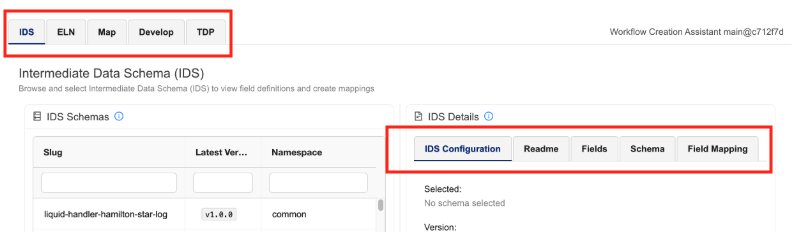
- To help better surface available tabs during workflow creation, tab names are now in bold and include borders and backgrounds.
Bug Fixes
The following bugs were fixed in this release:
- The app no longer sends spurious API calls to Benchling when customers set up the Benchling Lab Data Automation Configuration.
- The Benchling Lab Data Automation Configuration's Import button now works when unexpected output file configurations are imported.
- Intermediate Data Schema (IDS) files no longer sometimes display empty reference IDS values on the mapping table when customers select an IDS.
- User notification messages now display correctly in the application interface
Limitations
Although the Workflow Creation Assistant can enable significant improvements in developing integrations, it should not be considered a complete replacement for custom pipeline development. The following are known limitations of Workflow Creation Assistant v1.0.1 that benefit from expert tuning by an integrations expert:
- The app will configure target pipelines with generated code, but will not create new pipelines or configure them with access credentials. Users will need to manually create their TDP Pipeline and configure it with authentication credentials for their target ELN before using the WCA.
- The app can configure
python-execpipelines with code, but won't adjust any other pipeline configuration options. - The app will execute the pipeline on user-selected files, but won't configure pipeline triggers.
- The app creates an integration to the user-selected project and experiment. Users will need to update their pipeline code to dynamically assign results to target projects (for Benchling) and experiments (For Revvity Signals) in the destination ELN after end-to-end testing verifies that the integration is functional.
- The app supports direct, 1:1 mapping of fields from an IDS to target ELN fields. Complex transformations and M:M field mappings are the responsibility of the user to implement.
- The app is able to perform integration with file contents, but is unable to directly access TDP-associated metadata, like
file key,file ID,source, andMTL. - The app does not support Benchling output file configurations set to Record Datasets only (
Benchling action: NO_ACTION). These configurations lack a result schema and are skipped during import. Users who need to upload data to these outputs must manually modify the transform function.
Known and Possible Issues
The following are known issues in Workflow Creation Assistant v1.0.1:
- By default, Benchling integration code includes the user's configured Project ID. Users will need to extract and apply the project ID from file labels, file content, file path, or other sources. Failure to apply a Benchling Project ID will result in successful data pushes to Benchling, but the results will only be visible to the Benchling app that uploaded the contents.
- By default, Revvity Signals integration code uses the experiment ID selected for the user's tests. In a production setting, users will need to extract and use the experiment ID from file labels, file contents, file path, or other sources.
- Verification of the transformation code can fail if the user's test file and the TDP's expected.json sample file do not have the file contents to meet the requirements of the target ELN. In case of repeating Python verification errors, examine test files for accuracy and completeness.
Upgrade Considerations
Customers can upgrade directly to Workflow Creation Assistant v1.0.1 from v1.0.0 or v0.5.1. To upgrade or activate the Workflow Creation Assistant, see Activate an Embedded Data App.
v1.0.0
Release date: 9 January 2026
TetraScience has released its first general availability version of the Workflow Creation Assistant app, version 1.0.0. Previously available in beta release, Workflow Creation Assistant v1.0.0 introduces the following:
- Support for Lab Data Automation and Assay Run components of Benchling Connect
- Support for Admin Defined Tables and Experiments in Revvity Signals
- Integration credentials management through Tetra Data & AI Workspace Providers
- User interface and performance improvements
Here are the details for what's in Workflow Creation Assistant v1.0.0
Prerequisites
Workflow Creation Assistant v1.0.0 requires the following:
- TDP v4.2.0 or higher (v4.3.1 or higher is recommended)
- Customers must contact their customer account leader to activate the app in the TDP user interface.
- App users must have either Developer or Administrator TDP permissions.
- For Revvity Signals integrations, users must have access to the following:
- Base URL
- API key
- Access to Admin Defined Tables and Experiments
- For Benchling Integrations, users must have access to the following:
- Base URL
- Assay Run schema definitions defined and accessible in Feature Settings
- Assay Result schema definitions defined and accessible in Feature Settings
- Their selected Project and corresponding Project ID
- Benchling App credentials with access to all schemas and Benchling Projects in scope
- A Client ID
- A Client Secret
New Functionality
New functionality includes features not previously generally available in the Workflow Creation Assistant beta release versions.
-
Benchling Integration: Users can configure Workflow Creation Assistant to read schemas from Benchling related to Assay Runs, Assay Results, Output File Processors. Users can now upload these schemas through a file upload option, and configure WCA to use the Benchling Project ID directly. For more information, see Choose a Target ELN in the Workflow Creation Assistant User Guide (v1.0.x).
-
Signals Integration: Users can configure Workflow Creation Assistant to read more Admin Defined Tables and Experiments from Revvity Signals. Workflow Creation Assistant's Pipeline code has significant performance and logging improvements compared to EAP. For more information, see Choose a Target ELN in the Workflow Creation Assistant User Guide (v1.0.x).
-
Tetra Data App Provider support: Users can configure providers from the scientific data and AI workspace to host integration credentials. Although these are optional, they make repeat development and testing against multiple (dev, test, prod) systems significantly easier. For more information, see Configure Providers for Shared Settings and Secrets in the Workflow Creation Assistant User Guide (v1.0.x).
Enhancements
Enhancements are modifications to existing functionality that improve performance or usability, but don't alter the function or intended use of the system.
- Significant upgrades have been made to the user interface, which greatly improve the app's performance and user experience.
Bug Fixes
There are no bug fixes in this release.
Limitations
Although the Workflow Creation Assistant can enable significant improvements in developing integrations, it should not be considered a complete replacement for custom pipeline development. The following are known limitations of Workflow Creation Assistant v1.0.0 that benefit from expert tuning by an integrations expert:
- The app will configure target pipelines with generated code, but will not create new pipelines or configure them with access credentials. Users will need to manually create their TDP Pipeline and configure it with authentication credentials for their target ELN before using the WCA.
- The app can configure
python-execpipelines with code, but won't adjust any other pipeline configuration options. - The app will execute the pipeline on user-selected files, but won't configure pipeline triggers.
- The app creates an integration to the user-selected project and experiment. Users will need to update their pipeline code to dynamically assign results to target projects (for Benchling) and experiments (For Revvity Signals) in the destination ELN after end-to-end testing verifies that the integration is functional.
- The app supports direct, 1:1 mapping of fields from an IDS to target ELN fields. Complex transformations and M:M field mappings are the responsibility of the user to implement.
- The app is able to perform integration with file contents, but is unable to directly access TDP-associated metadata, like
file key,file ID,source, andMTL.
Known and Possible Issues
The following are known issues in Workflow Creation Assistant v1.0.0:
- By default, Benchling integration code includes the user's configured Project ID. Users will need to extract and apply the project ID from file labels, file content, file path, or other sources. Failure to apply a Benchling Project ID will result in successful data pushes to Benchling, but the results will only be visible to the Benchling app that uploaded the contents.
- By default, Revvity Signals integration code uses the experiment ID selected for the user's tests. In a production setting, users will need to extract and use the experiment ID from file labels, file contents, file path, or other sources.
- Verification of the transformation code can fail if the user's test file and the TDP's expected.json sample file do not have the file contents to meet the requirements of the target ELN. In case of repeating Python verification errors, examine test files for accuracy and completeness.
Upgrade Considerations
Customers can upgrade directly to Workflow Creation Assistant v1.0.0 from v0.5.1. To upgrade or activate the Workflow Creation Assistant, see Activate an Embedded Data App.
Other Release Notes
To view other release notes for Tetra Data Apps, see Tetra Data Apps Release Notes.
Updated 5 months ago