

Visual Pipeline Builder v1.x Release Notes
The following are release notes for Visual Pipeline Builder versions 1.x. The Visual Pipeline Builder helps customers create automated data flows with drag-and-drop simplicity. It can help users quickly connect lab systems, add data transformations, and route results where they need them—all through a visual interface that requires no programming knowledge.
v1.1.0
Release date: 15 December 2025
What's New
TetraScience has released its next version of the Visual Pipeline Builder, version 1.1.0. This release introduces AWS Lambda and Amazon Elastic Container Service (Amazon ECS) execution environment options, allowing users to optimize pipeline performance based on their workload requirements. It also adds additional protocol editing and management capabilities, making it simpler for users to edit existing protocols and load them with their default configurations.
Here are the details for what's new in Visual Pipeline Builder v1.1.0
Prerequisites
Visual Pipeline Builder v1.1.0 requires the following:
- TDP v4.2.0 or higher (v4.3.1 or higher is recommended)
- Amazon Bedrock Access: Contact your customer account leader to obtain access. For more information about Amazon Bedrock, see the Amazon Bedrock User Guide.
- Customers must contact their customer account leader to activate the app in the TDP user interface
- App users must have the following TDP functionality permissions:
- Pipelines: Full Access
- Artifacts: Full Access
For Customer-Hosted TDP Environments Only
- The TDP's Transport Layer Security (TLS) certificate must validate the following endpoint:
*.data-apps.tdp-hostname.com - The Domain Name Server (DNS) zone for
tdp-hostname.commust have a CNAME record routing*.data-apps.tdp-hostname.comtotdp-hostname.com
New Functionality
New functionality includes features not previously available in the Visual Pipeline Builder App beta release version.
New AWS Lambda Execution Environment Option
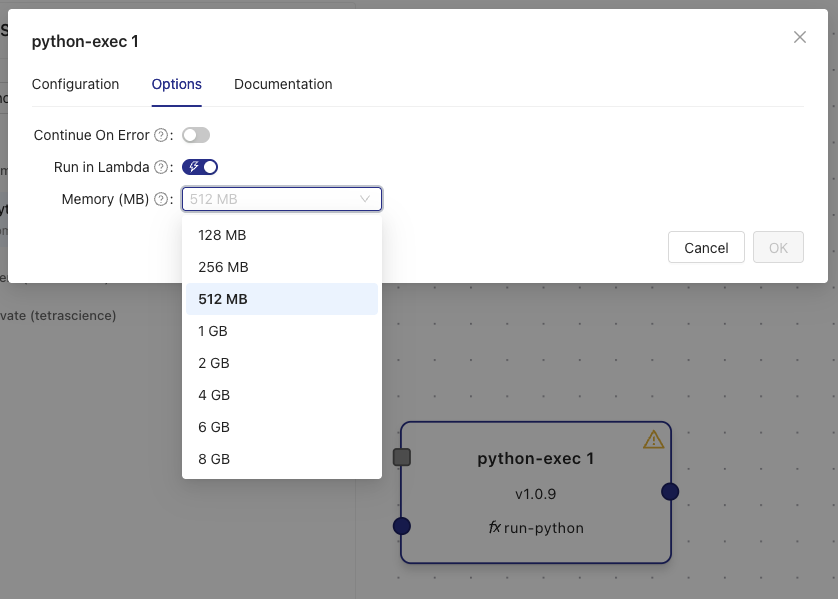
When adding pipeline components, customers now have the option to select a new AWS Lambda execution environment that's ideal for latency-sensitive lab data automation use cases (~1 second pipeline startups). To use the new Lamba runtime environment for a specific pipeline step, customers can select the new Run in Lambda checkbox when configuring step execution options.
If the Run in Lambda check box isn't selected, the step uses the default Amazon Elastic Container Service (Amazon ECS) execution environment, which provides one minute-plus pipeline startups and is ideal for use cases that don't require low data latency.
For more information, see Configuring Step Execution Options in the Visual Pipeline Builder User Guide (v1.1.x) and Memory and Compute Settings.
Protocol Action Modal and Enhanced Management
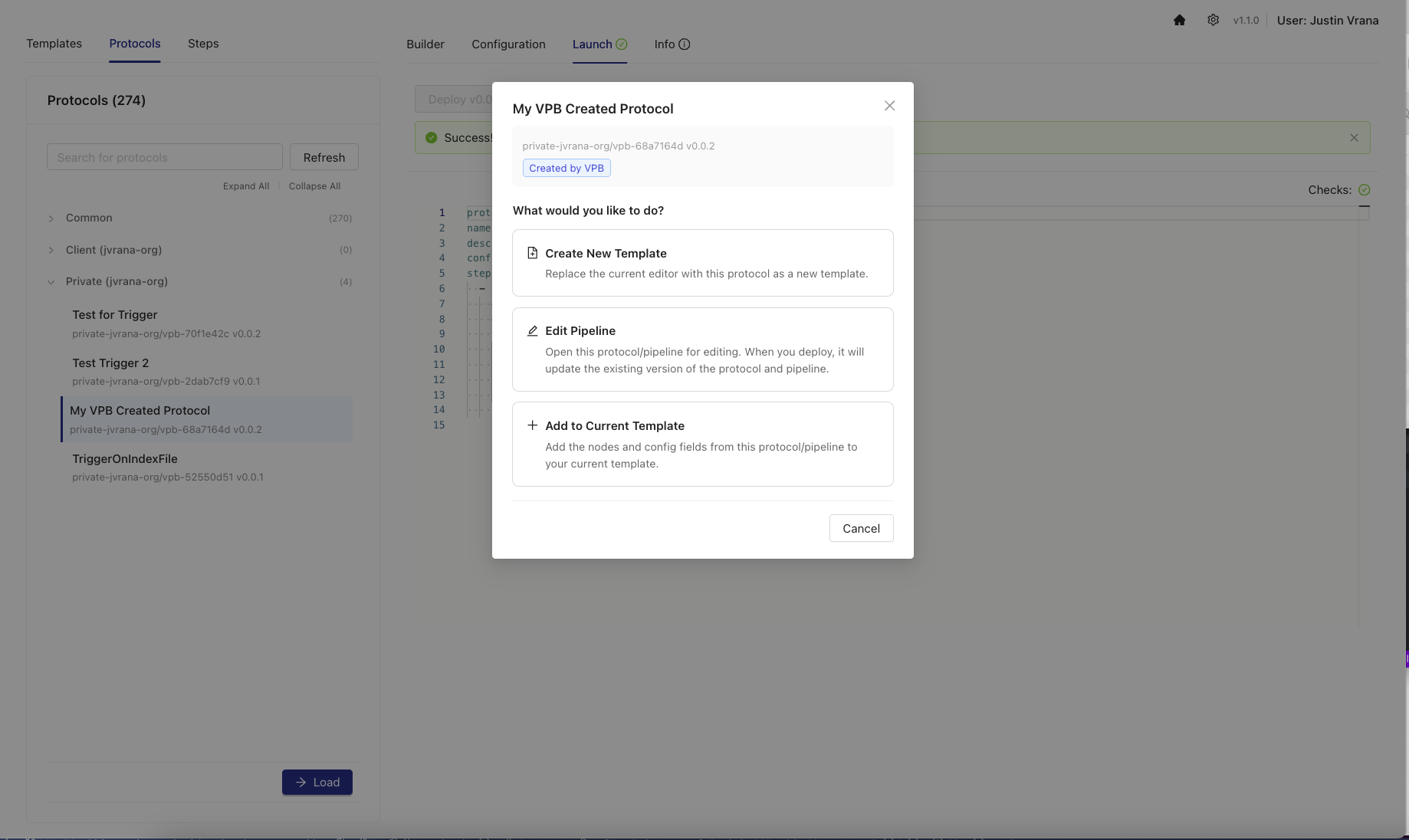
To provide customers with more flexibility in how they work with protocols, a new Protocol Action Modal appears when selecting a protocol from the Protocol List. The new modal appears after customers select a protocol, and then choose Load.
The new modal provides three distinct options for working with protocols:
- Load: loads a protocol into a new template with global configuration values automatically populated from the pipeline configuration
- Edit: loads the protocol and its associated pipeline into a template for editing, then deploy changes back to the original protocol and pipeline (only available for protocols created in Visual Pipeline Builder; externally managed protocols, such as self-service or GitHub-based protocols, must be updated through their original management system)
- Add to Current Template: merges a protocol's steps into the current working template while automatically handling naming conflicts
For more information, see Managing Protocols in the Visual Pipeline Builder User Guide (v1.1.x).
Enhancements
Enhancements are modifications to existing functionality that improve performance or usability, but don't alter the function or intended use of the system.
Improved Protocol Loading and Type Detection
- Enhanced type detection logic for protocol fields with improved accuracy
- Better handling of boolean values, script types, and field type detection
- Improved input type detection for protocol configurations
- Protocol loading now includes pipeline configuration context for better default value handling
User Interface Improvements
- Improved platform URL detection and navigation to the TDP
- Enhanced button titles and tooltips for better user guidance
- Code editor modal improvements with light theme matching the TDP
- Better error handling for navigation and platform URL detection
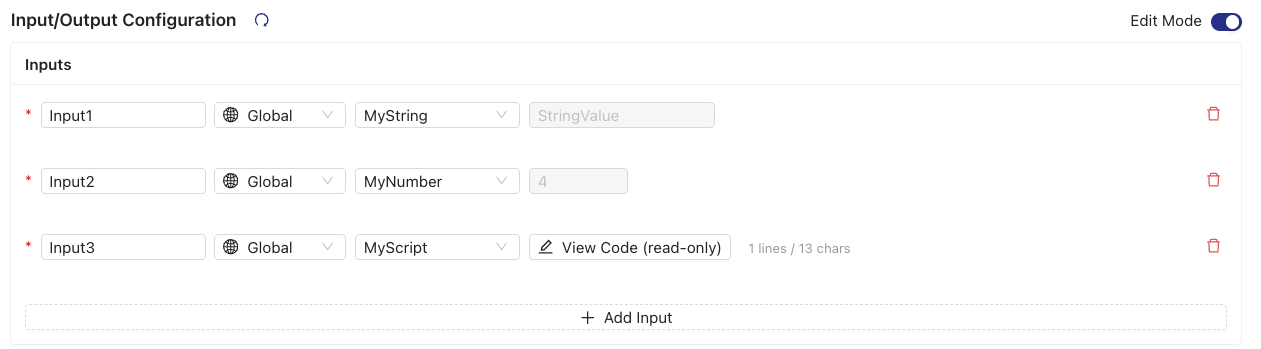
- Step configuration inputs that reference global configuration values now display the resolved value for easier verification
- Script fields in step configurations now display as read-only when populated from global configuration
- Improved layout and toolbar responsiveness
- More consistent icons throughout the UI
Bug Fixes
The following bugs are now fixed:
- Default trigger conditions no longer include an extra nested level
- TDP pipeline links that weren't working in certain environments are now fixed
- The max-width layout option now behaves as expected
- Loading default inputs from protocols now works as expected
- When merging protocols, unique global config name conflicts are now resolved
- Deployment state management is updated to consolidate last deployed updates
- ReactFlow canvas sizing now works as expected
- A
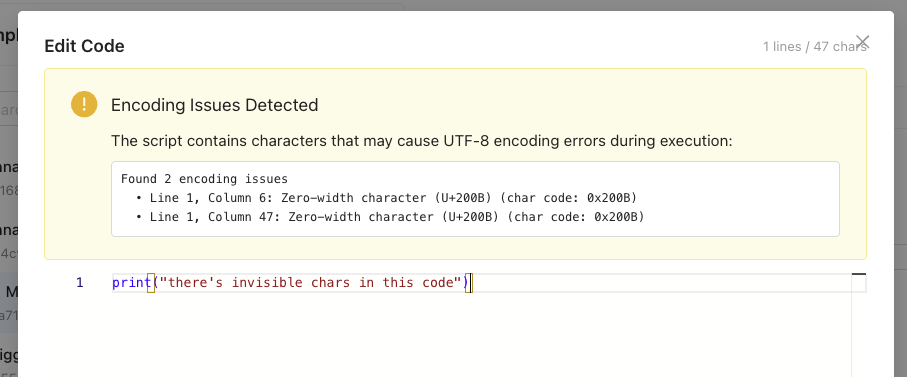
FieldTypedetection issue that affected protocol conversion is now resolved - UTF-8 encoding issues with scripts copied from certain code editors were resolved by adding validation and sanitization utilities that detect and warn customers about invisible characters:
Limitations
The following are known limitations of Visual Pipeline Builder v1.1.0:
- The app uses task script
READMEfiles to determine input configurations. This parsing might be inconsistent, becauseREADMEfile formats vary greatly between task scripts. - The AI Chat Assistant cannot be guaranteed to provide accurate information. The AI Chat Assistant may hallucinate or give incorrect information.
- The AI Chat Assistant is limited to publicly available TetraScience components and can't incorporate organization-specific components in the
privatenamespace. - The AI Chat Assistant currently supports English language inputs only.
- AI-generated pipelines with complex logic may require manual implementation and refinement.
- AI Chat Assistant response times can take up to 60 seconds for complex queries.
- No validation is provided for step dependencies or connections.
- There are no keyboard shortcuts for common operations.
- No copy/paste functionality is available for nodes.
Known and Possible Issues
The following are known issues in Visual Pipeline Builder v1.1.0:
-
Python scripts copied into Visual Pipeline Builder from certain code editors may result in pipeline failures that return an error message similar to the following:
"'utf-8' codec can't decode byte 0xa0 in position 10: invalid start byte"This error occurs because of hidden characters (such as carriage return/line feed CRLF characters) in the copied scripts that aren't Linux compatible. Visual Pipeline Builder v1.1.0 now includes UTF-8 encoding validation and sanitization utilities that detect and warn about invisible characters to help prevent these issues. However, customers should still verify that scripts don't contain hidden characters such as CRLF (
\r\n). Online tools like View non-printable unicode characters can help identify hidden characters quickly. -
In rare cases, Visual Pipeline Builder may show that no templates are available when there should be. When this issue occurs, the templates aren't deleted and are recoverable with help from TetraScience. As a workaround, customers should submit a support ticket to recover their templates. A fix for this issue is in development and testing and is scheduled for Visual Pipeline Builder v1.1.1.
-
Protocols and pipelines not originally created in Visual Pipeline Builder cannot be edited in Visual Pipeline Builder. These protocols can be loaded into new templates, but the Edit functionality is only available for VPB-created protocols. Externally managed protocols (such as self-service or GitHub-based protocols) must be updated through their original management system.
-
Some pipeline configuration options are not directly editable. These must be edited after deployment on the TDP Pipeline Edit page. These configurations include the following:
- Pipeline triggers
- Configuration secret and shared settings
-
Templates are user-specific and can't be shared. Once pipelines are deployed, however, users can share them in the TDP.
-
Templates must be deleted individually and can't be deleted in bulk.
-
Loading steps from older versions of protocols isn't supported.
-
Clearing settings in the Settings Page won't clear the Advanced > AWS Bedrock Credentials settings.
-
The AI Chat Assistant will not work in environments that require IAM proxy configuration.
-
Default values for protocol configurations aren't loaded.
-
Internet loss results in silent failures within the application
-
Templates are marked as modified on browser refresh
-
Some protocol features are either not supported or only partially supported. For more information, see Unsupported Protocol YAML Properties.
Unsupported Protocol YAML Properties
The Visual Pipeline Builder supports a subset of protocol.yml features for importing and editing existing protocols. For a complete list of protocol.yml file properties, see Protocol YAML Files.
When using Visual Pipeline Builder, customers may have issues loading or deploying pipelines and protocols that use the following unsupported and partially supported properties:
config.<config_id>.defaultsteps[*].ifsteps[*].optionssteps[*].options.memoryInMBsteps[*].options.timeoutInSecprotocol.*(Context that includes optional, top-level metadata (Manifest Fields))function:constants
Partially Supported Properties
The following protocol.yml file properties are only partially supported:
steps[*].input: supports script/text values only. Users may have issues loading existing protocols with default values specified.
Upgrade Considerations
Users upgrading from Visual Pipeline Builder v1.0.0 to v1.1.0 should retain their configured pipeline templates. Pipeline and protocol artifacts already deployed to the TDP will remain unchanged.
To activate the Visual Pipeline Builder, please contact your customer account leader. For more information about how to access and use the Visual Pipeline Builder after it's activated, see the Visual Pipeline Builder documentation.
IMPORTANTIn rare cases, templates may be lost during the upgrade from v1.0.0 to v1.1.0. If you experience template loss after upgrading, please contact TetraScience support immediately. Upgrading from Visual Pipeline Builder v0.5 to v1.0.0 or later will delete all user templates. Contact your customer account leader if you need to save your templates before upgrading.
v1.0.0
Release date: 19 September 2025
What's New
TetraScience has released its first general availability (GA) version of the Visual Pipeline Builder App, version 1.0.0. The app provides no-code and low-code tools to help customers quickly build Tetra Data Pipelines that run automated data operations and transformations, and then enrich and push that data to downstream systems.
To activate the Visual Pipeline Builder in your Tetra Data Platform (TDP) environment, contact your customer account leader.
Here are the details for what's new in Visual Pipeline Builder v1.0.0
Prerequisites
Visual Pipeline Builder v1.0.0 requires the following:
- TDP v4.2.0 or higher (v4.3.1 or higher is recommended)
- Amazon Bedrock Access: Contact your customer account leader to obtain access. For more information about Amazon Bedrock, see the Amazon Bedrock User Guide.
- Customers must contact their customer account leader to activate the app in the TDP user interface
- App users must have the following TDP functionality permissions:
- Pipelines: Full Access
- Artifacts: Full Access
For Customer-Hosted TDP Environments Only
- The TDP's Transport Layer Security (TLS) certificate must validate the following endpoint:
*.data-apps.tdp-hostname.com - The Domain Name Server (DNS) zone for
tdp-hostname.commust have a CNAME record routing*.data-apps.tdp-hostname.comtotdp-hostname.com
New Functionality
New functionality includes features not previously available in the Visual Pipeline Builder App beta release version.
- A new health indicator for the AI Chat Assistant is now displayed on the Settings page.

Enhancements
Enhancements are modifications to existing functionality that improve performance or usability, but don't alter the function or intended use of the system.
- There are no enhancements in this release.
Bug Fixes
- Fixes a bug in the
python-execconfiguration to useinput-fileas the input name rather thaninput-file-pointer
Limitations
The following are known limitations of Visual Pipeline Builder v1.0.0:
- The app uses task script README files to determine input configurations. This parsing might be inconsistent, because README file formats vary greatly between task scripts.
- The AI Chat Assistant cannot be guaranteed to provide accurate information. The AI Chat Assistant may hallucinate or give incorrect information.
- The AI Chat Assistant is limited to publicly available TetraScience components and can't incorporate organization-specific components in the
privatenamespace. - The AI Chat Assistant currently supports English language inputs only.
- AI-generated pipelines with complex logic may require manual implementation and refinement.
- AI Chat Assistant response times can take up to 60 seconds for complex queries.
- No validation is provided for step dependencies or connections.
- There are no keyboard shortcuts for common operations.
- No copy/paste functionality is available for nodes.
Known and Possible Issues
Last updated: 24 October 2025
The following are known issues in Visual Pipeline Builder v1.0.0:
-
Python scripts copied into Visual Pipeline Builder from a Windows OS may result in pipeline failures that return the following error message:
"'utf-8' codec can't decode byte 0xa0 in position 10: invalid start byte"This error occurs because of hidden carriage return/line feed (CRLF) characters in the copied scripts that aren't Linux compatible. As a workaround, customers should remove all hidden CRLF characters (
\r\n) from scripts before using them in the app. Online tools like View non-printable unicode characters can help identify hidden characters quickly. (Added on 24 October 2025) -
Customers can't load existing TDP pipelines into Visual Pipeline Builder.
-
Some pipeline configuration options are not directly editable. These must be edited after deployment on the TDP Pipeline Edit page. These configurations include the following:
- Pipeline triggers
- Configuration secret and shared settings
-
Templates are user-specific and can't be shared. Once pipelines are deployed, however, users can share them in the TDP.
-
Templates must be deleted individually and can't be deleted in bulk.
-
Loading steps from older versions of protocols isn't supported.
-
Clearing settings in the Settings Page won't clear the Advanced > AWS Bedrock Credentials settings.
-
The AI Chat Assistant will not work in environments that require IAM proxy configuration.
-
Pipeline Edit links to the TDP do not work in certain TDP environments.
-
Default values for protocol configurations aren't loaded.
-
Internet loss results in silent failures within the application
-
Templates are marked as modified on browser refresh
-
Some protocol features are either not supported or only partially supported. For more information, see Unsupported Protocol YAML Properties.
Unsupported Protocol YAML Properties
The Visual Pipeline Builder supports a subset of protocol.yml features for importing and editing existing protocols. For a complete list of protocol.yml file properties, see Protocol YAML Files.
When using Visual Pipeline Builder, customers may have issues loading or deploying pipelines and protocols that use the following unsupported and partially supported properties:
config.<config_id>.defaultsteps[*].ifsteps[*].optionssteps[*].options.memoryInMBsteps[*].options.timeoutInSecprotocol.*(Context that includes optional, top-level metadata (Manifest Fields))function:constants
Partially Supported Properties
The following protocol.yml file properties are only partially supported:
steps[*].input: supports script/text values only. Users may have issues loading existing protocols with default values specified.
Upgrade Considerations
Users upgrading from Visual Pipeline Builder v0.5 to v1.0 will lose their configured pipeline templates. However, pipeline and protocol artifacts already deployed to the TDP from Visual Pipeline Builder will still remain on the TDP.
To activate the Visual Pipeline Builder, please contact your customer account leader. For more information on how to access and use the Visual Pipeline Builder after it's activated, see the Visual Pipeline Builder documentation.
IMPORTANTUpdating the application currently will delete all user templates. Contact your customer account leader if you need to save your templates before upgrading app versions.
Other Release Notes
To view other release notes for Tetra Data Apps, see Tetra Data Apps Release Notes.
Updated 5 months ago