

Tetra Empower Agent Fetch Sample Set Method Command
The following procedure shows how to fetch an existing Sample Set Method from Waters Empower programmatically by using the Tetra Empower Agent and the Tetra Data Platform (TDP) Command Service.
The Fetch Sample Set Method Command extracts a Sample Set Method from Empower in JSON format. This is useful for use cases where a new Sample Set Method may be created in Empower from TDP using an existing Sample Set Method as a template, with specific values filled in depending on the information available in TDP (often with context and information fetched from a LIMS or ELN).
Prerequisites
The Tetra Empower Agent Fetch Sample Set Method Command requires the following:
- A running Tetra Empower Agent v5.1.x or higher installed and configured with its queue enabled.
- A valid JSON Web Token (JWT) for the service user running the command. To create a JWT, see Generate a JWT for a Service User.
- Your TDP organization's slug (ORG SLUG). To find your org slug, see View Organization Details.
- Access to a tool that will allow you to run REST API calls, such as curl or Postman.
Step 1: Verify That the Agent Can Receive Commands
To allow the Agent to securely receive and run commands from the TDP, do the following:
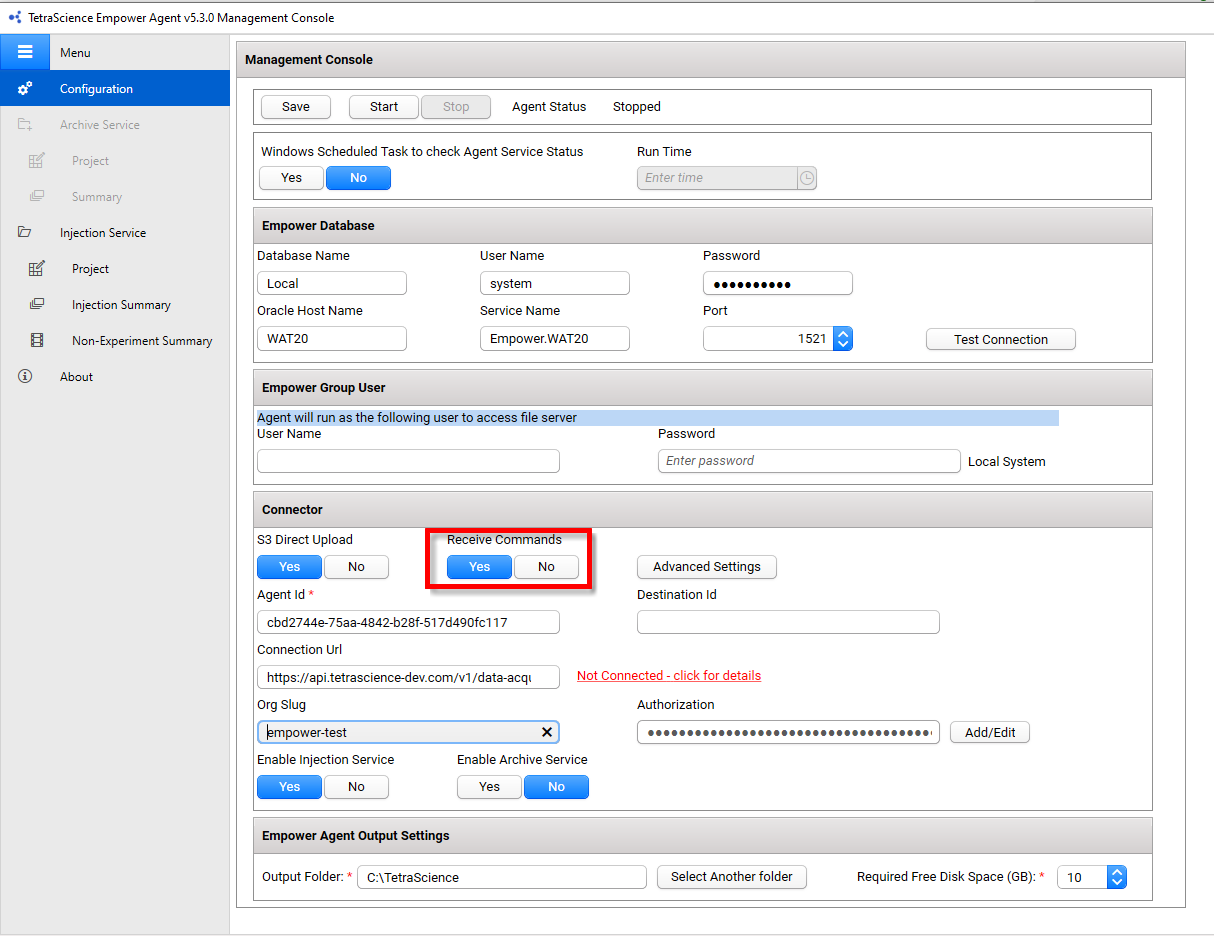
- From the Tetra Empower Agent Management Console, in the left navigation menu, under Menu, choose Configuration.
- Verify that the Receive Commands toggle is set to Yes (the default value is set to No).
For more information, see Verify Connector Settings in the Tetra Empower Agent Installation Guide.
Step 2: Run the Fetch Sample Set Method Command
To run the Tetra Empower Agent Fetch Sample Set Method Command, do the following:
- Create a valid Create Command in your code editor by using the following Fetch Sample Set Method Command Example code snippet.
- Copy and run the updated command by using a tool that will allow you to run REST API calls, such as curl or Postman.
Upon receiving the Fetch Sample Set Method Command, the Agent will extract the specified Sample Set Method from Empower in JSON format and upload it to the TDP. After the Agent successfully fetches the Sample Set Method, it sends a SUCCESS status back to the TDP with a FileId that can be used to download the JSON file.
Fetch Sample Set Method Command Example
IMPORTANTYou must enter values for the following variables:
- For
POST, enterhttps://api.tetrascience.com/v1/commands- For
x-org-slug, enter your organization's slug.- For
ts-auth-token, enter your service user's JWT.- Make sure that you enter a valid
Request bodythat includes all of the Required fields listed in the Request Body Data Fields table.
// POST https://api.tetrascience.com/v1/commands

// Headers:
x-org-slug: <your-org-slug>
ts-auth-token: <your-auth-token>

// Request body:
{
  "targetId": "<agentId>",
  "action": "TetraScience.Agent.empower.FetchSampleSetMethod",
  "expiresAt": "2024-12-31T23:58:43.749Z",
  "payload": {
    "project_name": "<project_name>",
    "sample_set_method_name": "<existing_sample_set_method_name>"
  }
}
Request Body Data Fields
| Field | Description | Example |
|---|---|---|
"targetId" | (Required) ID of the Agent that receives the command | caed8e22-d100-49a3-a00d-2dc0345e174b |
"expiresAt" | (Required) Command expiration date in ISO-8601 format. If the processing time is later than this date, the Agent won't execute the command. | 2024-12-31T23:58:43.749Z |
"action" | (Required) Command name (this field is case-insensitive) | TetraScience.Agent.empower.FetchSampleSetMethod |
"payload" | (Required) Command body containing project_name and sample_set_method_name. Both fields are mandatory. | See example above |
"project_name" | (Required) A valid Empower project name (case-insensitive). The Agent Empower User must have permission to access this project. | "MyProject" |
"sample_set_method_name" | (Required) The name of an existing Sample Set Method (case-insensitive) | "MySampleSetMethod" |
Command Response
When the command succeeds, the result will look like this:
{
  "FileId": "faad0956-f8e6-44bf-bf28-4b6001e3bc4e",
  "Reason": "TetraScience.Agent.empower.FetchSampleSetMethod is executed successfully.",
  "ValidationErrors": []
}
You can search for the FileId in TDP to download the Sample Set Method in JSON format. The file contains all of the data fields found in that Sample Set Method, including the Custom Fields.
If the command fails, you will see an explanation of the error in the reason field. For example:
{
  "reason": "SampleSetMethod - Store: SampleSetLine DataStart must be less than RunTime.; Exception from HRESULT: 0x8004021C",
  "validationErrors": []
}
Sample Set Method File Contents
General
- The specified Sample Set Method will be extracted in JSON format.
- All fields with corresponding values, components, and custom fields will be extracted.
- The data for all of the properties are presented as a string.
- Any data field which is not included in Agent will be stored in the custom field section.
- If the custom field is an enum type, the JSON outputs the string value of the custom field, instead of the integer value.
- The data value from the properties having Empower Null value will be output as
null.
Non-English Locale Handling
If the Tetra Empower Agent is hosted on an Empower client that has a non-English (United States) locale, the string value reflects this setting.
For example, if the locale is English (Germany), Windows uses , (comma) instead of . (dot) as the decimal separator. The output JSON will look like:
{
  "sample_weight": "1,00000",
  "target_mass_1": "365,10",
  "target_mass_2": "419,13"
}
Enum Types
Enum types in Empower will be returned as a string. For example, ColumnPosition is an optional field defined as an enum in Empower. The Fetch Sample Set Method Command outputs the values as "No Change", "Position 1", etc. (without underscores).
Known Issues
-
The data value of some fields fetched from Empower, such as
MethodSetOrReportMethod, may be included as an empty string in the returned JSON, but shown in the Empower Client UI as null.- The field
MethodSetOrReportMethodcan't be left as an empty string when used to create a Sample Set Method with the Create Sample Set Method Command, and should be manually updated tonull.
- The field
-
The data value of the field
PreTypeis fetched as a number representing the enum, instead of a string as expected.- The
PreTypecan't be left as a number when used to create a Sample Set Method with the Create Sample Set Method Command, and should be manually updated. - The values of PreType as defined in Empower are:
- The
enum class PrepType
{
  None = 0,
  Calibration = 1,
  Dilution = 2,
  InNeedleAutoAddition = 3,
  Transfer = 4
};
Documentation Feedback
Do you have questions about our documentation or suggestions for how we can improve it? Start a discussion in TetraConnect Hub. For access, see Access the TetraConnect Hub.
NOTEFeedback isn't part of the official TetraScience product documentation. TetraScience doesn't warrant or make any guarantees about the feedback provided, including its accuracy, relevance, or reliability. All feedback is subject to the terms set forth in the TetraConnect Hub Community Guidelines.
Updated about 1 month ago