
Tetra Charles River Apollo Connector
The Tetra Charles River Apollo Connector is a standalone, containerized application that uses the Pluggable Connector Framework to automatically retrieve documents from the Charles River Apollo API and upload them to the Tetra Data Platform (TDP). The Connector polls the Apollo API at configurable intervals to discover and download documents from opted-in studies, enriching them with metadata and labels for downstream processing.
Design Overview
The Tetra Charles River Apollo Connector integrates with the Charles River Apollo API to provide automated retrieval of study documents. The Connector works in conjunction with the Charles River Apollo Study Opt-In Manager pipeline, which manages which studies are opted into for document retrieval.
Architecture
The following diagram show an example Tetra Charles River Apollo Connector workflow:
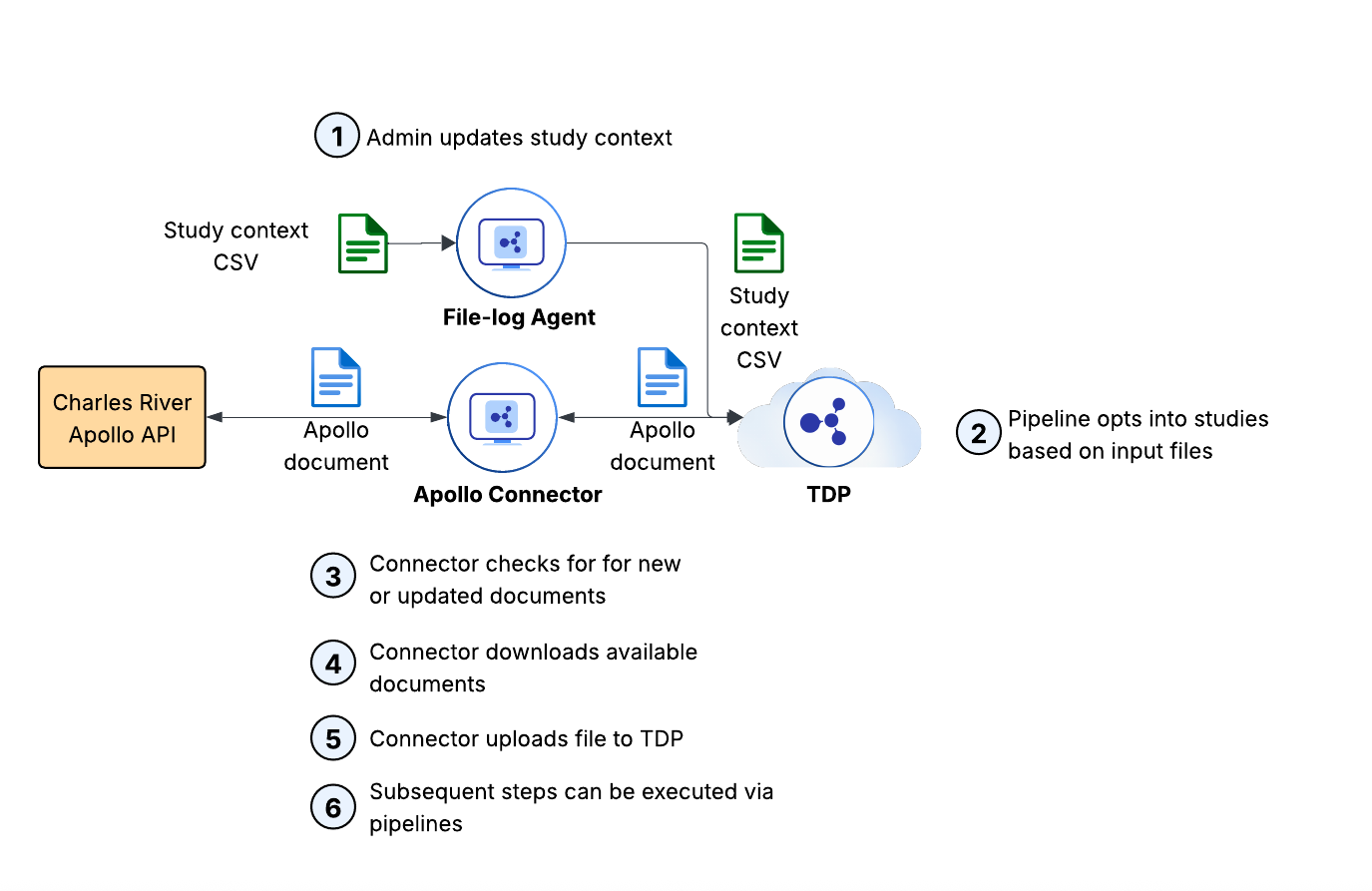
The diagram describes the following workflow:
- A user uploads a CSV file containing Charles River Study IDs and sponsor email addresses to TDP.
- The Charles River Apollo Study Opt-In Manager pipeline processes the CSV file and opts into or out of studies via the Charles River Apollo API based on the file contents.
- The Connector polls the Charles River Apollo
/v1/documentsAPI endpoint at a configurable interval (default: 60 minutes). - When the Connector detects a new document or a new version of an existing document for an opted-in study, it downloads the document from the Apollo API.
- The Connector uploads the document to the TDP Data Lake with rich metadata and labels, including:
- Apollo StudyId: The Charles River study identifier
- Apollo documentId: The unique document identifier
- Apollo documentType: The type of document (for example,
"SEND - Regulatory Affairs") - Apollo primaryStudyContact: The primary contact for the study
- Apollo status: The document status (for example,
"completed") - Apollo crlSite: The Charles River site location (for example,
"Kansas") - Apollo gxpFlag: Whether the study is GxP (
"true"or"false")
- The uploaded documents can then be processed by Tetra Data Pipelines for further analysis and integration with other systems.
Prerequisites
Before you can create and use a Tetra Charles River Apollo Connector, you must have the following:
- An active TDP environment running version 3.6.0 or higher
- A Charles River Apollo API account with the following credentials:
- Client ID
- Client Secret
- Subscription Key (Ocp-Apim-Subscription-Key)
- OAuth Token URL
- OAuth Scope
- Base API URL
- IP whitelisting configured in the Charles River Apollo API firewall for your TDP environment's IP addresses
- Charles River Apollo Study Opt-In Manager pipeline v1.0.0 or higher deployed and configured in your TDP environment
- An AES-256 encryption key for encrypting study IDs and sponsor emails (required by the Charles River Apollo Study Opt-In Manager pipeline, not the Connector itself)
NOTEThe Charles River Apollo API requires IP whitelisting. Contact your Charles River representative or TetraScience support to obtain the appropriate IP addresses for your TDP environment, as these vary by region and deployment type.
Authentication
The Connector uses OAuth 2.0 Client Credentials for authentication:
- Access tokens are automatically cached and refreshed before expiration
- Token refresh occurs 10 minutes before expiry to prevent request failures
- All API requests include the
Ocp-Apim-Subscription-Keyheader for additional authentication
Document Retrieval
The Connector only downloads documents from studies that have been opted into through the Charles River Apollo API.
The Connector follows a two-phase polling architecture that does the following:
- Queries the
/v1/studiesendpoint to discover opted-in studies - For each opted-in study, fetches documents through the
/v1/studies/{id}/documentsendpoint - Compares the list of available documents against previously downloaded documents using a unique identifier based on document ID and modification timestamp
- Downloads any new documents or new versions of existing documents
- Uploads the documents to the TDP Data Lake with metadata and labels
IMPORTANTThe Connector will not download documents from studies that have not been opted into. To manage study opt-in, you must use the Charles River Apollo Study Opt-In Manager pipeline.
Study Opt-In Management
The Charles River Apollo Study Opt-In Manager pipeline is a companion pipeline that manages which studies are opted into for document retrieval.
The pipeline does the following:
- Accepts a CSV file with Charles River Study IDs and sponsor email addresses
- Queries the Charles River Apollo
/v1/studiesendpoint to retrieve currently opted-in studies - Opts into studies that are in the CSV file, but that are not currently opted into (if the sponsor email is valid)
For more information about configuring and using the Study Opt-In Manager pipeline, see the Tetra Charles River Apollo Connector User Guide (v1.0.x).
User Guides
For more information about how to install and use the Tetra Charles River Apollo Connector, see the latest user guide:
- Tetra Charles River Apollo Connector User Guide (v1.1.x)
- Tetra Charles River Apollo Connector User Guide (v1.0.x).
Documentation Feedback
Do you have questions about our documentation or suggestions for how we can improve it? Start a discussion in TetraConnect Hub. For access, see Access the TetraConnect Hub.
NOTEFeedback isn't part of the official TetraScience product documentation. TetraScience doesn't warrant or make any guarantees about the feedback provided, including its accuracy, relevance, or reliability. All feedback is subject to the terms set forth in the TetraConnect Hub Community Guidelines.
Updated 12 days ago