

TDP v4.5.0 Release Notes
Release date: 29 April 2026 (updated 9 October 2026)
TetraScience has released Tetra Data Platform (TDP) version 4.5.0. This release helps teams reduce troubleshooting time with centralized Databricks job monitoring, optimize compute costs with flexible resource configuration, improve data consistency with enhanced vocabulary management services, and accelerate validation workflows with prerelease pipeline artifact support.
TDP v4.5.0 also introduces platform support for new, separately versioned products: a Scientist UX designed for bench scientists and data-focused users, an Artifact Version Manager for controlling artifact versions and activation, and a Use Case Manager for defining and managing end-to-end scientific use cases.
Key Updates
- Jobs dashboard — centralized monitoring and troubleshooting for Databricks job executions across Lakehouse, Tetraflow, and Scientific AI Workflow artifacts.
- Compute Profiles for Lakehouse Processing — right-size Lakehouse compute resources with compute profiles that empower users to choose the right data processing resources for their data footprint and use cases.
- Vocabulary management — standardize data labeling across the platform with labels and clear publisher attribution.
- Prerelease pipeline artifact support — safely test and validate new artifact versions in pipelines before promoting to production.
- Support for uploading new versions of PROCESSED files — maintain full data lineage by uploading new versions of processed files with automatic metadata inheritance.
- Stable, user-friendly subdomains for Tetra Data Apps — simplify DNS and TLS configuration with predictable, slug-based subdomain routing.
- Data App manifest requirements enforcement — ensure deployment consistency and reliability through enforced manifest standards.
- Scientist UX (limited availability) — a simplified, separately versioned interface for scientists, with persona-based routing, streamlined search, file management, and curated Data Apps.
- Use Case Manager (limited availability) — a new, separately versioned tool for defining, organizing, and tracking the platform artifacts that make up end-to-end scientific use cases across environments.
- Artifact Version Manager (limited availability) — a new, separately versioned interface for managing, versioning, and activating artifacts across environments.
Here are the details for what's new in TDP v4.5.0.
Notes
Learn about note blocks and what they mean.
- Any blue NOTE blocks indicate helpful considerations, but don't require customer action.
📘 NOTE
- Any yellow IMPORTANT note blocks indicate required actions that customers must take to either use a new functionality or enhancement, or to avoid potential issues during the upgrade.
🚧 IMPORTANT
GxP Impact Assessment
All new TDP functionalities go through a GxP impact assessment to determine validation needs for GxP installations.
New Functionality items marked with an asterisk (*) address usability, supportability, or infrastructure issues, and do not affect Intended Use for validation purposes, per this assessment.
Enhancements and Bug Fixes do not generally affect Intended Use for validation purposes.
Items marked as either beta release or limited availability release are not validated for GxP by TetraScience. However, customers can use these prerelease features and components in production if they perform their own validation.
New Functionality
New functionalities are features that weren't previously available in the TDP.
Data Access and Management New Functionality
Support for PROCESSED File Uploads
The File UploadAPI endpoint (v1/data-acquisition/agent/upload) has been enhanced to support uploads of PROCESSED files. When uploading a new version of a PROCESSED file, the sourceFileId parameter is mandatory and must reference the source file. If the provided sourceFileId refers to a PROCESSED file, the new version automatically inherits existing Amazon Simple Storage Service (Amazon S3) metadata. The endpoint also now includes support for Metadata Transfer Language (MTL) fields in the request payload, aligned with existing RAW file upload implementations.
With this change, the Upload button on the File Details page is now activated when the file type is PROCESSED, allowing users to upload new versions of PROCESSED files directly from the user interface.
For more information, see View the File Details Page.
Data Harmonization and Engineering New Functionality
Prerelease Pipeline Artifact Support*
Customers can now publish and use prerelease versions of pipeline artifacts. Prerelease pipeline artifact versions follow semantic versioning conventions (for example, 1.2.0-beta.1) and allow teams to test and validate new artifact versions before promoting them to a full release. This feature enables more controlled rollouts and reduces the risk of introducing breaking changes to production workflows.
For more information, see SSP Artifact manifest.json Files and Protocol YAML Files' Manifest Fields.
Prerelease IDS Behavior*
This release introduces improved handling of Intermediate Data Schema (IDS) artifacts and their dependencies for task scripts operating in prerelease versions. The updates enable task scripts to correctly resolve and utilize prerelease TDP JSON schemas during development and testing phases.
TDP System Administration New Functionality
Compute Profiles for Lakehouse Processing*
New Cluster Sizing options in the Configuration section of the Pipeline Edit page provides flexible compute configuration capabilities for ids-to-lakehouse and direct-to-lakehouse pipelines. Previously only Tetraflow pipelines provided cluster size options.
For more information, see Create an ids-to-lakehouse Pipeline and Create a direct-to-lakehouse Pipeline.
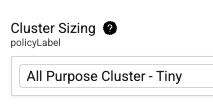
Job Clusters*
Users can now select Job Clusters as compute options, enabling more cost-effective and flexible resource allocation.
Jobs Dashboard*
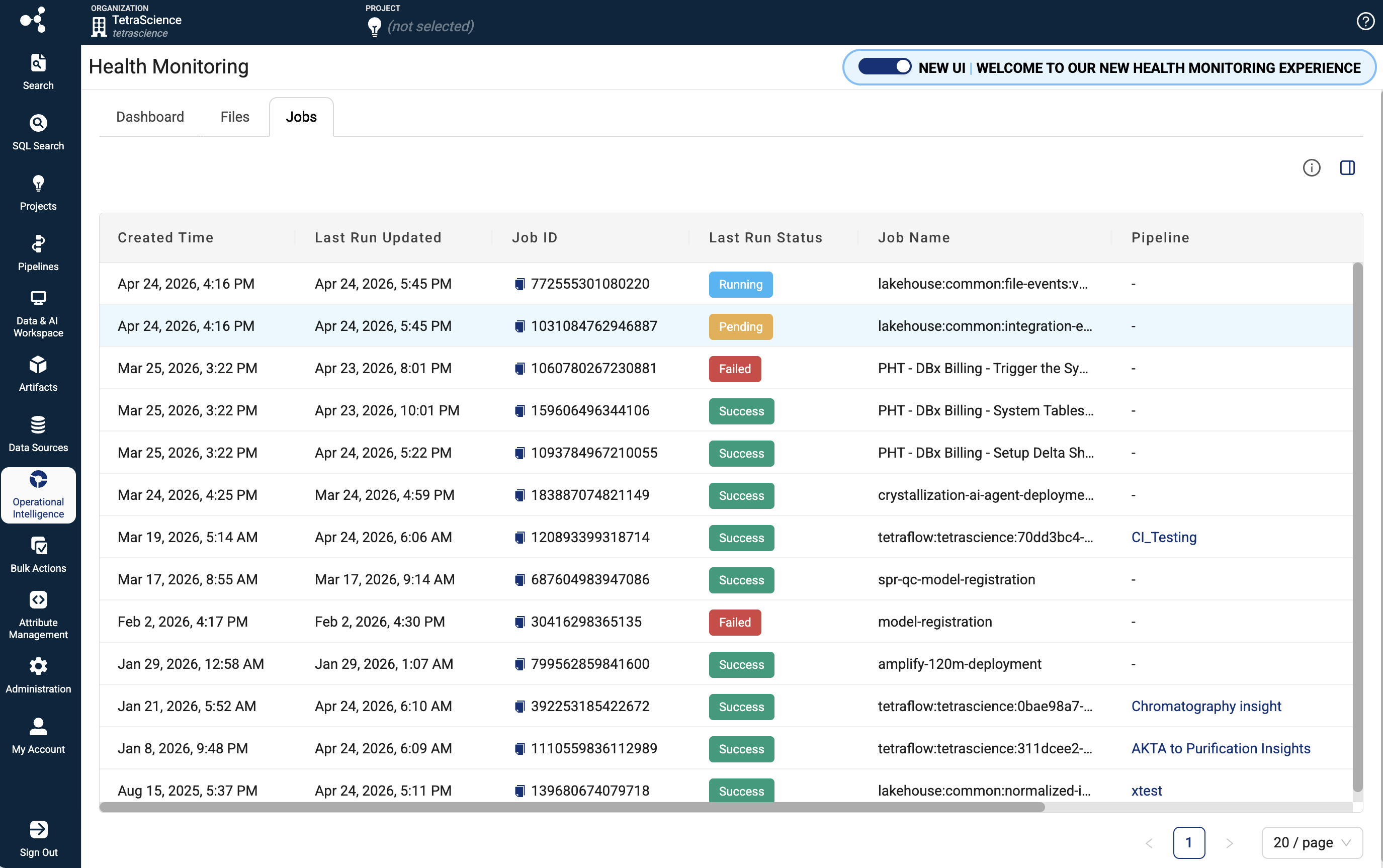
The new Jobs dashboard provides platform administrators and data engineers with comprehensive monitoring, analysis, and troubleshooting capabilities for Lakehouse job executions across the TDP. The dashboard integrates with the Lakehouse Job Management API to deliver real-time visibility into job runs, performance metrics, execution logs, and detailed job metadata.
Key Features:
- Centralized Jobs Monitoring: View all Lakehouse and AI Services jobs in a paginated table, including jobs from ids-to-lakehouse, direct-to-lakehouse, TetraFlow, and AI Workflow artifacts.
- Real-time Job Status Tracking: Monitor job run status, execution duration, and performance metrics to quickly identify issues.
- Comprehensive Filtering and Search: Filter and search across jobs to find specific executions and drill down into execution history.
- Detailed Job Run Information: Access execution logs, job metadata, and run history to diagnose failures and understand job behavior.
- Performance Analytics: Track job durations and execution patterns to optimize scheduling and resource allocation.
For more information, see Job Monitoring .
Vocabulary Management: Attribute Management with Semantic Services Support
TDP v4.5.0 introduces enhanced vocabulary management capabilities through the following expanded attribute management features:
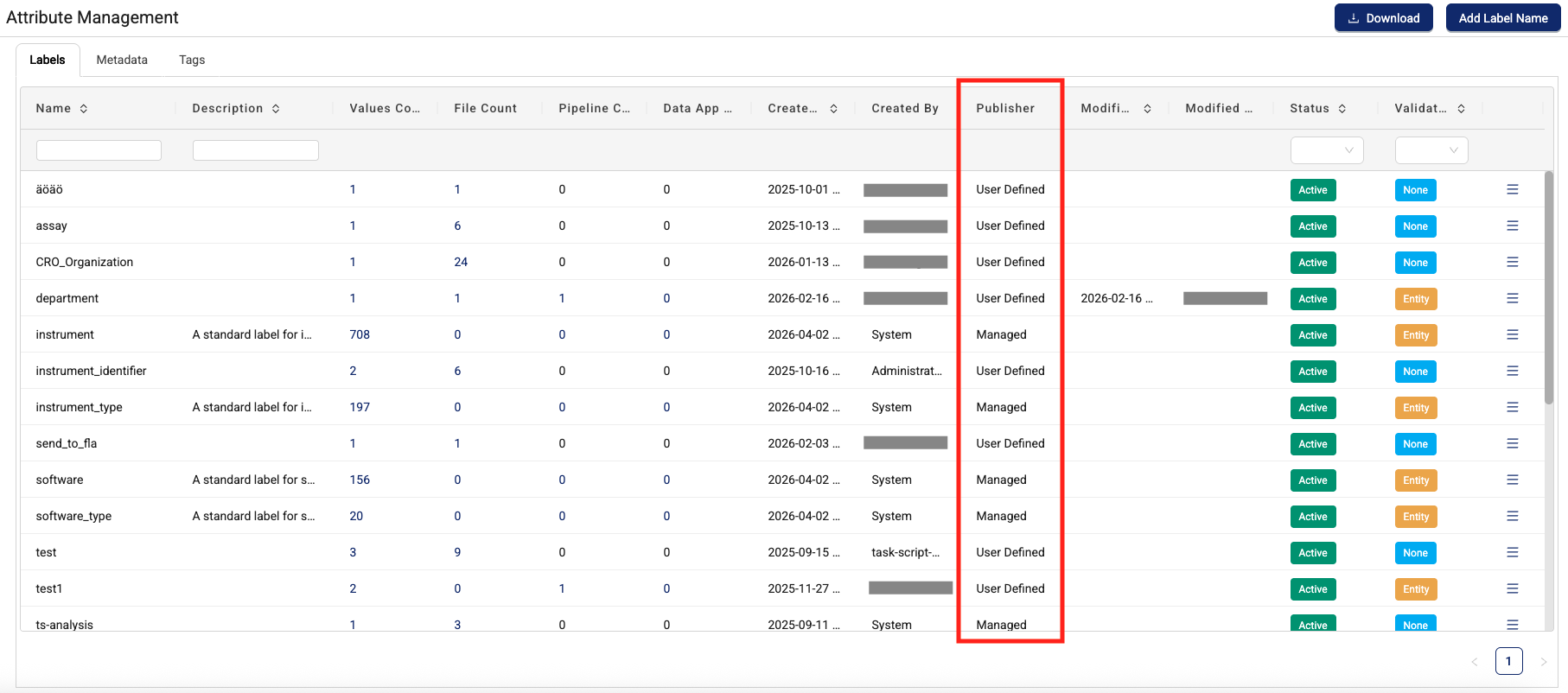
- Multi-source labels: Display labels originating from the Tetra Data Platform (existing user-defined labels) and TetraScience-defined label sets.
- Publisher attribution: A new publisher column on the Attribute Management page displays the source of each label, enabling clear identification of whether labels come from user-defined sources or semantic services.
- Consistent publisher display: Publisher information appears in all locations where labels are displayed when sourced from semantic services, providing transparency across the platform.
- Flexible verification: Labels from both sources support any verification type (none or entity-based verification).
Support for customer-specific label sets is planned for a future release.
For more information, see Manage and Apply Attributes .
Data App Manifest Requirements Enforcement*
Starting in TDP v4.5.0, the platform actively enforces the platformRequirements, supportedPlatformVersion, and a new serviceRequirements fields in a Data App's manifest.json at install and upgrade time. Previously, these fields were informational only. Now the platform will block installation if the requirements are not met in the target environment.
If your Self-Service Data App declares any of the following fields in its manifest, the platform verifies them before allowing install or upgrade:
- platformRequirements - TDP checks that the specified IDS or Tetraflow artifacts (correct namespace, slug, and version) are actually deployed in the organization.
- supportedPlatformVersion - TDP checks that the environment's platform version falls within the declared minVersion and maxVersion range.
- serviceRequirements - TDP checks that the required service (for example, TetraScience AI Services) is running and its version satisfies the declared range.
Data Apps can also now optionally specify TetraScience AI Services version requirements in their manifest.json files.
For more information, see Data App manifest.json Files in the TetraConnect Hub.
Action required for Self-Service Data Apps
Review any Self-Sevice Data App manifest.json files for the following before upgrading to TDP v4.5.0:
- Verify that every entry in
platformRequirementsreferences the correct artifact type, namespace, slug, and version that actually exists in target environments. - Confirm
supportedPlatformVersionranges are accurate for the TDP versions you intend to support. - Ensure
serviceRequirementsversion ranges match real deployed service versions.
IMPORTANTIf your Self-Service Data App declares any requirement fields in its manifest.json file, review them carefully. The platform will block installation if requirements cannot be met in the target environment.
For more information, see Data App manifest.json Files in the TetraConnect Hub. For access, see Access the TetraConnect Hub.
Data App README Access Expanded*
Customers with Data User policy permissions (read-only role) can now view app documentation. Users can also now view the app READMEs for prior versions, not just the latest app version.
For more information, see View Tetra Data App Documentation.
Beta Release and Limited Availability New Functionality
Scientist UX (Limited Availability)
TDP v4.5.0 includes platform support for a new, separately versioned scientific user experience — Scientist UX. This feature will be released shortly after the TDP v4.5.0 GA release and is versioned and deployed independently, similar to TetraScience AI Services.
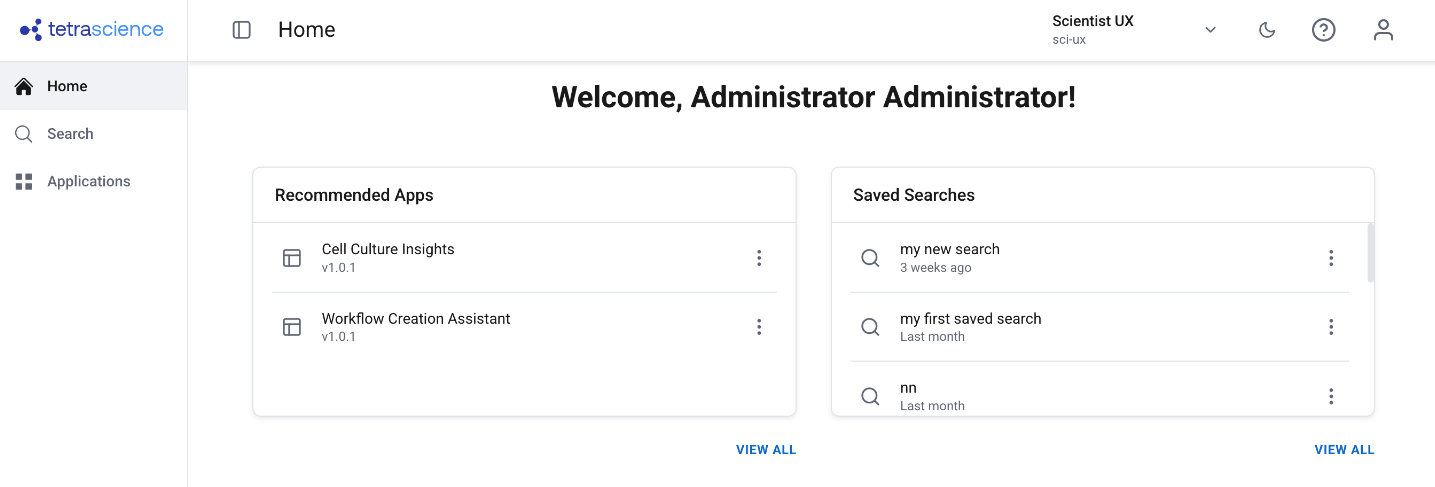
The new Scientist UX will provide a simplified, scientist-first interface designed for bench scientists and other data-focused users who don't need access to the full platform administration experience.
The Scientist UX is available through a limited availability release. To start using the feature, contact your customer account leader.
Key Capabilities
- Persona-based routing — The platform detects the user's assigned role at login and automatically routes them to the appropriate experience. Users can also switch between Scientist and IT modes without logging out.
- Simplified navigation — A dedicated side navigation and home page show only scientist-relevant sections: Search, Applications, and My Account.
- Scientist-aligned search and file details — A decluttered search experience with scientist-friendly language, readable labels, and a streamlined file details view with preview, download, version info, and file history.
- File management from search results — Upload files, upload new versions, edit labels, view history, delete files, and share results — all directly from the search results view without navigating to separate pages.
- Bulk actions — Select multiple files to apply labels or delete in bulk.
- Curated Data Apps — Only Data Apps tagged with the
scientific_app_categorylabel are displayed, keeping the experience focused on scientist-relevant tools. - Admin activation and version management — Administrators enable the feature via a feature flag and activate specific versions through the Artifact Version Manager, allowing controlled rollout independent of TDP upgrades.
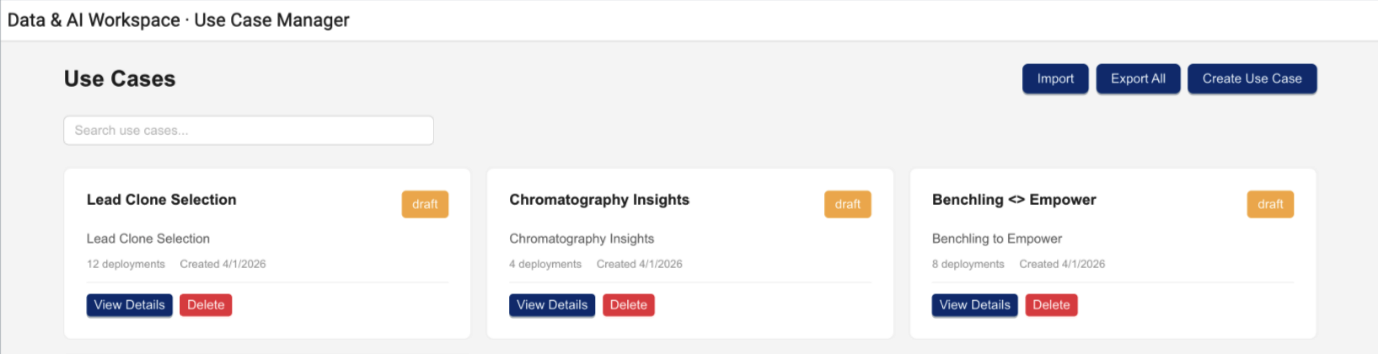
Use Case Manager (Limited Availability)
TDP v4.5.0 includes platform support for a new, separately versioned Use Case Manager that provides a unified view of use case definitions and deployments on the TDP. This feature will be released shortly after the TDP v4.5.0 GA release and is versioned and deployed independently, similar to TetraScience AI Services.
The Use Case Manager helps Scientific IT teams and forward-deployed developers organize, create, and track the platform artifacts that make up an end-to-end scientific use case—such as Agents, Connectors, Pipelines, and Applications—in a single, structured view.
The Use Case Manager is available through a limited availability release. To start using the feature, contact your customer account leader.
Key Capabilities
- Use case creation and management — Define use cases as structured collections of platform artifacts with descriptions, versions, and deployment status.
- Artifact tracking — View all artifacts that belong to a use case, including their types, versions, and deployment configurations, in a single organized view.
- Import and export — Export complete use case definitions and import them into other environments, supporting migration workflows across development, testing, and production.
- Cross-environment visibility — See which artifacts are deployed and where, helping teams plan promotions from DEV to TEST to PROD and troubleshoot configuration differences.
- Use case documentation — In-app documentation explaining the parts of a use case and what they represent, reducing onboarding friction for new team members.
Artifact Version Manager (Limited Availability)
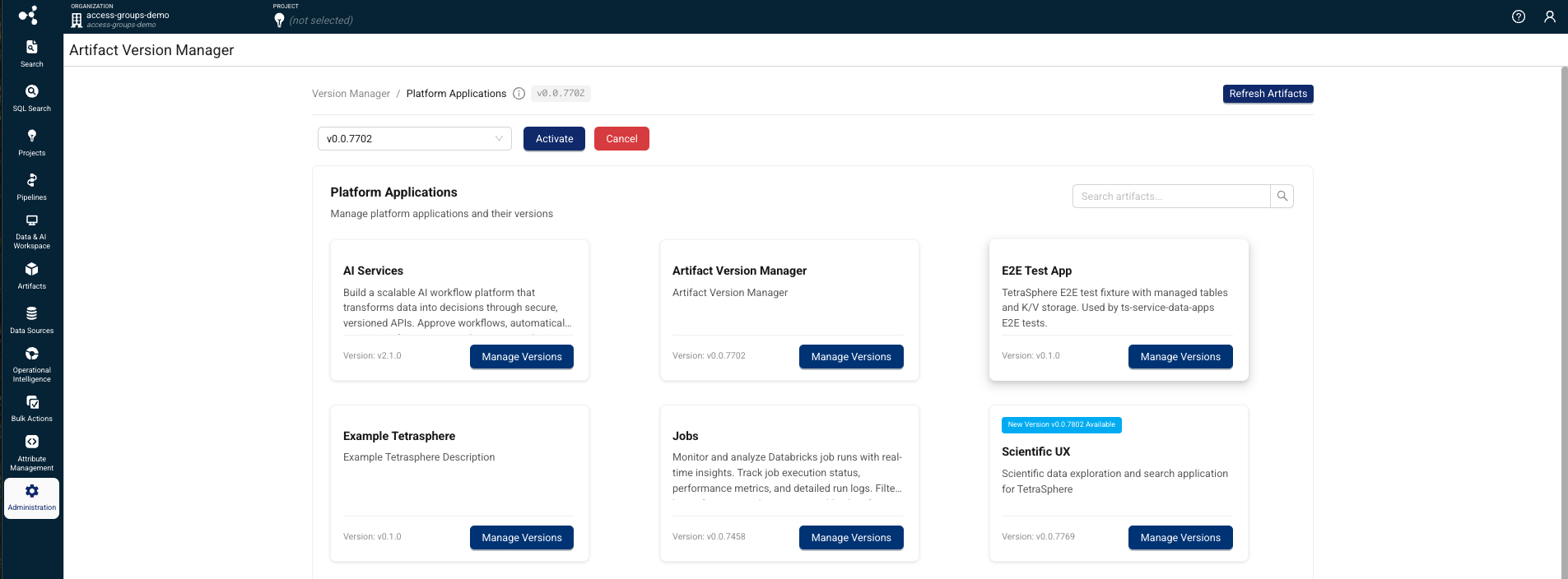
TDP v4.5.0 includes platform support for a new, separately versioned Artifact Version Manager that provides a unified interface for managing, versioning, and activating versioned artifacts. This feature will be released shortly after the TDP v4.5.0 GA release and is versioned and deployed independently, similar to TetraScience AI Services.
The Artifact Version Manager helps platform administrators control which versions of artifacts are active in each TDP environment. Artifact Version Manager provides the activation and approval mechanism that other separately versioned artifacts depend on, and must be deployed and activated before those artifacts can be used.
The Artifact Version Manager is available through a limited availability release and will support only TetraScience AI Services, Use Case Manager, and Scientist UX artifacts to start. Support for other artifact types will be added in future releases. To start using the feature, contact your customer account leader.
Key Capabilities
- Version control for platform applications — View current, newest, and in-review versions for artifacts, with full version history tracking.
- Approval workflow — Review and approve new artifact versions before activation, with role-based permissions and status tracking (New, In Review, Approved, Cancelled).
- Activation and cancellation — Activate approved artifact versions to make them available to users, or cancel versions to roll back.
- Artifact synchronization — Sync available artifacts from the platform registry to ensure the version manager reflects the latest published versions.
- Admin activation — Administrators enable Artifact Version Manager through a feature flag and the Organization Settings page. Once enabled, Artifact Version Manager is accessible from the Administration menu in the side navigation.
Prerelease Pipelines UI Support (Limited Availability)
This release introduces support for managing prerelease Tetra Data Pipeline artifacts as part of an optional, limited availability release through the following capabilities:
-
Prerelease Configuration Toggle: Customers can now toggle prereleases into the protocol and tetraflow list view on the pipeline configuration page, making prerelease versions selectable alongside released versions. This toggle is separate from the pipeline's
includePrereleasesflag. -
Prerelease Flag Support: A new
includePrereleasesfield has been added to pipeline and workflow objects. This flag allows you to configure a pipeline with a target base version plus theincludePrereleasesflag, signaling the platform to substitute in a prerelease version if no release version is found. When updating an artifact that has anincludePrereleasesflag, the toggle is automatically propagated to the update payload. -
Manual Version Configuration: You can now manually set a pipeline version that doesn't exist if a prerelease version is available, providing greater flexibility in version management.
-
Workflow and Search Compatibility: Workflows using prerelease pipeline artifacts now correctly link to prerelease protocols and Tetraflows. The platform no longer fails to fetch steps or artifacts when a pipeline is set to
includePrereleases: trueon the Search page, Workflow Processing page, or File Processing page. -
Artifact Mapping: The
pipeline.masterScriptVersionandworkflow.masterScriptVersionfields may not map directly to an artifact that exists due to prerelease support. The platform now correctly handles this scenario and resolves the appropriate prerelease pipeline artifact when needed.
Data Apps Write-back (Limited Availability)
Tetra Data Apps can now write processed data back to the platform as part of an optional limited availability release, supporting the full data lifecycle from ingestion through analysis and back to storage.
Once the feature flag is activated, Data App developers can declare managed tables in their app's manifest.json file, and the platform automatically provisions them on install. Write operations use parameterized SQL through a new DML execution endpoint, with built-in SQL injection protection and table ownership enforcement. For more information, or to start using the app write-back feature, customers should contact their customer account leader.
For more information, see Data App manifest.json Files in the TetraConnect Hub.
Enhancements
Last updated: 29 May 2026
Enhancements are modifications to existing functionality that improve performance or usability, but don't alter the function or intended use of the system.
UI Enhancements
UI Performance Optimization
TDP v4.5.0 improves platform UI page load performance through optimized asset delivery, reduced CSS bundle size, and elimination of render-blocking resources.
Data Access and Management Enhancements
Shareable Search URLs
Added on 5 May 2026
The Search page now reflects your current filters, sort order, and pagination directly in the browser's address bar as a human-readable URL. You can copy, share, or bookmark this URL, and anyone who opens it sees the same filtered results.
Search URLs now use a clean, key-value format:
/search?category=RAW&label.organism=mouse&source=Empower
Previously, search URLs used a long, encoded JSON format that was difficult to read or construct manually:
/search?query=v2%3D%7B%22configuration%22%3A%7B%22filters%22%3A...%7D
You can also construct search URLs manually to link directly to filtered data from external tools such as a LIMS, ELN, or lab notebook. The URL format supports standard filters (category, source, file path, date ranges), label and metadata filters (label.{key}=value, meta.{key}=value), tag filters, comparison operators, and OR logic.
All existing search links and bookmarks from previous TDP versions continue to work. When you open an old-format URL in TDP v4.5.0, the platform automatically converts it to the new readable format.
For more information, see Share and Bookmark Search Results.
Health Monitoring App Table Migration
The ORG__tss__system tables that contain the information used for the Health Monitoring App's dashboards have been migrated to take advantage of the latest Lakehouse architecture improvements and to provide a better experience in the Health Monitoring App. These tables are being phased out and will be removed in a future release.
NOTE
Single-tenant customers: As part of this migration, Health Monitoring event processing jobs move from AWS Glue to Databricks. Until the Glue jobs are disabled in your environment, both the new Databricks jobs and the existing Glue jobs will run in parallel, which will increase infrastructure costs. To disable the Glue jobs, you must upgrade to Health Monitoring App v2.0.0 and contact your customer account leader to have the transition completed — upgrading the app alone does not automatically remove the Glue jobs. Once the Glue jobs are removed, costs normalize, though the spend will now appear as a Databricks line item rather than AWS Glue. Customers who opt in during the TDP v4.5.0 rollout can have this handled on their behalf at upgrade time.
For more information, see ORG__tss__system Tables Deprecation in SQL Search.
New Tetra File-Log Agent Default Label for Instrument Name
Added on 5 May 2026
A new instrument_name default label was added to the Tetra File-Log Agent Path Configuration page. The new label provides the ability for customers to specify an instrument name label for any new files acquired from the configured path.
For more information, see Path Configuration Options.
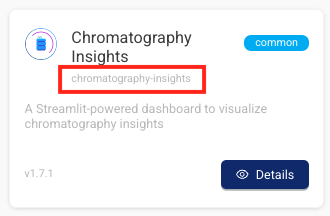
Data App Slugs are Now Displayed in the Tetra Data & AI Workspace
To disambiguate Tetra Data Apps with the same display name, each app's unique slug now appears on its Details pages and gallery modals in the Tetra Data & AI Workspace .
Improved Data App Downstream Validation Error Messages
Specific downstream validation errors for Tetra Data Apps are now surfaced to users instead of generic 503 responses.
Tetra Data & AI Workspace Dashboard Pagination
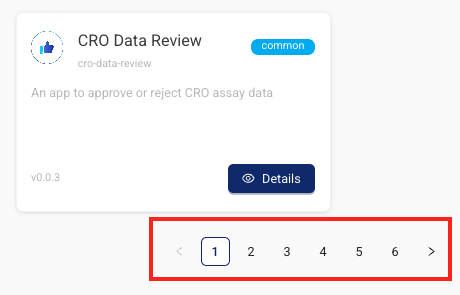
The Tetra Data & AI Workspace dashboard now paginates enabled Data Apps instead of loading all at once. Now, users see page controls and a total count of displayed and available apps (for example, Showing 1-20 of 150 apps).
Run Multiple Data Apps at the Same Time
Customers can now launch and use multiple Tetra Data Apps simultaneously on the same machine without encountering HTML errors.
Data Harmonization and Engineering Enhancements
Databricks Job Monitor Table Optimization
Added on 29 May 2026
TDP v4.5.0 introduces automated lifecycle management for Databricks job monitoring tables. A scheduled process now manages table records, retaining a maximum of three months of data and handling corrupted or non-standard job records. This optimization keeps monitoring tables lightweight, prevents excessive error logging that could increase infrastructure costs, and improves overall platform performance.
TDP System Administration Enhancements
User-Friendly Subdomains for Data Apps
Tetra Data Apps configured for subdomain routing now get a stable, user-friendly subdomain derived from their organization, artifact namespace, and app slugs. Instead of an opaque data app ID, subdomain-routed data apps use the following format:
{ORG_SLUG}-{NAMESPACE_TYPE}-{APP_SLUG}.data-apps.{TENANT_SUBDOMAIN}.tetrascience.com
NAMESPACE_TYPE is common for common-namespace artifacts and private for private-namespace artifacts. (The org slug isn't repeated for private-{orgSlug} namespaces, to keep subdomains within DNS length limits.) For example, a data-review app installed in the common namespace of the analytics org on the biologics-dev tenant is reachable at https://analytics-common-data-review.data-apps.biologics-dev.tetrascience.com. The same app installed in the org's private namespace would be reachable at https://analytics-private-data-review.data-apps.biologics-dev.tetrascience.com.
This allows single-tenant customers to use explicit domains in their DNS and TLS certificate configurations instead of requiring wildcard entries. Because each organization runs only one instance of a particular data app at any given time, this subdomain remains stable across deployments.
For more information, contact your customer account leader.
Operational Insights Menu Option Displays by Default
The Operational Insights menu option now displays for all customers by default, whether or not the Health Monitoring App is installed and activated in their TDP environment. Previously, the Operational Insights dashboard required the Health Monitoring App to be manually activated by a customer account leader.
For the Operational Insights dashboard to appear and populate with usage data, either a user with Administrator permissions must choose to enable the dashboard in the UI after selecting the Operational Insights menu option, or customers must have the Health Monitoring App activated in their TDP environment. If the app isn't activated or the Operational Insights dashboard isn't enabled through the UI by an admin, then customers will see a prompt to either enable the dashboard if they're an admin, or to contact their admin to enable it if they're a non-admin user.
Enabling the Operational Insights dashboard through the UI installs the Health Monitoring App and activates the Operational Insights dashboard only. It doesn't activate the Health Monitoring App dashboard, which must still be done in coordination with TetraScience.
For more information, see Operational Insights.
Infrastructure Updates
The following is a summary of the TDP infrastructure changes made in this release. For more information about specific resources, contact your customer account leader.
New Resources
- AWS services added: 0
- AWS Identity and Access Management (IAM) roles added: 23
- IAM policies added: 24 (inline policies within the roles)
- AWS managed policies added: 2 (
AWSLambdaVPCAccessExecutionRole,AWSXrayFullAccess)
Removed Resources
- IAM roles removed: 6
- IAM policies removed: 8 (inline policies within removed roles)
- AWS managed policies removed: 0
Bug Fixes
Data Harmonization and Engineering Bug Fixes
- Workflow logs now load correctly for workflows with large log output (over ~120,000 lines). Previously, the View Logs page displayed "There was an error fetching logs" when the log file exceeded the V8 function argument limit.
- Instant (Lambda) mode protocols now run successfully on the first execution. Previously, workflows using newly released instant mode protocols could fail on the first run and on reprocess, but succeed on retry.
TDP System Administration Bug Fixes
- Data App UI responses are no longer cached in the browser. Previously, browser caching could prevent starting new Data App sessions and setting authentication tokens correctly.
- Pipeline configuration names and slugs no longer overflow past the configuration box border on the Pipeline Details page.
Deprecated Features
The following features are now on a deprecation track:
- Health Monitoring App versions 1.1.0 and earlier will be deprecated in TDP v4.6.0 as part of the migration of
ORG__tss__systemtables to the new Lakehouse architecture starting in TDP v4.5.0. Upgrading to Health Monitoring App v2.0.0 or later is recommended after upgrading to TDP v4.5.0 for improved functionality and will be required starting in TDP v4.6.0. For more information, see the Health Monitoring App v1.1.0 and Earlier Deprecation notice.
For more information about TDP deprecations, see Tetra Product Deprecation Notices.
Known and Possible Issues
Last updated: 9 October 2026
The following are known and possible issues for TDP v4.5.0.
Data Integrations Known Issues
- For new Tetra Agents set up through a Tetra Data Hub and a Generic Data Connector (GDC), Agent command queues aren’t enabled by default. However, the TDP UI still displays the command queue as enabled when it’s deactivated. As a workaround, customers can manually sync the Tetra Data Hub with the TDP. A fix for this issue is in development and testing and is scheduled for a future release.
- For on-premises standalone Connector deployments that use a proxy, the Connector’s installation script fails when the proxy’s name uses the following format:
username:password@hostname. As a workaround, customers should contact their customer account leader to update the Connector’s install script. A fix for this issue is in development and testing and is scheduled for a future release.
Data Harmonization and Engineering Known Issues
-
Creating, editing, then saving
ids-to-lakehousepipelines on protocol versions earlier thanv1.2.0can cause the Normalized IDS processing jobs to be provisioned on a larger platform cluster than the previous default configuration. This can lead to increased data processing costs. As a workaround, upgrade yourids-to-lakehousepipelines tov1.2.0. A fix for this issue is scheduled for TDP 4.5.1. -
Ingesting large Tetrasphere artifacts can cause out-of-memory (OOM) errors related to Artifact Management. A fix for this issue is scheduled for TDP v4.5.1. (Added on 1 May 2026)
-
For customers using proxy servers to access the TDP, Tetraflow pipelines created in TDP v4.3.0 and earlier fail and return a
CalledProcessErrorerror. As a workaround, customers should disable any existing Tetraflow pipelines and then enable them again. A fix for this issue is in development and testing and is scheduled for a future release. -
The legacy
ts-sdk putcommand to publish artifacts for Self-service pipelines (SSPs) returns a successful (0) status code, even if the command fails. As a workaround, customers should switch to using the latest TetraScience Command Line Interface (CLI) and run thets-cli publishcommand to publish artifacts instead. -
IDS files larger than 2 GB are not indexed for search.
-
The Chromeleon IDS (thermofisher_chromeleon) v6 Lakehouse tables aren't accessible through Snowflake Data Sharing. There are more subcolumns in the table’s
methodcolumn than Snowflake allows, so Snowflake doesn’t index the table. A fix for this issue is in development and testing and is scheduled for a future release. -
Empty values in Amazon Athena SQL tables display as
NULLvalues in Lakehouse tables. -
File statuses on the File Processing page can sometimes display differently than the statuses shown for the same files on the Pipelines page in the Bulk Processing Job Details dialog. For example, a file with an
Awaiting Processingstatus in the Bulk Processing Job Details dialog can also show aProcessingstatus on the File Processing page. This discrepancy occurs because each file can have different statuses for different backend services, which can then be surfaced in the TDP at different levels of granularity. A fix for this issue is in development and testing. -
Logs don’t appear for pipeline workflows that are configured with retry settings until the workflows complete.
-
Files with more than 20 associated documents (high-lineage files) do not have their lineage indexed by default. To identify and re-lineage-index any high-lineage files, customers must contact their CSM to run a separate reconciliation job that overrides the default lineage indexing limit.
-
OpenSearch index mapping conflicts can occur when a client or private namespace creates a backwards-incompatible data type change. For example: If
doc.myFieldis a string in the common IDS and an object in the non-common IDS, then it will cause an index mapping conflict, because the common and non-common namespace documents are sharing an index. When these mapping conflicts occur, the files aren’t searchable through the TDP UI or API endpoints. As a workaround, customers can either create distinct, non-overlapping version numbers for their non-common IDSs or update the names of those IDSs. -
File reprocessing jobs can sometimes show fewer scanned items than expected when either a health check or out-of-memory (OOM) error occurs, but not indicate any errors in the UI. These errors are still logged in Amazon CloudWatch Logs. A fix for this issue is in development and testing.
-
File reprocessing jobs can sometimes incorrectly show that a job finished with failures when the job actually retried those failures and then successfully reprocessed them. A fix for this issue is in development and testing.
-
File edit and update operations are not supported on metadata and label names (keys) that include special characters. Metadata, tag, and label values can include special characters, but it’s recommended that customers use the approved special characters only. For more information, see Attributes.
-
The File Details page sometimes displays an Unknown status for workflows that are either in a Pending or Running status. Output files that are generated by intermediate files within a task script sometimes show an Unknown status, too.
-
Some historical protocols and IDSs are not compatible with the new
ids-to-lakehousedata ingestion mechanism. The following protocols and IDSs are known to be incompatible withids-to-lakehousepipelines:- Protocol:
fcs-raw-to-ids< v1.5.1 (IDS:flow-cytometer< v4.0.0) - Protocol:
thermofisher-quantstudio-raw-to-ids< v5.0.0 (IDS: pcr-thermofisher-quantstudio < v5.0.0) - Protocol:
biotek-gen5-raw-to-idsv1.2.0 (IDS:plate-reader-biotek-gen5v1.0.1) - Protocol:
nanotemper-monolith-raw-to-idsv1.1.0 (IDS:mst-nanotemper-monolithv1.0.0) - Protocol:
ta-instruments-vti-raw-to-idsv2.0.0 (IDS:vapor-sorption-analyzer-tainstruments-vti-sav2.0.0)
- Protocol:
-
In affected environments, rebuilding a task script without specifying a TetraScience software development kit (SDK) version could switch it from SDK v1 to SDK v2. Scripts that call Tetra REST APIs directly may then lose required network access, causing their pipelines to fail.
TetraScience has deployed a configuration change to affected environments, but this change does not update scripts already rebuilt with SDK v2. Scripts that were not rebuilt are unaffected.
If your script requires SDK v1, set
"sdkVersion": "v1"in itsconfig.jsonfile. Contact your customer account leader to confirm the required execution settings before rebuilding. (Added on 9 October 2026)
Data Access and Management Known Issues
-
The Data Apps metadata backfill job can fail with a
401authentication error after upgrading to TDP v4.5.0. A fix for this issue is scheduled for TDP v4.5.1. (Added on 1 May 2026) -
Data App providers may exhibit the following issues when shared secrets are configured using the Custom provider option:
- Existing secrets linked to a provider can appear blank or fail to resolve correctly.
- New secrets created through the Custom provider option on the Providers page can appear as duplicate entries on the Shared Settings page. Do not delete these entries.
- Upgrading a data app after deleting a provider can return a
503error. As a workaround, do a hard refresh in your browser and retry the upgrade.
To avoid these issues when using the Custom provider option, create shared secrets on the Shared Settings page using all-lowercase names, and reference them as existing secrets in the provider rather than creating new secrets directly from the Providers page. Do a hard refresh in your browser after any provider changes, especially deletion. If you encounter duplicate secret entries or secrets that fail to resolve, contact your customer account leader for assistance. A fix for these issues is in development and testing and is scheduled for a future release.
-
When creating a
direct-to-lakehousepipeline (v0.2.0) and selecting an Instant Start (Lambda) option from the Memory Allocation list, the workflow fails and returns aFileNotFoundError: [Errno 2] No such file or directoryerror. This error is caused by a limitation of the Lambda runtime environment. As a workaround, customers should select a non-Instant Start memory allocation option when configuring a direct-to-lakehouse pipeline. A fix for this issue is in development and testing and is scheduled for a future release. -
When creating a
direct-to-lakehousepipeline, the pipeline won't create the transform output tables if any line breaks (\n), trailing whitespaces, or other special characters are included in the transform output'sschemaIdentifierfield. -
When using the SQL Search page to query a table created from a
direct-to-lakehousepipeline, the Select First 100 Rows functionality sometimes defaults to an invalid query and displays the following error:"COLUMN_NOT_FOUND: line <number>. Column 'col' cannot be resolved or requester is not authorized to access requested resources."As a workaround, customers should adjust their queries to a standardSELECT *orSELECT column_namequery, and then choose the SELECT First 100 Rows option again. -
On the Search (Classic) page, shortcuts created in browse view also appear in collections and as saved searches when they shouldn’t.
-
Saved Searches created on the Search (Classic) page can't be used or saved as Collections on the Search page.
-
Data Apps won’t launch in customer-hosted environments if the private subnets where the TDP is deployed are restricted and don’t have outbound access to the internet. As a workaround, customers should enable the following AWS Interface VPC endpoint in the VPC that the TDP uses:
com.amazonaws.<AWS REGION>.elasticfilesystem -
In deployments where the UI and API use different subdomain hierarchies (for example,
frontend.domain.comandapi.domain.cominstead ofapi.frontend.domain.com), Data Apps may return CORS errors.
To resolve, create the following AWS Systems Manager (SSM) parameters:
/tetrascience/production/ECS/ts-service-data-apps/DOMAIN— Set this to your TDP URL withouthttps://(for example,frontend.domain.com). This configures the CORS policy to restrict which origins can send requests to the Data Apps service./tetrascience/production/ECS/ts-service-data-apps/COOKIE_DOMAIN— Set this to the shared root domain (for example,domain.com). This ensures cookies are scoped correctly when the UI and API are on sibling subdomains.- The Data Lakehouse Architecture doesn't support restricted, customer-hosted environments that connect to the TDP through a proxy and have no connection to the internet. A fix for this issue is in development and testing and is scheduled for a future release.
- On the File Details page, related files links don't work when accessed through the Show all X files within this workflow option. As a workaround, customers should select the Show All Related Files option instead. A fix for this issue is in development and testing and is scheduled for a future release.
- When customers upload a new file on the Search page by using the Upload File button, the page doesn’t automatically update to include the new file in the search results. As a workaround, customers should refresh the Search page in their web browser after selecting the Upload File button. A fix for this issue is in development and testing and is scheduled for a future TDP release.
- Values returned as empty strings when running SQL queries on SQL tables can sometimes return
Nullvalues when run on Lakehouse tables. As a workaround, customers taking part in the Data Lakehouse Architecture EAP should update any SQL queries that specifically look for empty strings to instead look for both empty string andNullvalues. - Query DSL queries run on indices in an OpenSearch cluster can return partial search results if the query puts too much compute load on the system. This behavior occurs because the OpenSearch
search.default_allow_partial_resultsetting is configured astrueby default. To help avoid this issue, customers should use targeted search indexing best practices to reduce query compute loads. A way to improve visibility into when partial search results are returned is currently in development and testing and scheduled for a future TDP release. - Text within the context of a RAW file that contains escape (
\) or other special characters may not always index completely in OpenSearch. A fix for this issue is in development and testing, and is scheduled for an upcoming release. - If a data access rule is configured as [label] exists > OR > [same label] does not exist, then no file with the defined label is accessible to the Access Group. A fix for this issue is in development and testing and scheduled for a future TDP release.
- File events aren’t created for temporary (TMP) files, so they’re not searchable. This behavior can also result in an Unknown state for Workflow and Pipeline views on the File Details page.
- When customers search for labels in the TDP UI’s search bar that include either @ symbols or some unicode character combinations, not all results are always returned.
- The File Details page displays a
404error if a file version doesn't comply with the configured Data Access Rules for the user.
TDP System Administration Known Issues
-
The Data user policy doesn’t allow users who are assigned the policy to create saved searches, even though it should grant the required functionality permissions.
-
Limited availability release Data Retention Policies don’t consistently delete data. A fix for this issue is in development and testing and is scheduled for a future release.
-
Failed files in the Data Lakehouse can’t be reprocessed through the Health Monitoring page. Instead, customers should monitor and reprocess failed Lakehouse files by using the Data Reconciliation, File Processing, or Workflow Processing pages.
-
The latest Connector versions incorrectly log the following errors in Amazon CloudWatch Logs:
Error loading organization certificates. Initialization will continue, but untrusted SSL connections will fail.Client is not initialized - certificate array will be empty
These organization certificate errors have no impact and shouldn’t be logged as errors. A fix for this issue is currently in development and testing, and is scheduled for an upcoming release. There is no workaround to prevent Connectors from producing these log messages. To filter out these errors when viewing logs, customers can apply the following CloudWatch Logs Insights query filters when querying log groups. (Issue #2818)
CloudWatch Logs Insights Query Example for Filtering Organization Certificate Errors
fields @timestamp, @message, @logStream, @log | filter message != 'Error loading organization certificates. Initialization will continue, but untrusted SSL connections will fail.' | filter message != 'Client is not initialized - certificate array will be empty' | sort @timestamp desc | limit 20 -
If a reconciliation job, bulk edit of labels job, or bulk pipeline processing job is canceled, then the job’s ToDo, Failed, and Completed counts can sometimes display incorrectly.
Upgrade Considerations
During the upgrade, there might be a brief downtime when users won't be able to access the TDP user interface and APIs.
After the upgrade, the TetraScience team verifies that the platform infrastructure is working as expected through a combination of manual and automated tests. If any failures are detected, the issues are immediately addressed, or the release can be rolled back. Customers can also verify that TDP search functionality continues to return expected results, and that their workflows continue to run as expected.
For more information about the release schedule, including the GxP release schedule and timelines, see the Product Release Schedule.
For more details on upgrade timing, customers should contact their customer account leader.
Health Monitoring App Upgrade
Customers using the Health Monitor app versions earlier than 2.0.0 are encouraged to upgrade to version 2.0.0 or later after upgrading to TDP v4.5.0. Health Monitoring App v2.0.0 is built on the new Lakehouse-based tables and provides improved performance and functionality. Versions earlier than 2.0.0 will continue to work on TDP v4.5.0 but support will be removed in TDP v4.6.0. For more information, see the Health Monitoring App v1.1.0 and Earlier Deprecation notice.
After upgrading to v4.5.0, Health Monitoring App v2.0.0 dashboards may show delayed or missing data for a few hours as the new tables populate with data. The data will appear in the dashboards automatically once the new tables are ready.
Single-tenant customers running Health Monitoring App versions earlier than v2.0.0 will incur additional infrastructure costs during the transition period, as Databricks and Glue jobs run in parallel. Upgrading to Health Monitoring App v2.0.0 is required to remove the Glue jobs, but the transition must also be completed by your TetraScience team — upgrading the app alone does not automatically disable the Glue jobs. Contact your customer account leader to coordinate this step, or to opt into having the transition handled automatically during the TDP v4.5.0 rollout.
Security
TetraScience continually monitors and tests the TDP codebase to identify potential security issues. Various security updates are applied to the following areas on an ongoing basis:
- Operating systems
- Third-party libraries
This release includes security vulnerability remediation and infrastructure hardening across platform services, including dependency updates and resolution of findings from internal security scans.
Quality Management
TetraScience is committed to creating quality software. Software is developed and tested following the ISO 9001-certified TetraScience Quality Management System. This system ensures the quality and reliability of TetraScience software while maintaining data integrity and confidentiality.
Other Release Notes
To view other TDP release notes, see Tetra Data Platform Release Notes.
Updated 2 days ago