

Scientist Experience
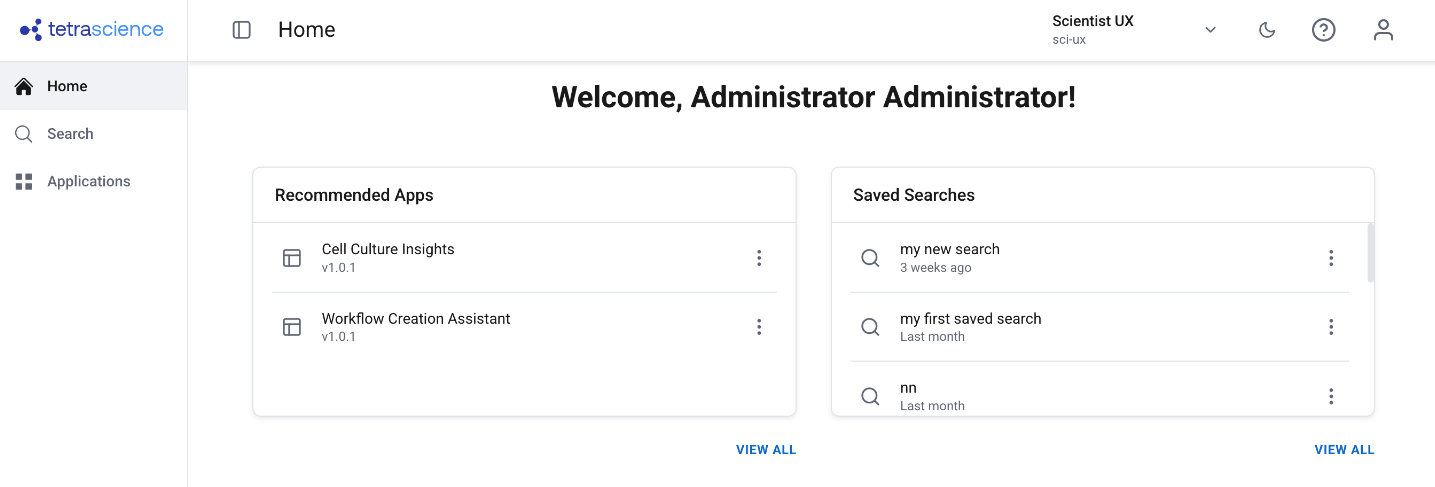
The Scientist Experience provides a simplified interface for scientists to find, preview, analyze, share, and track scientific data without platform complexity.
The Scientist Experience provides a simplified Tetra interface designed specifically for scientists. The new user interface removes platform complexity so that you can focus on finding, analyzing, sharing, and tracking your scientific data.
NOTEThe Scientist Experience is generally available and is activated for your organization through the Artifact Version Manager. It is separately versioned and deployed independently from Tetra.
Workflows
The Scientist Experience supports the following workflows:
- Find Data and Apps — Search for data across your organization using simplified search with filters and saved searches. Find scientific apps grouped by category.
- Preview Data — Quickly verify data and inspect file details, attributes, and history without leaving the interface.
- Analyze and Visualize — Open data in Tetra Data Apps or download it for use with external tools such as FlowJo or Spotfire.
- Share and Link Data — Share files, search results, and persistent URLs with colleagues. Link data to external systems such as LIMS or ELN.
- Track Workflows — Trace data lineage, verify process completion, and identify all data related to a batch, project, or study.
Prerequisites
The Scientist Experience requires the following:
- Tetra Data Platform (TDP) v4.5.0 or later
- Artifact Version Manager deployed and activated for your organization. The Artifact Version Manager provides the activation and approval mechanism that the Scientist Experience depends on.
- The Scientist Experience activated for your organization in coordination with TetraScience. Contact your customer account leader to get started.
Administrator Setup
Before scientists can use the Scientist Experience, administrators must complete the following setup steps.
Activate the Scientist Experience Through Artifact Version Manager
The Scientist Experience is deployed as a versioned artifact managed through the Artifact Version Manager. Administrators must review and activate the Scientist Experience artifact before it becomes available to users.
To activate the Scientist Experience, do the following:
- Sign in to the TDP as a user with the Org Admin role.
- In the left navigation menu, choose Administration.
- Select Artifact Version Manager.
- Find the Scientific UX artifact in the list.
- Review and activate the latest version. For detailed instructions, see Artifact Version Manager User Guide (Limited Availability).
After activation, the Scientist Experience becomes available to users in the environment.
Configure App Visibility
To control which apps appear in the Scientist Experience, administrators must apply the scientific_app_category label to each app that scientists should see. Only apps with this label appear in the Scientist Experience Apps view. This ensures that scientists see only apps relevant to scientific exploration and analysis, not builder or platform management apps.
To apply labels to apps, see Activate an Embedded Data App to update labels in the UI, or Update Data App labels for access control in the TetraScience API Reference to update labels programmatically.
User Guides
For more information about how to use the Scientist Experience, see the Scientist Experience User Guide.
Documentation Feedback
Do you have questions about our documentation or suggestions for how we can improve it? Start a discussion in TetraConnect Hub. For access, see Access the TetraConnect Hub.
NOTEFeedback isn't part of the official TetraScience product documentation. TetraScience doesn't warrant or make any guarantees about the feedback provided, including its accuracy, relevance, or reliability. All feedback is subject to the terms set forth in the TetraConnect Hub Community Guidelines.
Updated 15 days ago