

Scientist Experience v1.0.x Release Notes
Release notes for Scientist Experience versions 1.0.x
The following are the release notes for Scientist Experience versions 1.0.x. The Scientist Experience provides a simplified, scientist-first interface designed for bench scientists and other data-focused users who don't need access to the full platform administration experience.
NOTEThe Scientist Experience is currently part of a limited availability release and must be activated in coordination with TetraScience. The Scientist Experience is versioned and deployed independently from the Tetra Data Platform (TDP). For more information, contact your customer account leader.
v1.0.0
Release date: May 2026
TetraScience has released its first limited availability version of the Scientist Experience, version 1.0.0. The Scientist Experience provides a simplified, scientist-first interface designed for bench scientists and other data-focused users who don't need access to the full platform administration experience. This feature is versioned and deployed independently, similar to TetraScience AI Services.
Here are the details for what's new in Scientist Experience v1.0.0.
Prerequisites
Scientist Experience v1.0.0 requires the following:
- Tetra Data Platform (TDP) v4.5.0 or later
- The Scientist Experience activated for your organization in coordination with TetraScience. Contact your customer account leader to get started.
- Apps that you want to have displayed in the Scientist Experience must have the
scientific_app_categorylabel applied to them. Apps without this label won't appear in the new UI. To apply labels to apps, see Activate an Embedded Data App to update labels in the UI, or Update Data App labels for access control in the TetraScience API Reference to update labels programmatically.
New Functionality
New functionality includes features not previously available in the Tetra Data Platform (TDP).
- Persona-based routing — The platform detects the user's assigned role at login and automatically routes them to the appropriate experience. Users can also switch between Scientist and IT modes without logging out.
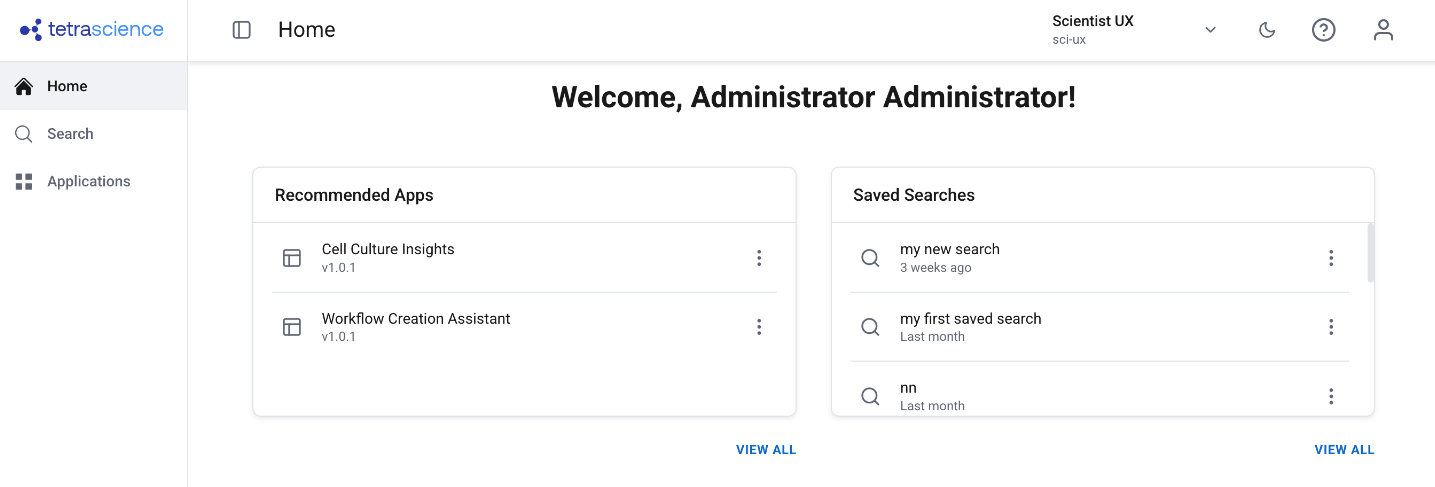
- Simplified navigation — A dedicated side navigation and home page show only scientist-relevant sections: Search, Applications, and My Account.
- Scientist-aligned search and file details — A decluttered search experience with scientist-friendly language, readable labels, and a streamlined file details view with preview, download, version info, and file history.
- File management from search results — Upload files, upload new versions, edit labels, view history, delete files, and share results — all directly from the search results view without navigating to separate pages.
- Bulk actions — Select multiple files to apply labels or delete in bulk.
- Curated Data Apps — Only Data Apps tagged with the
scientific_app_categorylabel are displayed, keeping the experience focused on scientist-relevant tools. - Admin activation and version management — Administrators enable the feature via a feature flag and activate specific versions through the Artifact Version Manager, allowing controlled rollout independent of TDP upgrades.
Enhancements
There are no enhancements in this release.
Bug Fixes
There are no bug fixes in this release.
Deprecated Features
There are no deprecated features in this release. For more information about TDP deprecations, see Tetra Product Deprecation Notices.
Known and Possible Issues
There are no known or possible issues in this release.
Upgrade Considerations
The Scientist Experience is versioned and deployed independently from the TDP. Administrators enable the feature via a feature flag and activate specific versions through the Artifact Version Manager, allowing controlled rollout independent of TDP upgrades.
For more information, see the Scientist Experience documentation and the Scientist Experience User Guide.
Other Release Notes
To view other Scientist Experience release notes, see Scientist Experience Release Notes.
Updated 15 days ago