

Tetra UNICORN Agent v3.9.x Release Notes
The following are the Tetra UNICORN Agent release notes for versions 3.9.x. Tetra UNICORN Agent is a high-performance Windows application that acquires ÄKTA batch data through UNICORN OPC Historical Data Access (HDA) Service and detects Alarms & Events (A&E) generated from UNICORN in real-time.
NOTE:To upgrade the Tetra UNICORN Agent, see Upgrade an Agent.
v3.9.1
Release date: 2 September 2026 (updated 24 September 2026)
TetraScience has released Tetra UNICORN Agent version 3.9.1. This release fixes defects in the v3.9.0 database upgrade that could prevent the Agent from starting, delete the Agent's record of the result files that it already processed, or cause already-uploaded result files to be generated and uploaded to Tetra again. It also stops the Agent from repeatedly regenerating and re-uploading unchanged result files when it can't parse the evaluation logbook timestamp that's stored for them.
GxP Impact Assessment
All new Tetra UNICORN Agent functionalities go through a GxP impact assessment to determine validation needs for GxP installations.
New Functionality items marked with an asterisk (*) address usability, supportability, or infrastructure issues, and do not affect Intended Use for validation purposes, per this assessment.
Enhancements and Bug Fixes do not generally affect Intended Use for validation purposes.
Items marked as either beta release or limited availability release (previously early adopter program (EAP)) are not validated for GxP by TetraScience. However, customers can use these prerelease features and components in production if they perform their own validation.
New Functionality
There is no new functionality in this release.
Enhancements
Enhancements are modifications to existing functionality that improve performance or usability, but don't alter the function or intended use of the system.
Change Detection Events Now Report Why a Result File Was Generated or Skipped
The result file change detection event that the Agent raises for each scanned result file now includes a GenerationReason field that describes the values that were compared and which of them changed, so that customers can tell why a result file was regenerated. The event also reports a new UnparseableLogbookChangeDate skip reason, which identifies result files that were skipped because the evaluation logbook timestamp that's stored for them couldn't be read. The existing FileAlreadyGenerated and IncompleteMethodRun skip reasons are unchanged.
Result File Skip Messages Now Logged at the Debug Level
The Result file is skipped since evaluation date '<date>' is older than <number> day(s) from today message that the Agent logs for each result file that falls outside the configured change detection window is now written to the Agent's debug log instead of its info log. On Agents that scan large numbers of result files, these messages made up more than 95% of the info log volume, which made other messages harder to find and increased the size of the log files that the Agent uploads to Tetra. The messages are unchanged and are still available at the debug level for troubleshooting.
Result File Generation Completed Events Now Report the Evaluation Date
The agents.unicorn.resultFileGenerationCompleted.v1 event that the Agent raises for each generated result file now includes an EvaluationDate field, which reports the evaluation date that the Agent recorded for that result file. The Agent compares this value against the change detection window on later scans, so you can query this event by result file path to determine the evaluation date that was used for change detection, instead of relying on the skip messages in the info log. The Agent database remains the authoritative source for a result file's current evaluation date.
Bug Fixes
The following bugs are now fixed:
-
The memory metrics that the Agent reports for its host server are now calculated correctly. Previously, the Memory Usage Percent and Available Memory In MB values were swapped, so the Agent reported readings such as
4837.78%memory used and40.95MBavailable. Because the reported percentage exceeded the memory threshold, the memory metric was also flagged with a Warning status. In addition, available memory is now converted from kilobytes to megabytes by using 1024 instead of 1000, so the reported amount of available memory is no longer overstated. For more information, see Monitor Agent Progress and Server System Metrics in the Tetra UNICORN Agent User Guide (v3.9.x). -
The Agent now starts successfully after you upgrade to v3.9.x from an earlier version. Previously, if the Agent database contained both the older
Hda.MonthDetectChangessetting and the currentHda.ChangeDetectionIntervalInDayssetting, the database upgrade failed with aUNIQUE constraint failed: AppSetting.Nameerror and the Agent couldn't start. Both settings are present on hosts where the v3.7.0 upgrade script didn't finish because the installation path contained a space. The upgrade now keeps the existing Change Detection Interval In Days value and removes the outdated setting instead of renaming it. -
The Agent no longer generates and uploads result files that it already uploaded successfully. Previously, the v3.9.0 database upgrade marked every existing result file as awaiting a generation retry, which bypassed the configured change-detection window and caused old result files to be generated and uploaded to Tetra again. Databases that were already upgraded to v3.9.0 are repaired automatically when you upgrade to v3.9.1.
-
The v3.9.0 database upgrade no longer deletes result file records, so result files that the Agent already uploaded aren't generated and uploaded to Tetra again. Previously, the upgrade deleted every result file record that was marked as not valid. That delete was intended to remove the duplicate records for a single result file that a UNICORN user account switch can create, but on Agents where every record in the database was marked as not valid, it removed the Agent's entire record of the result files that it had already processed. The Agent then treated those result files as new, and generated and uploaded them to Tetra again. The upgrade now removes only records that share a result file path, and keeps one record for each path: a valid record in preference to one that isn't valid, then the most recently created result, then the most recently added record.
-
The Agent no longer regenerates and re-uploads an unchanged result file on every scan cycle when it can't read the evaluation logbook timestamp that's stored for that result file. Previously, when the Latest Evaluation Logbook Change Date that the Agent recorded in its database for a result file couldn't be read, the Agent treated the result file as changed, so it regenerated the result file and uploaded it to Tetra on every scan cycle. Each upload created a new version of the file, and nothing stopped the cycle from repeating. The Agent now skips generation for that result file, logs a warning that includes the value it couldn't read, and reports the result file as skipped with a skip reason of
UnparseableLogbookChangeDate. -
The Agent now reads evaluation logbook timestamps that use a 24-hour clock, and timestamps whose date is in day-month-year (
dd-MM-yyyy) form. Previously, the Agent only read timestamps that use a 12-hour clock with an AM or PM designator, and it only read dates that match the host's configured short date pattern or one of the five standard English short date patterns, so a value such as01-07-2026 15:39:20((UTC + 2))couldn't be read. Because the UNICORN OPC HDA Service formats these timestamps according to the Windows regional settings of the account that it runs under, this affected Agents on hosts that are configured for a 24-hour clock or a day-month-year short date, such as European hosts. Each supported short date pattern is now accepted with either a 12-hour or a 24-hour time. -
The Tetra UNICORN Agent Management Console now scales to fit the size of its window. Previously, the panels on the Settings tab and the tab control that contains the HDA and AE settings had a fixed width and were anchored to the left edge of the window, so they kept their original size when the window was resized or when the Agent ran on a lower-resolution display. Long values, such as HDA paths, were cut off even though there was unused space in the window. These panels now stretch to the full width that's available. The UNICORN Path Editor dialog can also now be resized, and its height is limited to the height of the screen's work area, so that the Save and Cancel buttons stay reachable on shorter displays. For more information, see Configure HDA Service Settings in the Tetra UNICORN Agent User Guide (v3.9.x).
-
The Processing Summary panel on the Summary tab of the Tetra UNICORN Agent Management Console no longer clips its contents. Previously, the panel had a fixed height, so any content that didn't fit within that height was hidden instead of the panel expanding to show it. The panel now sizes itself to its contents, and the paging controls of the Failed Generation and Failed Upload tables no longer overlap the rows above them. For more information, see Monitor Agent Progress and Server System Metrics in the Tetra UNICORN Agent User Guide (v3.9.x).
-
The Agent no longer changes the Connection Url that you configure in the Tetra UNICORN Agent Management Console, so result files upload to Tetra as expected on a new installation. Previously, the first time that the Agent service started, it appended
/generic-connector/v1/agentto the connection URL that you saved. A Generic Data Connector (GDC) or Hub connection URL then contained the endpoint path twice (for example,https://10.8.4.20:8443/generic-connector/v1/agent/generic-connector/v1/agent), and a Tetra (No Connector) connection URL got a path that doesn't apply to it (for example,https://api.tetrascience-uat.com/v1/data-acquisition/agent/generic-connector/v1/agent). The Agent generated result files normally, but every upload failed with a404 Not Founderror and stayed in the upload retry queue. The Agent database that's installed with v3.9.1 no longer sets the data connector option that caused this change, so the connection URL is used exactly as you enter it. For more information, see Establish a Data Connection Between the Agent and the Tetra in the Tetra UNICORN Agent User Guide (v3.9.x).
Deprecated Features
There are no new deprecated features in this release. For more information about Tetra deprecations, see Tetra Product Deprecation Notices.
Known and Possible Issues
The following are known or possible issues in Tetra UNICORN Agent v3.9.1:
-
Due to a bug in the OPC HDA interface of UNICORN, the Peak Start and Peak End have the same value. The workaround to address this is to calculate the Peak End as Peak Start + Peak Width (both values are present in the PeakTable object in UNICORN and the RAW JSON file).
-
When using the database access approach with UNICORN methods created in version 11 or later, the Method Signature and FracXY data are not available in the RAW file. This is a limitation of the database access method for newer UNICORN method versions.
-
When ingesting result files generated by UNICORN v7.11 or later (which use UNICORN Method version 11 or later), if the Database Access option is not enabled, method-related data — including method items, scouting variables, variables, and questions — may be missing from the RAW JSON file. To retrieve this data, enable the Database Access option and configure the database connection settings. For more information, see Configure Database Access Settings in the Tetra UNICORN Agent User Guide (v3.9.x).
-
If a result file does not include a run log, the Agent will not generate a RAW JSON file for that result.
-
The Re-upload action doesn't re-upload every result file in the date range that you select. The Agent matches the folder address that it recorded for each result file against the Address Space that's configured for the path now, so result files recorded under a different address are skipped without an error. This affects result files that were scanned before the Address Space was edited, and result files that were scanned under a different UNICORN user account, because the account name is part of a result file's OPC address. If a re-upload doesn't include all of the result files that you expect, contact your customer success manager (CSM).
-
After a database migration that involves millions of result file records, the Summary tab of the Tetra UNICORN Agent Management Console can take 15 to 20 minutes to display its counts, and the migration window can take a few minutes to open. The counts appear after the Agent finishes calculating them.
-
After an upgrade against a very large Agent database (observed with a database of about 5 GB), the Agent service can fail to start. Attempting to start the service returns a
The service did not respond to the start or control request in a timely fashionerror. If this happens, contact your customer success manager (CSM). -
When the Database Access option is enabled, the Agent doesn't escape reserved XML characters (
&,<, and>) in the method Text Instructions that it retrieves from the UNICORN database and writes to the RAW JSON file. If a method's text instructions contain any of these characters, the RAW JSON file may fail to process with theakta-raw-to-idsprotocol v5.0.0 or lower. A fix will be available in a futureakta-raw-to-idsprotocol and Agent version.
Upgrade Considerations
To upgrade the Agent, see Upgrade an Agent and the Tetra UNICORN Agent Installation Guide (v3.9.x).
To configure and use the Agent after it's installed, see the Tetra UNICORN Agent User Guide (v3.9.x).
Tetra UNICORN Agent v3.9.1 is the recommended upgrade target for customers who remained on an earlier version because v3.9.0 was deprecated. No manual database steps are required. When the Agent starts after the upgrade, it repairs databases that were already upgraded to v3.9.0 by clearing the generation retry state on result files that uploaded successfully and by setting the retry values that were left empty. Result files that are in a Failed state keep their retry state, because a genuine retry that was recorded after the v3.9.0 upgrade can't be distinguished from one that the upgrade set incorrectly.
Timestamps that the Agent recorded in its database under an earlier version are kept as they were written; the upgrade doesn't rewrite them. If the Agent still can't read the stored timestamp for a result file after the upgrade, it skips that result file instead of regenerating it, and logs a Failed to parse LatestEvaluationLogBookChangeDate from scanned entity warning that includes the value. A result file that's skipped for this reason isn't generated or uploaded, so if you see this warning after upgrading, contact your customer success manager (CSM).
If you upgrade to v3.9.1 from a version earlier than v3.9.0, the database upgrade keeps your existing result file records and removes only duplicate records for the same result file path. If the v3.9.0 database upgrade already ran on your Agent, the result file records that it deleted can't be restored, and the affected result files might already have been generated and uploaded to Tetra again.
Upgrading to v3.9.1 keeps your existing Agent database, so it doesn't repair a connection URL that an earlier version already changed. If uploads fail with a 404 Not Found error after you upgrade, re-enter the connection URL in the Tetra UNICORN Agent Management Console, save it, and then restart the Agent service. The Agent doesn't change the connection URL again.
v3.9.0
Release date: 3 April 2026 (updated 24 September 2026)
IMPORTANTTetra UNICORN Agent v3.9.0 has been deprecated because of a known issue. We recommend that customers not install or upgrade to this version and instead remain on their current version until a newer release is available.
TetraScience has released its next version of the Tetra UNICORN Agent version 3.9.0. This release introduces database access capabilities for improved result file scanning and richer data retrieval (method data, scouting variables, text instructions, questions, and method variables). It also provides enhanced event logging for better visibility into Agent operations, backoff retry logic for improved upload and generation reliability, an Agent installation upgrade script, and several bug fixes.
Prerequisites
The following Tetra Data components are required for Tetra UNICORN Agent v3.9.0:
NOTEDocumentation for Tetra Data components is in the TetraConnect Hub. To request access, see Access the TetraConnect Hub.
- Operating system: Windows 10 or Windows 11
- Supported UNICORN versions:
- UNICORN v6.x or v7.0–v7.8: Supported natively via Classic OPC HDA.
- UNICORN v7.10–v7.13: Supported via the Classic OPC HDA workaround, which uses UNICORN v7.8 SP1 as an intermediary interface. For setup instructions, see Connect to UNICORN v7.10 or Later (Classic OPC HDA Workaround) in the Tetra UNICORN Agent Installation Guide (v3.9.x).
- Tetra Data:
- IDS: Cytiva AKTA IDS (akta) v3.0.0
- Protocol:
akta-raw-to-idsv3.2.2 - Task script:
akta-raw-to-idsv3.2.2
- Protocol:
- IDS: Cytiva AKTA IDS (akta) v4.0.0
- Protocol:
akta-raw-to-idsv4.0.3 - Task script:
akta-raw-to-idsv4.0.3
- Protocol:
- IDS: Cytiva AKTA IDS (akta) v3.0.0
New Functionality
New Functionality includes features not previously available in the Tetra UNICORN Agent.
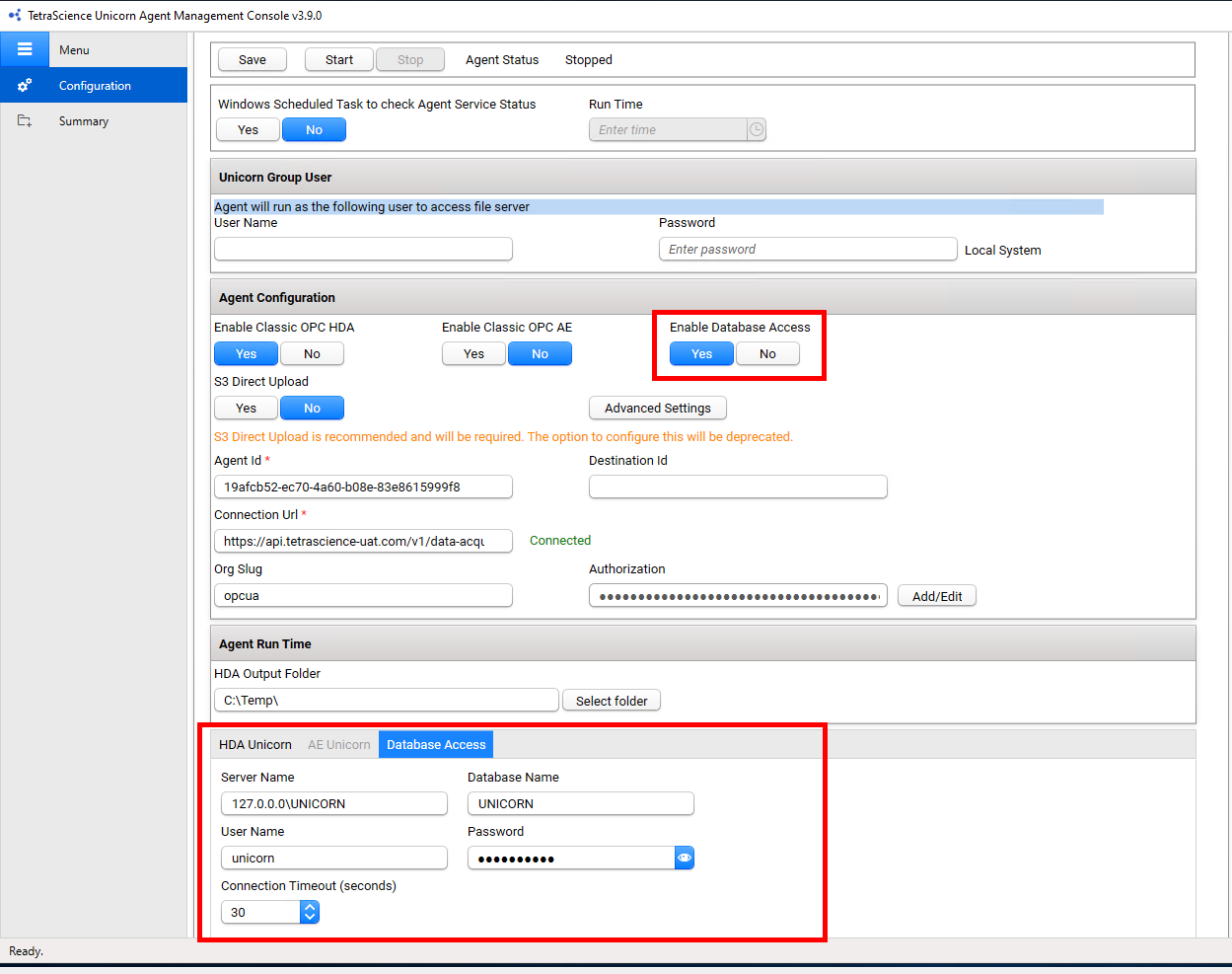
UNICORN Database Access Configuration
The Tetra UNICORN Agent Management Console now includes a Database Access configuration option that allows customers to enable or disable direct access to the UNICORN database. When database access is enabled, the Agent can query the UNICORN database directly to detect result files, improving detection efficiency.
When database access is enabled, the Agent now does the following:
- Database-Based Result File Scanning: Agent scans UNICORN result files directly through database access, rather than relying on file system monitoring.
- Method Data Retrieval from Database: Agent automatically falls back to the UNICORN database to fetch method-related data when the Classic OPC HDA interface returns empty method data. This occurs for UNICORN methods created in version 11 and later. The database fallback retrieves method information and scouting variables, which are populated into the existing structured fields in the output Raw JSON file. In addition, the raw MethodData XML from the database is preserved in the optional
UnicornRaw.MethodDataproperty of the output Raw JSON file, containing the complete method definition including blocks, instructions, and parameters. - Text Instruction Retrieval from Database: Agent fetches and parses Result file text instructions directly from the UNICORN database, providing more complete result file data.
- Questions Retrieval from Database: Agent now fetches Questions data directly from the UNICORN database, enhancing the completeness of result file information.
- Variables Retrieval from Database: Agent now fetches Variables data directly from the UNICORN database, populating the Variables field in the output Raw JSON file with the converted variables XML from the method data.
For more information, see Configure Database Access Settings in the Tetra UNICORN Agent User Guide (v3.9.x).
Agent Installation Script
A new Agent installation script simplifies the installation and upgrade process for the Tetra UNICORN Agent. The script automates common installation tasks and reduces manual configuration steps.
Enhancements
Enhancements are modifications to existing functionality that improve performance or usability, but don't alter the function or intended use of the system.
Upload Events
The Agent now generates upload events that provide visibility into file upload activities. These events help customers monitor and track the Agent's upload operations.
Generation Events
The Agent now generates events during the file generation process, providing enhanced visibility into data extraction activities.
Scan Events
The Agent now generates events during file scanning operations, allowing customers to monitor scanning activities and troubleshoot issues more effectively.
Backoff Retry Logic for Uploads
The Agent now implements backoff retry logic for file uploads. When an upload fails, the Agent automatically retries the upload with increasing delays between attempts, improving upload reliability in unstable network conditions. The Tetra UNICORN Agent Management Console includes a new Maximum Number of Uploads configuration option that allows customers to control the maximum number of retry attempts for failed uploads.
For more information, see Configure HDA Service Settings in the Tetra UNICORN Agent User Guide (v3.9.x).
Backoff Retry Logic for Result Generation
The Agent now implements backoff retry logic for result generation. When a generation attempt fails, the Agent automatically retries with increasing delays between attempts. The Tetra UNICORN Agent Management Console includes a new Generation Max Retry Limit configuration option (default: 40) that allows customers to control the maximum number of retry attempts for failed result generations.
For more information, see Configure HDA Service Settings in the Tetra UNICORN Agent User Guide (v3.9.x).
Bug Fixes
The following bugs are now fixed:
- Fixed a generation failure that occurred with UNICORN v7.12 data when numeric values were returned in scientific notation (for example,
2.565153E-05). The Agent now correctly parses these values using locale-invariant decimal formatting.
Deprecated Features
There are no new deprecated features in this release. For more information about Tetra deprecations, see Tetra Product Deprecation Notices.
Known and Possible Issues
The following are known or possible issues in Tetra UNICORN Agent v3.9.0:
-
Due to a bug in the OPC HDA interface of UNICORN, the Peak Start and Peak End have the same value. The workaround to address this is to calculate the Peak End as Peak Start + Peak Width (both values are present in the PeakTable object in UNICORN and the RAW JSON file).
-
When using the database access approach with UNICORN methods created in version 11 or later, the Method Signature and FracXY data are not available in the RAW file. This is a limitation of the database access method for newer UNICORN method versions.
-
When ingesting result files generated by UNICORN v7.11 or later (which use UNICORN Method version 11 or later), if the Database Access option is not enabled, method-related data — including method items, scouting variables, variables, and questions — may be missing from the RAW JSON file. To retrieve this data, enable the Database Access option and configure the database connection settings. For more information, see Configure Database Access Settings in the Tetra UNICORN Agent User Guide (v3.9.x).
-
If a result file does not include a run log, the Agent will not generate a RAW JSON file for that result.
-
Result files that the Agent already uploaded can be regenerated and uploaded again on every scan cycle, without limit, so that a single file accumulates thousands of versions in Tetra. This happens when the Agent can't read the Latest Evaluation Logbook Change Date that it recorded in its database for a result file. v3.7.0 compared this value as text and never read it as a date, so the format didn't matter in that version. Timestamps that were recorded in a 24-hour or day-month-year format, such as
01-07-2026 15:39:20((UTC + 2)), can't be read. The Agent logs aFailed to parse LatestEvaluationLogBookChangeDate from scanned entitywarning for each occurrence, but its scan counters still report no new results. To resolve this, upgrade to v3.9.1, which skips these result files instead of regenerating them and which also reads both formats. -
Upgrading to v3.9.0 can fail or corrupt generation state. The Agent can fail to start with a
UNIQUE constraint failed: AppSetting.Nameerror, result files that were already uploaded can be generated and uploaded again, and other result files can be excluded from generation entirely. This is the known issue that v3.9.0 was deprecated for. To resolve it, upgrade to v3.9.1, which fixes the upgrade and repairs databases that already applied the v3.9.0 upgrade. -
Upgrading to v3.9.0 can delete the Agent's record of the result files that it already processed, so those result files are generated and uploaded to Tetra again. The v3.9.0 database upgrade deletes every result file record that's marked as not valid, and on some Agents every record in the database is marked that way. To resolve this, upgrade to v3.9.1, which removes only duplicate records for the same result file path. Result file records that a v3.9.0 upgrade already deleted can't be restored.
-
On a new v3.9.0 installation, the Agent changes the Connection Url that you configure, so that no result files are ever uploaded to Tetra. The first time that the Agent service starts, it appends
/generic-connector/v1/agentto the connection URL that's saved in the Agent database. A Generic Data Connector (GDC) or Hub connection URL then contains the endpoint path twice (for example,https://10.8.4.20:8443/generic-connector/v1/agent/generic-connector/v1/agent), and a Tetra (No Connector) connection URL gets a path that doesn't apply to it (for example,https://api.tetrascience-uat.com/v1/data-acquisition/agent/generic-connector/v1/agent). Result files are still generated, but every upload fails with a404 Not Founderror and remains in the upload retry queue. The Agent logs aFailed to upload eventserror and raises anagents.unicorn.resultFileUploadFailed.v1event for each attempt. The Agent changes the connection URL only once, so to resolve this, re-enter the connection URL in the Tetra UNICORN Agent Management Console, save it, and then restart the Agent service. Alternatively, install v3.9.1, which installs an Agent database that doesn't cause the change. For more information, see Establish a Data Connection Between the Agent and Tetra in the Tetra UNICORN Agent User Guide (v3.9.x). -
After a database migration that involves millions of result file records, the Summary tab of the Tetra UNICORN Agent Management Console can take 15 to 20 minutes to display its counts, and the migration window can take a few minutes to open. The counts appear after the Agent finishes calculating them.
-
After an upgrade against a very large Agent database (observed with a database of about 5 GB), the Agent service can fail to start. The database migration finishes successfully and the Configuration tab of the Tetra UNICORN Agent Management Console shows the Agent as connected and configured, but starting the service returns a
The service did not respond to the start or control request in a timely fashionerror, and nothing is logged for the failure. If this happens, contact your customer success manager (CSM). -
The Re-upload action doesn't re-upload every result file in the date range that you select. The Agent matches the folder address that it recorded for each result file against the Address Space that's configured for the path now, so result files recorded under a different address are skipped without an error. This affects result files that were scanned before the Address Space was edited, and result files that were scanned under a different UNICORN user account, because the account name is part of a result file's OPC address. If a re-upload doesn't include all of the result files that you expect, contact your customer success manager (CSM).
-
When the Database Access option is enabled, the Agent doesn't escape reserved XML characters (
&,<, and>) in the method Text Instructions that it retrieves from the UNICORN database and writes to the RAW JSON file. If a method's text instructions contain any of these characters, the RAW JSON file may fail to process with theakta-raw-to-idsprotocol v5.0.0 or lower. A fix will be available in a futureakta-raw-to-idsprotocol and Agent version.
Upgrade Considerations
To upgrade the Agent, see Upgrade an Agent and the Tetra UNICORN Agent Installation Guide (v3.9.x).
To configure and use the Agent after it's installed, see the Tetra UNICORN Agent User Guide (v3.9.x).
NOTEIf you want to use the new database access features, you must configure database access settings after upgrading. The Agent installation upgrade script will automatically add the necessary database columns (
Result IDandResultPath) to support database-based scanning.
Other Release Notes
To view other release notes for Tetra Agents, see Tetra Agent Release Notes.
Updated 29 days ago